
The nightly battle over the TV remote is a familiar story in many homes. One person needs the volume cranked up just to follow the dialogue, while for everyone else, it’s a blaring, uncomfortable noise. This constant negotiation can turn a relaxing evening into a source of frustration for the whole family. But what if you could end the volume wars for good? The solution is simpler than you might think. This guide is all about finding a personal audio device that lets you hear every word with perfect clarity, without disturbing anyone else. We’ll explore how the right pair of digital tv headphones wireless can create a peaceful and enjoyable viewing experience for everyone in the room.

Immerse Yourself in Crystal-Clear Sound with the Right Wireless Headphone for a TV
In the dynamic world of home entertainment, finding the ideal wireless headphone for a TV can be a game-changer. This blog post dives into the key considerations, benefits, and top picks to help you make an informed decision, ensuring you enjoy every moment of your favorite shows and movies.
Why Do You Need a Dedicated Wireless Headset for TV?
Your TV is a portal to a world of entertainment, and the right wireless headphone can unlock a new dimension of audio enjoyment. Let’s explore why selecting the perfect wireless headphone for a TV is crucial for an immersive experience.
1. Enhanced Audio Quality
A high-quality wireless headphone for a TV can significantly enhance audio quality. Whether it’s the subtle background music or the crisp dialogue, these headphones ensure that every sound is delivered with precision, providing a richer and more immersive experience.
2. Freedom of Movement
Cutting the cord doesn’t mean sacrificing mobility. Wireless headphones for a TV offer the freedom to move around without being tethered to your TV set. You can grab a snack, answer the door, or simply stretch your legs without missing a moment of your favorite show.
3. Personalized Listening Experience
The right wireless headphone allows you to customize your audio experience. Adjust the volume to your liking without disturbing others in the room. It’s a personalized listening experience tailored to your preferences.
4. Comfort and Convenience
Modern wireless headphones are designed with comfort in mind. Whether you prefer over-ear headphones or a sleek headset, the ergonomic design ensures comfort during extended TV-watching sessions. Convenience is key, and these headphones deliver just that.
What to Look For in Wireless TV Headphones
- Sound Quality: Choose headphones that prioritize clear and balanced audio, ensuring an immersive experience.
- Wireless Range: Opt for headphones with a reliable wireless range, allowing you to move freely around your living space.
- Battery Life: Consider the battery life to ensure your headphones won’t run out of power during extended use.
- Comfort: Look for headphones with padded ear cups, an adjustable headband, and a lightweight design for maximum comfort.
- Connectivity Options: Ensure compatibility with your TV by choosing headphones with versatile connectivity options.
Understanding Wireless Technology
When you start looking for TV headphones, you’ll notice a few different terms describing how they connect: RF, IR, and Bluetooth. These are just the names for the wireless technologies they use. Each has its own way of sending sound from your TV to your ears, and understanding the basics can help you pick the one that best fits your home and your needs. You don’t need to be a tech expert, but knowing the difference between them can save you a lot of frustration and ensure you get that perfect, uninterrupted sound you’re looking for.
Radio Frequency (RF)
Radio Frequency, or RF, is a fantastic choice for TV listening. These headphones use a radio signal to transmit sound, which means you get a clear, strong connection with almost no delay. This is incredibly important for watching TV because it prevents that annoying “lip-sync” issue where the actors’ mouths don’t match the words you’re hearing. A huge advantage of RF technology is that the signal can travel through walls and ceilings. This gives you the freedom to walk to the kitchen for a drink or check on something in another room without losing the audio from your show. Many RF systems offer a generous range, sometimes over 100 feet.
Infrared (IR)
Infrared (IR) is another wireless technology you might come across. It works similarly to your TV remote control, using a beam of infrared light to send the audio signal from a transmitter to the headphones. For IR to work, you need a direct, clear line of sight between the transmitter and the headphones. If someone walks in front of the transmitter or you move to a different room, you’ll lose the sound. While they can offer great audio quality, this limitation makes them less flexible than RF headphones for many people who enjoy moving around while they listen.
Bluetooth
Bluetooth is a technology many of us are familiar with from our phones and portable speakers. Many modern smart TVs come with Bluetooth built-in, which can make connecting a pair of compatible headphones very simple. However, not all TVs support it, and sometimes pairing devices can be a bit tricky. Another thing to consider is audio delay, or latency. While many newer Bluetooth devices have improved this, some can still have a slight lag that makes dialogue feel out of sync with the video. If your TV doesn’t have Bluetooth, you can buy an adapter, but a dedicated RF system is often a more straightforward solution for television viewing.
Key Features and Specifications to Consider
Once you’ve got a handle on the technology, it’s time to think about the features that will make your TV watching experience truly enjoyable. The best wireless headphones aren’t just about great sound; they’re also about convenience, comfort, and fitting seamlessly into your life. Paying attention to a few key details—like how easy the headphones are to set up and how they feel after an hour-long episode—will help you find a pair that you’ll love to use every single day. Let’s walk through the most important features to keep an eye on.
Ease of Setup
Nobody wants to spend hours trying to figure out a complicated new gadget. The best wireless TV headphones are designed for a simple, “plug-and-play” experience. Look for systems where the headphones and transmitter connect automatically once they’re turned on. This means you won’t have to mess with Wi-Fi passwords or complicated Bluetooth pairing menus. A great system should come with all the cables you need and clear instructions, allowing you to connect it to your TV’s audio output and start listening in just a few minutes.
Comfort and Design
If you’re settling in for a movie marathon or binge-watching a new series, comfort is non-negotiable. Look for headphones that are lightweight and feature soft padding on the headband and ear cups. An adjustable headband ensures a secure but gentle fit for any head size. The design of the ear cups is also important. Over-ear styles can help block out distracting background noise, creating a more immersive experience. The goal is to find a pair so comfortable you almost forget you’re wearing them.
Support for Multiple Listeners
Do you often watch TV with a partner or family member who also needs a personalized volume? This is a common situation, and thankfully, many systems are designed to solve it. Some RF transmitters have the ability to connect to more than one pair of headphones simultaneously. This fantastic feature allows two people to watch the same show together, each with their own headset and individual volume control. It’s the perfect way to share an experience without arguing over the remote.
Included Accessories
When you unbox your new headphones, the last thing you want is to discover you need to make another trip to the store for a specific cable. A quality product will include all the necessary accessories to get you started right away. Check to see if the package comes with the different types of audio cables that TVs use, such as Optical, RCA, and 3.5mm auxiliary cables. This ensures you can connect to virtually any television, old or new, without any extra hassle or expense.
Different Styles of Listening Devices
Just as people have different tastes in TV shows, they also have different preferences for how they listen. There isn’t a single “one-size-fits-all” solution. The market offers several styles of listening devices, from traditional headphones that cover your ears to lightweight headsets that rest just inside them. There are even personal speakers you can place nearby. Thinking about what feels most comfortable for you and how you plan to use the device will guide you toward the perfect style for your needs.
Over-Ear Headphones
This is the classic style that most people picture when they think of headphones. Over-ear headphones have large, cushioned cups that fully enclose your ears. This design is excellent for blocking out ambient sounds in the room, allowing you to focus completely on the TV’s audio. They are known for delivering rich, high-quality sound with good bass. If you want a truly immersive, private listening experience and don’t mind a larger headset, this is a wonderful option to consider.
Stethoscope-Style Headsets
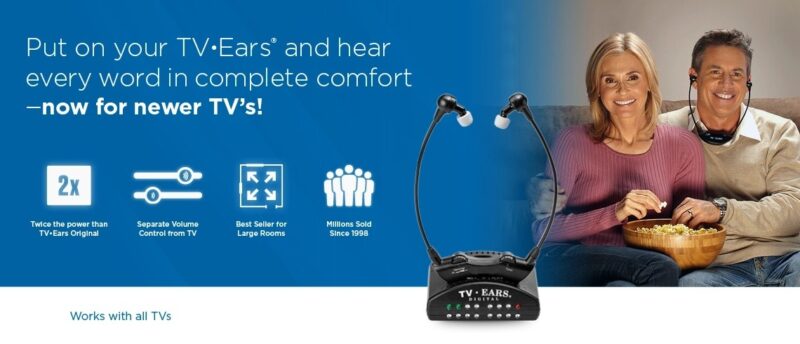
For those who find traditional headphones too bulky or warm, stethoscope-style headsets are a brilliant alternative. These devices are incredibly lightweight and rest under the chin, with small foam ear tips that sit comfortably in your ears. This design won’t mess up your hair and is easy to put on and take off. At TV Ears, we specialize in this style because it delivers sound directly into the ear canal, providing outstanding clarity for dialogue. Our TV Ears Digital system is a perfect example of how this design combines comfort with powerful Voice Clarifying Technology®.
Personal Wireless Speakers
What if you don’t like wearing anything on your head or in your ears at all? A personal wireless speaker might be the ideal solution. These compact speakers connect to your TV wirelessly and can be placed right next to your chair or on a side table. This brings the sound closer to you, so you can hear it clearly without having to turn up the main TV volume for everyone else in the room. It’s a great way to get personalized sound while still feeling connected to your surroundings.
How to Connect Headphones to Any TV
Getting your headphones to work with your television can feel like a technical puzzle, but it’s usually more straightforward than it seems. Whether your TV is brand new or has been in your living room for years, there’s almost always a way to get private, personal audio. The right method simply depends on the type of TV you have and its available connections. Let’s walk through the most common scenarios so you can start listening without disturbing anyone else in the room. We’ll cover everything from modern smart TVs with built-in features to older models that might need a little extra help.
For TVs with Built-in Bluetooth
If you have a newer smart TV, you’re in luck—it most likely has Bluetooth built right in. This is the simplest way to connect a pair of wireless headphones. To get started, you’ll need to put your headphones into “pairing mode,” which usually involves holding down a button until a light starts flashing. Then, use your TV remote to go into the settings menu. Look for a section related to sound, audio output, or connected devices. From there, you should see an option to search for Bluetooth devices. Select your headphones from the list, and your TV audio will start playing directly through them.
For TVs without Built-in Bluetooth
Don’t worry if your TV doesn’t have Bluetooth. You can easily add this capability with a small device called a Bluetooth transmitter. This gadget plugs into one of your TV’s audio output ports—like the 3.5mm headphone jack, red and white RCA ports, or the digital optical port. The transmitter then wirelessly sends the audio signal to your Bluetooth headphones. Many dedicated TV listening systems, like those from TV Ears, come with their own transmitter designed for a seamless, low-latency connection, ensuring the sound you hear perfectly matches the action on screen.
For TVs with No Headphone Jack
Some newer, slimmer TVs have done away with the traditional headphone jack to save space. If you find your TV doesn’t have one, you still have options. Most televisions will have either red and white RCA audio output jacks or a digital optical audio output. You can connect a Bluetooth transmitter to either of these ports to send sound to your headphones. If you’re using the RCA ports, you may need a simple adapter, but these are widely available and easy to use. This ensures that even without a headphone jack, you can still enjoy a private listening experience.
For Media Streaming Devices
Many of us watch content through devices like an Amazon Fire TV Stick, Roku, Apple TV, or Google Chromecast. These streaming players often have their own built-in Bluetooth capabilities, separate from the TV itself. This provides a great workaround if your television doesn’t support Bluetooth. You can simply go into the settings menu of your streaming device and pair your headphones directly with it. Once connected, any audio from the apps on that device will be sent to your headphones, giving you another convenient way to listen wirelessly.
How to Solve Common Connection Problems
Even with the right setup, you might occasionally run into a snag. It can be frustrating when your headphones won’t connect or when you can’t hear any sound. The good news is that most of these issues are caused by simple oversights that are easy to fix. Before you get too discouraged, try working through these common troubleshooting steps. Often, a quick adjustment to your settings or a simple restart is all it takes to get your audio working perfectly. Think of this as a basic checklist to run through whenever you encounter a connection problem.
Check Pairing Mode and Range
One of the most common reasons for a failed connection is that the headphones aren’t in pairing mode. Most headphones require you to press and hold a specific button to make them discoverable by your TV or transmitter. Check your headphone’s manual to confirm the correct process. Another factor to consider is range. Bluetooth signals have a limited distance, so make sure your headphones are close to the TV or transmitter when you’re trying to pair them. Once connected, you can move around more freely, but the initial connection requires them to be nearby.
Restart Your Devices
It’s the oldest trick in the tech support book for a reason: turning your devices off and on again often works wonders. This simple action can clear out temporary glitches or software bugs that might be preventing a successful connection. Start by turning off your headphones and your television completely. If you’re using a Bluetooth transmitter, unplug it from its power source as well. Wait about a minute, then turn everything back on and try the pairing process again. This quick reset can often resolve stubborn connection issues without any further hassle.
Check Your TV’s Audio Settings
Sometimes, the headphones are connected properly, but the TV isn’t sending the audio to the right place. You’ll need to go into your TV’s sound or audio settings menu to fix this. Look for an option labeled “Audio Output” or “Speaker Select.” Here, you’ll need to change the output from “Internal TV Speakers” to the appropriate option for your setup, which might be labeled “Bluetooth,” “Headphones,” or “External Speakers (Optical/RCA).” Making sure the TV knows where to send the sound is a critical step that’s easy to overlook.
Update Your Software
If you have a smart TV or a media streaming device, its performance relies on its internal software, also known as firmware. Manufacturers regularly release updates to fix bugs, improve performance, and add new features. If you’re having persistent connection problems, it’s a good idea to check if a software update is available. You can usually find this option in your device’s main settings menu under a section like “System,” “About,” or “Support.” Keeping your devices up to date can resolve compatibility issues and ensure everything runs smoothly.
What Makes a TV Headphone Brand Trustworthy?
When you’re investing in a device to improve your TV experience, especially if it’s to address hearing challenges, you want to choose a product from a company you can rely on. But with so many options available, how do you separate the trustworthy brands from the rest? It comes down to more than just features and price. A reliable brand demonstrates a deep understanding of its customers’ needs, offers strong evidence of its product’s effectiveness, and provides accessible, helpful support. Looking for these key indicators will help you find a solution that not only works well but also gives you peace of mind.
Expert Perspectives and User Statistics
A trustworthy brand often has a history of positive feedback from both professionals and everyday users. Look for companies that are recognized by experts in relevant fields. For example, TV Ears products are recommended by doctors, which speaks to their effectiveness and design for people with hearing loss. Beyond expert endorsements, consider what other users are saying. A company that has helped millions of people hear their TV clearly has a proven track record. This kind of widespread satisfaction is a strong signal that you’re choosing a product that genuinely solves the problem it claims to address.
Customer Support and Purchase Options
Excellent customer support is a hallmark of a trustworthy company, especially for technology products. The ability to easily reach a knowledgeable person for help is invaluable. Look for brands that offer accessible support, such as a U.S.-based team you can call directly. This is particularly important if you need help choosing the right system or troubleshooting the setup process. A company like TV Ears, which encourages customers to call for assistance and the best prices, shows a commitment to service that goes beyond the initial sale, ensuring you have a positive experience from start to finish.
Discover Our Top-Rated Wireless TV Headphones
At TV Ears, we understand the importance of choosing the right wireless headphone for a TV. Our collection is curated to provide top-notch audio solutions for an unparalleled TV-watching experience. Explore our featured options:
- TV Ears Original System: A stylish and user-friendly headset for an immersive audio experience.
- TV Ears Digital System: Discover premium wireless headphones for crystal-clear sound quality.
- TV Ears 5.8 Digital System: Share the joy of TV with a loved one using this dual wireless headset system.
More from the TV Ears Blog
Stay informed and entertained with our previous blog stories that delve into the world of TV audio:
- How to Connect Your TV Ears Wireless Headphones for the Ultimate Audio Experience
- Choosing the Right TV Speaker for Your Home Theater
- Transform Your Home Theater with TV Ears Wireless Surround Sound
Don’t miss out on valuable insights and tips. Subscribe to our newsletter to receive updates and exclusive offers directly in your inbox.
Ready to Hear Your TV Better?
Choosing the perfect wireless headphone for a TV is a pivotal step toward transforming your TV-watching experience. TV Ears offers a range of top-quality wireless headphones designed to cater to diverse preferences and needs. Ready to elevate your audio experience? Explore TV Ears systems today. As the leading solution for restoring TV enjoyment while dealing with hearing loss, TV Ears ensures that everyone can experience the joy of television. Take the first step toward a better TV experience by exploring our range of wireless headphones and systems. Discover the difference TV Ears can make in your home entertainment journey.
Frequently Asked Questions
Can other people in the room still hear the TV while I’m using the headphones? Yes, absolutely. When you connect a dedicated TV listening system, it doesn’t have to mute the television’s main speakers. This means you can enjoy the show at your ideal volume through your headset, while your family and friends listen at a much lower, more comfortable volume from the TV itself. It’s the best way to end the arguments over the remote for good.
Will these headphones work if I already wear hearing aids? Many people use our headsets right along with their hearing aids. Our stethoscope-style headsets are very lightweight and the ear tips sit gently in the ear canal, which often allows them to be worn comfortably with behind-the-ear hearing aids. Some users find our Voice Clarifying Technology® so effective that they actually prefer to take their hearing aids out to watch TV.
My TV is pretty old. How can I be sure a wireless system will connect to it? You don’t need the latest smart TV to enjoy clear, personal audio. A good wireless headphone system will come with all the cables needed to connect to a wide variety of televisions, new or old. As long as your TV has an audio output port—like the red and white RCA jacks or a digital optical port—you’ll be able to plug in the transmitter and get started in minutes.
Why should I get a dedicated TV headset instead of just using my regular Bluetooth headphones? While standard Bluetooth headphones are great for music, they can sometimes have a slight audio delay when watching TV. This creates an annoying “lip-sync” issue where the actors’ mouths don’t match the words you hear. Dedicated TV listening systems, especially those using Radio Frequency (RF) technology, are designed to eliminate that lag. They also provide a more stable connection and a much simpler plug-and-play setup.
Do I need an internet connection or Wi-Fi for these headphones to work? Not at all. These systems are completely self-contained and do not require an internet connection to function. The transmitter plugs directly into your TV and creates its own private wireless signal that it sends to the headset. This makes the setup incredibly simple and ensures you have a reliable connection every time you want to watch your favorite shows.
Key Takeaways
- Opt for a Dedicated TV Headphone System: Unlike standard Bluetooth headphones that can cause a frustrating delay between the picture and sound, systems using Radio Frequency (RF) technology are designed specifically for TV, ensuring dialogue is perfectly synced.
- Focus on a Hassle-Free Setup and Comfort: A great system should be simple enough to connect in minutes, regardless of your TV’s age. Look for a product that includes all the necessary cables and features a lightweight design for watching your favorite shows in comfort.
- Check Your TV’s Audio Settings First: If you’ve connected your headphones but don’t hear sound, the most common culprit is a simple TV setting. Go into your TV’s sound menu and change the ‘Audio Output’ from ‘Internal Speakers’ to ‘Headphones’ or ‘External Audio’.
