
As someone who has struggled with hearing loss, I know the frustration of trying to enjoy a movie night. For years, I felt like I was missing half the story. I’d turn the volume up, only to see my family flinch. I’d keep it down, and the dialogue would turn into a muffled mess. It’s an isolating experience. My first attempt at a solution was a generic pair of headphones, but the audio was often out of sync with the picture. I learned that not all wireless solutions are created equal, and a standard set of ‘bluetooth tv ears’ isn’t always the answer. There’s a better way. This article will walk you through how specialized TV headphones can bring back the clarity and joy to your viewing experience.

How Do Wireless TV Headphones Work?
These specialized wireless headphones connect directly to your TV’s audio output, allowing you to stream crystal clear sound straight to your ears. No more relying on your TV’s speakers and dealing with ambient noise interference. Just pure, uncompromised audio tailored to your unique hearing needs. Many modern TVs come equipped with Bluetooth connectivity that lets you easily sync a compatible wireless headphone. For older models, you can purchase an inexpensive transmitter that plugs into your audio outputs and beams the signal to your headphones. Once connected, you have complete control over volume levels without disturbing others. And high-quality wireless headphone models integrate seamlessly with hearing devices to provide capabilities like voice focusing, feedback cancellation, and custom EQ settings.
Connecting Your Headphones to the TV
Getting your headphones set up is usually a straightforward process, whether your TV is brand new or a few years old. The method you use will depend on your television’s built-in capabilities. Most TVs fall into one of two categories: those with built-in Bluetooth and those without. Either way, you can get clear audio streamed directly to your ears in just a few simple steps. This means no more arguments over the volume or rewinding because you missed a crucial line of dialogue. Let’s walk through how to get connected so you can start enjoying a better listening experience right away.
For TVs with Built-in Bluetooth
Many modern TVs come equipped with Bluetooth connectivity that lets you easily sync a compatible wireless headphone. This feature is perfect for creating a private listening experience without disturbing others in the room. To get started, you’ll need to navigate to your TV’s settings menu, which is usually accessible via a button on your remote. From there, look for an option related to sound output, audio devices, or Bluetooth. Once you find it, put your wireless headphones into pairing mode and have your TV search for new devices. When your headphones appear on the screen, simply select them to complete the connection.
For TVs Without Bluetooth (Using a Transmitter)
If your TV does not have built-in Bluetooth, you can still enjoy wireless audio by using a transmitter. This small device plugs into your TV’s audio output port and broadcasts the sound directly to your headphones. Devices like our TV Ears systems work with nearly all TVs, including smart, digital, and analog sets, because they are designed for universal compatibility. They support various connection types such as Optical, Coaxial, RCA, and 3.5mm AUX, making it easy to set up and enjoy high-quality sound. Just connect the transmitter to the appropriate port on your TV, and it will handle the rest, sending clear, crisp dialogue right where you need it.
Hear What You’ve Been Missing
Before getting a wireless headphone for the TV, I had gradually lost that satisfying sense of immersion when watching my favorite shows and films. Key dialogue was frequently muffled or drowned out, while subtle sound effects and soundtrack nuances were rendered unintelligible. But the first time I experienced entertainment through a dedicated assistive listening wireless headphone setup? It was like someone had pulled away a dense veil of audio distortion. Suddenly, I could revel in the full depth and fidelity of a movie’s sound design once again. Every snap of a twig, roar of an engine, and swell of a musical score regained its visceral presence and purpose. And I could easily discern even hushed character exchanges without straining or missing a beat. It was like rediscovering an entire indispensable layer of the viewing experience that had steadily slipped away without my full realization. By leveraging a wireless headphone for the TV, I had finally restored TV and movies to their full-impact potential.
How to Choose the Best Wireless Headphones for TV
When shopping for a quality wireless headphone for the TV, you’ll want to look for models optimized for hearing aid/cochlear implant integration. A few standout options worth checking out:
- Sennheiser RS Series
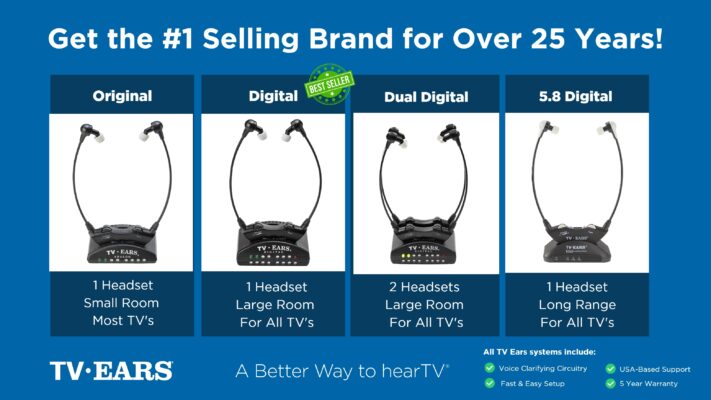
- TV Ears Headphones
- Etymotic BEAN Wireless
- Amplifon Amplified TV Listener
Features to prioritize include voice enhancement, adjustable tone controls, balance setting, and compatibility across multiple audio inputs (TV, gaming systems, etc.). Most quality wireless TV headphones even let you save multiple custom sound profiles for different types of programming. So you could have one optimized for watching movies, another for sports, and so on.
Key Audio Features to Look For
When you start looking for wireless TV headphones, you’ll quickly realize there are a lot of options out there. But not all of them are designed to address the specific challenges of hearing loss. To find a pair that truly makes a difference, you need to look past the basic features and focus on the audio technology that will bring clarity back to your TV experience. These key features are what separate a standard pair of headphones from a powerful assistive listening tool that can help you catch every word of dialogue without compromise.
Voice Clarifying Technology
Have you ever been watching a movie and the dramatic music swells, completely drowning out what the characters are saying? It’s a common frustration, but there’s a technology specifically designed to fix it. Voice Clarifying Technology is a must-have feature that intelligently separates speech from background noise. It works by identifying vocal frequencies and amplifying them while reducing the volume of distracting sounds like music, explosions, or ambient noise in the scene. This makes dialogue crisp and easy to understand, so you can follow the plot without constantly asking, “What did they just say?” It’s the core technology behind TV Ears systems, ensuring you hear every word clearly.
No Audio Delay (Low Latency)
There’s nothing more distracting than watching someone’s lips move on screen and hearing their words a split second later. This mismatch, known as audio delay or latency, can completely pull you out of the story. It’s a common issue with some wireless technologies, especially older Bluetooth versions. When shopping for TV headphones, look for models that promise low latency or no audio delay. This ensures that the sound is perfectly synchronized with the picture, providing a seamless and natural viewing experience. A perfect sync between audio and video is crucial for enjoying your shows without the jarring effect of out-of-sync dialogue.
High Volume Capability
While the goal is clarity over sheer loudness, having a high volume capability gives you complete control over your listening experience. Standard headphones often have a limited volume range, which may not be enough for individuals with significant hearing loss. Headphones classified as Assistive Listening Devices are designed to reach much higher volumes—up to 120 decibels in some cases—without distorting the sound. This allows you to set the volume to a level that is perfect for you, independent of the TV’s main volume. It puts you in charge of your own audio environment, ensuring comfort and clarity without disturbing anyone else in the room.
Advanced TV Compatibility
The last thing you want is to bring home a new pair of headphones only to discover they won’t connect to your television. TVs come with a variety of audio output ports, and it’s essential that your headphones are compatible with your specific model. Before you buy, check the back of your TV for its audio outputs—common types include Optical (also called Toslink), Coaxial, RCA (red and white ports), and a 3.5mm headphone jack. The best wireless headphone systems are designed for universal compatibility, supporting all these connection types for a simple, plug-and-play setup with almost any TV, whether it’s a brand-new smart TV or an older analog set.
Wireless Technology Options
The “wireless” in wireless TV headphones can mean a few different things. The technology used to transmit sound from your TV to your headset plays a big role in its performance, range, and reliability. The three main types you’ll encounter are Radio Frequency (RF), Bluetooth, and Infrared (IR). Each has its own set of advantages and potential drawbacks, so understanding the basics will help you choose the technology that best fits your home and your viewing habits. Let’s look at how they compare.
Radio Frequency (RF)
Radio Frequency is one of the most common and reliable technologies used for dedicated TV headphones. An RF system includes a transmitter base that you plug into your TV, which then sends the audio signal to your headphones. The biggest advantage of RF technology is that it doesn’t require a direct line of sight. This means you can wear the headphones and walk into another room, like the kitchen to grab a drink, without losing the audio signal. RF generally offers a long range and a stable connection, making it a fantastic and flexible choice for home use.
Bluetooth
Bluetooth is a technology you’re probably already familiar with, as it’s used in everything from smartphones to speakers. Many modern smart TVs have Bluetooth built-in, which can allow you to connect a compatible pair of headphones directly without a separate transmitter. While convenient, Bluetooth can sometimes introduce a slight audio delay, which can cause the lip-sync issues we talked about earlier. If you opt for Bluetooth headphones, it’s best to look for a pair that supports a low-latency codec to ensure the audio and video stay in sync. Its versatility is great, but for a dedicated TV solution, you’ll want to prioritize that audio synchronization.
Infrared (IR)
Infrared technology works similarly to your TV remote control. It sends a beam of light from the transmitter to a receiver on the headphones. Because it uses light, IR requires a direct, unobstructed line of sight between the transmitter and the headphones. If you turn your head the wrong way, or if someone walks in front of the transmitter, you’ll lose the sound. While IR can deliver high-quality audio, this line-of-sight limitation makes it less practical than RF or Bluetooth for most users. It’s less common today, but you may still find some models that use this technology.
Comfort and Wearing Styles
If you’re settling in for a movie night or planning to binge-watch a new series, you could be wearing your headphones for hours at a time. That’s why comfort is just as important as sound quality. An uncomfortable headset can become a distraction, causing pressure or soreness that takes away from your enjoyment. Luckily, there are several different wearing styles to choose from, so you can find one that feels like it was made just for you. Considering how a headset will feel over a long period is key to making a great choice.
Over-Ear Headphones
Over-ear headphones are the classic, cushioned style that features large earcups that completely enclose your ears. This design is excellent for sound isolation, as it naturally blocks out ambient room noise and helps you become fully immersed in what you’re watching. The downside is that they can feel a bit heavy or bulky for some people, and they might make your ears feel warm after extended use. However, if your top priority is to block out the world and dive into a cinematic experience, the immersive quality of over-ear headphones is hard to beat.
Under-the-Chin Headsets
For those who prioritize a lightweight and unobtrusive fit, the under-the-chin style is an outstanding option. Instead of a band that goes over your head, these headsets rest lightly under your chin, with soft eartips that sit just inside your ears. This design, used by TV Ears headsets, is incredibly lightweight—often weighing just a couple of ounces—making it comfortable enough to wear for hours on end. It won’t mess up your hair, interfere with glasses, or cause the warmth associated with over-ear styles. This makes it an ideal choice for anyone who wants powerful sound without feeling weighed down.
Earbuds and Personal Speakers
Beyond the two most common styles, there are a few other options to consider. Wireless earbuds offer a very discreet way to listen, but some people find them uncomfortable for long durations. Another interesting alternative is a personal speaker system. These are small speakers that you place near you, creating a personal bubble of clear sound without requiring you to wear anything on your head. This can be a great solution for someone who dislikes the feeling of headphones or earbuds but still needs the audio to be amplified and directed toward them.
Are Wireless TV Headphones a Worthwhile Investment?
Will decking out your home entertainment setup with a dedicated wireless headphone for the TV require an investment up front? Yes, but I’ve found it to be one of the most worthwhile investments I’ve made into reclaiming my passion for television and movies. By restoring that sense of audio immersion and nuance, I can now appreciate shows and films on a richer, more engaged level once again. No longer am I passive spectator struggling to catch plot points – I’m an active participant enveloped in each story’s sonic artistry. And the value of that elevated viewing experience, in my book, is truly priceless. Being able to savor my favorite entertainment with the same captivation as anyone? It reinvigorates the pure magic of screen storytelling. So if your TV time has gradually lost its luster due to hearing complications, I’d highly encourage exploring a wireless headphone solution tailored to your individual needs. It could be your gateway back to the fully immersive adventures you once treasured.
Considering the Cost
It’s true that a high-quality listening device is an investment, but it’s one that pays dividends in quality of life. Think about the peace it can bring to a household where the TV volume is a constant point of contention. TV Ears sells special headphones, listening systems, and sound bars designed specifically to help people with hearing loss hear the television clearly. Instead of just making everything louder, these systems clarify dialogue, making it crisp and understandable. The cost reflects not just a piece of hardware, but a solution that allows you to reconnect with your favorite shows and enjoy them alongside your family without anyone having to compromise on comfort.
Why They’re Recommended by Professionals
When you’re looking for a solution to a health-related issue like hearing loss, it’s reassuring to know that professionals stand behind a product. It’s one of the reasons so many people feel confident choosing TV Ears. In fact, many doctors and audiologists recommend TV Ears to their patients. These hearing specialists understand that watching television presents a unique set of challenges. The mix of dialogue, background music, and sound effects can be difficult to untangle. Products like TV Ears are engineered to isolate and enhance speech frequencies, which is why they are often more effective for watching TV than traditional hearing aids alone. This professional endorsement speaks volumes about their effectiveness and reliability.
Tips for the Best Listening Experience
Once you’ve chosen your wireless TV headphones, a few simple steps can make a huge difference in your listening experience. Getting the best performance from your device isn’t just about turning it on; it’s about setting it up for success from the very beginning. Proper charging, ideal placement of the transmitter, and routine maintenance all play a crucial role in delivering the crystal-clear sound you’re looking for. Taking a few minutes to get these details right will ensure you have a seamless, frustration-free experience every time you sit down to watch your favorite show. Think of it as laying the groundwork for countless hours of entertainment. Below are a few key tips to help you get the most out of your new headset, from the initial unboxing to long-term care.
Initial Setup and Charging
Getting started on the right foot is key. Before you do anything else, it’s important to give your new headset a full initial charge. For the best battery performance, you should charge the headset for 14 hours before you use it for the first time. This conditions the battery and ensures it will hold a charge for as long as possible down the road. To do this correctly, make sure the headset is properly seated in its base. A common mistake is not turning the volume knob off completely. You’ll need to turn the headset’s volume knob all the way off until it clicks, then place it in the charging cradle. This “click” confirms the unit is off and ready to charge, ensuring a solid connection and an effective charge cycle.
Proper Transmitter Placement
Where you place the transmitter—the base that sends the audio signal to your headset—matters more than you might think. For a clear and uninterrupted signal, you’ll want to follow a few placement guidelines. A good rule of thumb is to place the transmitter 3 to 5 feet off the ground and make sure it’s pointing toward the area where you’ll be sitting. This helps create a direct line of sight between the transmitter and your headset, which is especially important for infrared (IR) systems like TV Ears. Avoid tucking it away in a crowded media cabinet or behind the TV, as objects can block the signal. Giving it a clear path is the easiest way to prevent audio dropouts or static.
Troubleshooting Signal Interference
Even with perfect placement, you might occasionally run into signal issues. With some wireless technologies, particularly Bluetooth, you might notice the sound doesn’t perfectly match the picture. This is often called a “lip-sync error” and can be quite distracting. TV Ears uses infrared technology, which doesn’t have this delay, but it can be sensitive to other things. For instance, direct, bright sunlight or even other remote controls can sometimes interfere with the signal. If you notice any crackling or sound cutting out, try closing the blinds or repositioning the transmitter slightly. Most of the time, a small adjustment is all it takes to clear up the signal and get you back to your show.
Headset Maintenance and Care
A little bit of upkeep will keep your headset working and feeling like new for years to come. The most important part of this is caring for the ear tips, as they directly impact both comfort and sound quality. Over time, earwax and debris can build up and muffle the audio. To prevent this, it’s a good idea to change the foam ear tips every 8 to 12 weeks to keep them clean and working their best. This simple step ensures you’re always getting the clearest possible sound. Beyond that, occasionally wiping down the headset and transmitter with a soft, dry cloth will keep them free of dust and in great condition.
Ready to Hear Clearly? Explore top-rated, audiologist-designed systems that can help, find more at www.tvears.com.
Looking for more? Check out the recent stories on the TV Ears blog:
TV Ears: The Perfect Choice for Wireless Headphones for a TV with Hearing Loss
Hearing Aids Online: Your Ultimate Guide to Finding the Perfect Fit
AudioFetch: A New Competitor in the TV Headset Market Challenges TV Ears
Enhancing Your TV Experience with a High-Quality Headset from TV Ears
Forget Ears Bluetooth! Upgrade Your TV Audio with TV Ears’ Audiologist-Designed Voice Clarifying Technology
Elevate Your TV Experience Beyond TV Speakers: Discover the Power of TV Ears!
Unveiling the Truth: The Pros and Cons of As Seen on TV Hearing Aids
Enhancing TV Enjoyment for Seniors: The Power of TV Hearing Devices for Seniors
Frequently Asked Questions
Can I use these headphones if I already wear hearing aids? Yes, you absolutely can. Many people find that using TV headphones provides a better experience than relying on their hearing aids alone for television. The under-the-chin style is especially comfortable as it doesn’t interfere with behind-the-ear hearing aids. These systems deliver clear audio directly to your ears, which often helps distinguish dialogue from background noise more effectively than hearing aids picking up sound from across the room.
Will other people in the room still be able to hear the TV while I’m using the headphones? They sure can. Using a wireless TV headset creates a personal listening zone just for you. The TV’s main volume can be set to a comfortable level for everyone else, or even muted completely if you’re watching alone. Your headphone volume is controlled independently, which means you can have the sound as clear and loud as you need it without affecting anyone else’s viewing experience.
What makes these different from regular Bluetooth headphones I can buy anywhere? The main difference is that specialized TV headphones are engineered specifically for watching television, not just for listening to music. They feature technology like Voice Clarification, which actively separates speech from background sounds to make dialogue crisp and understandable. They also prioritize having no audio delay, so the sound you hear is always perfectly synced with the picture on the screen, avoiding that distracting lip-sync mismatch common with some standard Bluetooth devices.
I’m not very tech-savvy. Is the setup process difficult? Not at all. These systems are designed with simplicity in mind. The process is typically just plugging one cable from the transmitter base into the back of your TV and another into a power outlet. There’s no complicated software or pairing process to worry about. The goal is to get you set up and listening in just a few minutes, regardless of your comfort level with technology.
How do I know which connection type my TV has? The best way to check is to look at the back or side panel of your television where the ports are located. They are almost always labeled. An Optical port looks like a small, square-shaped door, while RCA ports are the familiar red and white circular jacks. A 3.5mm port is the same size as a standard headphone jack. The good news is that quality systems like TV Ears are universally compatible and include the cables for all of these common connection types.
Key Takeaways
- Prioritize Voice Clarifying Technology: The goal is to hear dialogue clearly, not just make everything louder. Choose a system that intelligently separates speech from background noise, making conversations crisp and easy to follow without cranking up the main volume.
- Ensure a Seamless Technical Setup: Avoid the frustration of audio delay by selecting headphones with low-latency technology to keep sound perfectly synced with the picture. Also, confirm the system is compatible with your TV’s specific audio output ports (like Optical or RCA) for a simple, plug-and-play experience.
- Match the Headset to Your Viewing Habits: Since you’ll be wearing them for hours, comfort is key. Consider lightweight styles like under-the-chin headsets for extended use, and pick a wireless technology like Radio Frequency (RF) that allows you to move freely without losing the signal.
