
If you struggle to understand dialogue on TV, you know that simply turning up the volume isn’t always the answer. In fact, cranking it up can make things worse, amplifying background music and sound effects right along with the speech, leaving you with a loud, muddled mess. The real solution isn’t about more volume; it’s about more clarity. That’s where assisted listening devices come in. These specialized earphones for tv use voice-clarifying technology to separate dialogue from other sounds, making every word crisp and easy to follow. This article will explain how this technology works and what to look for.

Tune Into Crystal Clear TV Audio
Traditional TV speakers can make it challenging to catch every word, especially if you’re seated far from the screen or have hearing loss. A dedicated wireless headphone for television solves this problem by delivering crisp, amplified audio directly to your ears. No more rewinding or constantly adjusting the volume!
Raising the Bar: Infrared Headphones
Have you ever wondered how those silent disco parties work? Infrared tech! Infrared wireless headphones for television beam audio through, you guessed it, infrared signals instead of radio frequencies. This means no interference from other wireless devices. The catch? You’ll need a clear line of sight for the transmitter.
Infrared (IR) Headphones
Infrared (IR) technology is a fantastic choice for delivering clear, direct audio. Think of it like your TV remote—it sends a signal in a straight line from a transmitter to a receiver. Infrared wireless headphones for television beam audio through infrared signals instead of radio frequencies, which means you get a crisp sound without any interference from other wireless devices in your home, like cordless phones or microwaves. The only thing to keep in mind is that you’ll need a clear line of sight between the headphones and the transmitter. This makes them perfect for focused viewing from your favorite chair, ensuring the audio you hear is pure and uninterrupted.
Radio Frequency (RF) Headphones
If you like to move around while you watch or listen, Radio Frequency (RF) headphones might be the right fit for you. Unlike IR systems that require a direct line of sight, RF technology helps the signal stay strong and clear even when you move around your home. It uses radio waves that can pass through walls and ceilings, so you won’t miss a moment of your show if you need to step into the kitchen for a snack. This freedom of movement is a major plus for many people who don’t want to be tethered to one spot.
Wireless Range
The freedom offered by RF headphones is impressive. With many models, you can walk up to 330 feet away from your TV and still hear clearly, even through walls and ceilings. This extensive range means you can listen to the news while making coffee or keep up with the game while grabbing something from another room. It provides a seamless audio experience throughout a good portion of your home, so you’re never out of earshot.
Bluetooth Connectivity
Bluetooth is a technology we see everywhere, and many modern smart TVs come with it built right in. This can seem like a simple solution for connecting wireless headphones. You can pair many standard Bluetooth headphones directly with your TV, just like you would with your smartphone. While the convenience is undeniable, there’s a common issue that can pop up specifically when watching video: a noticeable delay between the picture and the sound.
The Challenge of Audio Lag (Latency)
Have you ever watched a movie where the actors’ lips move, and you hear their words a split second later? That frustrating delay is called latency, and it can be a common problem with standard Bluetooth connections. When it comes to enjoying a show, low latency is crucial for keeping the audio and video in sync. This lag can take you right out of the story and make for a disjointed viewing experience, which is why specialized systems are often a better choice.
Solving for Latency: aptX Low Latency
Thankfully, there’s a solution for Bluetooth’s audio lag: a technology called aptX Low Latency. It’s designed specifically to reduce that delay and keep your audio perfectly synced with the on-screen action. For the best sound and no delays, even if your TV has Bluetooth, it’s often recommended to use a special transmitter that comes with the headphones. For this to work, both the transmitter connected to your TV and your headphones must support aptX Low Latency technology.
Hybrid Systems
To get the best of both worlds, some innovative systems use a hybrid approach. These setups might use Bluetooth to connect the transmitter to the TV but then use a more stable RF signal to send the audio from the transmitter to the headphones. This clever combination leverages the widespread compatibility of Bluetooth with the reliability and low-latency performance of a dedicated RF connection. It’s a great way to ensure you have a stable, high-quality audio stream without worrying about interference or audio lag, giving you a smooth and enjoyable listening experience.
The Total Package: RF Wireless Headphone for Television Systems
These bad boys combine the best of both worlds: impressive audio quality and range PLUS the ability to wander about your home without dropping the signal. Of course, premium performance comes at a premium price. But for many, it’s worth the investment!
The Importance of Low Latency
Have you ever watched a video where the actor’s lips move, but the sound of their voice is just a fraction of a second behind? It’s a small delay, but it’s incredibly distracting. This phenomenon is called latency, or audio lag. When you’re trying to immerse yourself in a movie or show, this sync issue can pull you right out of the experience. That’s why low latency is a critical feature for any wireless TV headphone. You want the audio to reach your ears at the exact same moment the action happens on screen. Dedicated Radio Frequency (RF) systems are particularly good at this, as they are designed to transmit audio with virtually no delay, ensuring a seamless and enjoyable viewing experience.
Connectivity Ports: Checking Your TV’s Compatibility
Before you choose a new headphone system, it’s a good idea to play detective with your television for a moment. Don’t worry, this is a simple task! Take a look at the back or side panel of your TV where all the cables plug in. You are looking for audio output ports, which are the gateways that send sound from your TV to an external device like a soundbar or a headphone transmitter. Most televisions have at least one or two options, but confirming what you have will guarantee that the system you buy will connect without a hitch. Knowing your TV’s capabilities ahead of time makes the setup process smooth and frustration-free.
Common Audio Outputs to Look For
As you inspect your TV, you’ll likely see a few different types of ports. The most common audio outputs include a Digital Optical port (which often has a small flap and may glow with a red light), standard red and white RCA jacks, and a 3.5mm headphone jack, which looks just like the port on a smartphone or laptop. Having one of these common audio outputs means your TV is ready to work with most wireless headphone systems. Just match the port on your TV to the cable that comes with your headphone transmitter, and you’ll be ready to enjoy clear audio in minutes.
Battery Life
There’s nothing more frustrating than having your headphones die right at the most suspenseful moment of a movie. To avoid this, battery life is a key factor to consider. Look for headphones that offer several hours of continuous use on a single charge, which will cover you for a movie marathon or a full afternoon of binge-watching your favorite series. It’s also helpful to consider the charging system. Many top-tier wireless headphone systems come with a charging base that doubles as the transmitter. This design is incredibly convenient—when you’re done watching, you simply place the headphones on the base, and they’ll be fully charged and ready for your next session.
Simultaneous Audio: Watching Together
A common concern is whether using wireless headphones will mute the TV speakers for everyone else in the room. Fortunately, most modern systems are designed to solve this exact problem. They allow for simultaneous audio playback, meaning sound can be sent to your headphones and played through the TV’s internal speakers at the same time. This is the perfect solution for households where viewing preferences differ. You can enjoy amplified, clear dialogue in your headphones at your ideal volume, while your partner, family, or friends can listen at a level that’s comfortable for them. It’s a simple feature that brings harmony back to the living room.
Support for Multiple Headphones
What if more than one person in your home could benefit from clearer TV audio? Some systems are built for exactly this scenario. You can find transmitters that are capable of connecting to two or more headphones at once. This allows multiple viewers to enjoy their own personalized listening experience from a single television. Each person can adjust their own volume independently, making it an ideal setup for couples or family members who want to watch together without arguing over the remote. It ensures that everyone can hear every word clearly and comfortably, making movie night enjoyable for all.
Specialized Features for Hearing Loss
When you have hearing loss, simply making the TV louder doesn’t always make it clearer. In fact, it can sometimes make the audio more distorted. This is where specialized headphones truly shine. Unlike standard music headphones, assisted listening devices are engineered with technology that specifically clarifies human speech. They can intelligently separate dialogue from distracting background music and sound effects, making conversations crisp and easy to understand. This focus on voice clarity means you can stop straining to follow the plot and start relaxing and enjoying your favorite shows again. It’s not about volume; it’s about clarity.
Hearing Aid Compatibility
If you wear hearing aids, you might be wondering how a TV listening system would work for you. Many devices are designed with hearing aid users in mind. Some over-ear headphones are large enough to fit comfortably over your hearing aids. However, other systems, like TV Ears, feature a unique under-the-chin headset style. This design doesn’t interfere with your ears at all, allowing you to wear it with or without your hearing aids, depending on your preference. This flexibility ensures you can find a comfortable and effective solution that complements your existing hearing aids to provide the best possible TV sound.
Personalized Sound Profiles and Voice Clarity
Everyone’s hearing is different, so a one-size-fits-all audio solution rarely works for everyone. Advanced wireless TV headphones often include features that let you tailor the sound to your specific needs. You may be able to adjust the tone and balance to better suit your hearing profile. The most impactful of these features is often called voice clarifying technology. This smart technology actively identifies and amplifies speech frequencies while reducing the volume of background noise. The result is that dialogue stands out from the soundtrack, making it much easier to follow. It’s like having a personal sound engineer focused on making sure you never miss a word.
Don’t Sacrifice Sound Quality for Affordability
While budget options for wireless headphones for television exist, you’ll often have to compromise on audio fidelity and features. That’s not the case with TV Ears. Their top-of-the-line wireless headphone for television systems use premium components and cutting-edge technology to deliver uncompromising sound quality.
Connecting via Bluetooth
Many modern TVs and headphones come equipped with Bluetooth, a wireless technology that lets devices talk to each other over short distances. To connect your headphones this way, you’ll first need to check if your TV has built-in Bluetooth. You can usually find this information in your TV’s manual or by looking through its settings. If it’s compatible, navigate to your TV’s settings menu, select “Sound,” and then choose the “Bluetooth” option. From there, put your headphones into pairing mode—the instructions for this will be in your headphone’s manual—and select them from the list on your TV screen to complete the connection.
While Bluetooth is convenient, it can sometimes cause a slight delay between the picture on the screen and the sound in your ears. This is known as audio latency, and it can be distracting when you’re trying to follow dialogue. For a more seamless experience without any lag, a dedicated transmitter system is often the better choice.
Setting Up a Transmitter Base (RF/IR)
A transmitter base is a small box that acts as a dedicated “home base” for your TV’s sound. You simply plug the transmitter directly into your TV’s audio output port (like an optical or 3.5mm jack), and it sends the audio signal wirelessly to your headphones. Using a dedicated base station can significantly enhance your listening experience, as these systems are designed to offer long-range connectivity and minimal audio delay. The setup is incredibly straightforward; just plug in the transmitter, turn on your headphones, and they typically connect automatically without any complicated pairing process.
One of the biggest advantages of this setup is the reliability and clarity of the sound, which is why it’s often recommended to use a specialized base that comes with the headphones, even if your TV supports Bluetooth. These systems are built specifically for watching television, often incorporating technology that clarifies voices and reduces background noise. Plus, a single transmitter can often connect to multiple pairs of headphones, allowing you and a loved one to watch together, each with your own personal volume control.
Experience TV Audio Like Never Before
With TV Ears headphones, you can rediscover your favorite shows and movies with crisp, balanced audio that makes every word easy to understand. Advanced voice clarifying circuitry ensures stellar speech intelligibility, while robust bass response adds dimension and depth to soundtracks.
What Top Reviewers Look For
When experts evaluate headphones for television, they look beyond basic sound quality. The most critical factor is the sync between audio and video. Top reviewers prioritize systems with low latency to ensure that what you see on screen matches what you hear, eliminating that distracting lip-sync delay. They also focus on dedicated home theater headphones that come with a transmitter base. This setup simplifies the connection to your TV and provides a more reliable signal than standard Bluetooth, which wasn’t originally designed for this purpose. Ultimately, the best products are those that offer clear, intelligible dialogue and a seamless, frustration-free user experience from setup to daily use.
Comparing General Audio Brands to Specialists
You might be tempted to grab a pair of headphones from a big-name audio brand, but they are often designed for a general audience that prioritizes music fidelity or gaming immersion. A specialist brand, on the other hand, focuses entirely on solving specific challenges. For instance, some companies design headphones to help seniors hear dialogue clearly without disturbing others. These products aren’t just about making the sound louder; they’re about making it clearer with features like voice clarifying technology.
This is where a company like TV Ears truly stands out. As a leader in the field, we create specialized listening systems, not just headphones. Our products are engineered specifically to enhance the clarity of television dialogue for those with hearing loss, which is why they are so widely recommended by doctors. Instead of a one-size-fits-all approach, you get a solution tailored to your exact needs, ensuring you can finally stop asking, “What did they just say?” and simply enjoy your favorite shows again.
Simple, Out-of-the-Box Setup
But TV Ears doesn’t just excel on audio performance – their systems are also incredibly user-friendly right out of the box. Most feature plug-and-play operation with your television and have intuitive controls for adjusting volume, tone, and other settings. There’s no complicated pairing or menus to fuss with.
Customized Comfort for Hours of Enjoyment
And thanks to lightweight, ergonomic designs with plush, padded headbands and adjustable ear cups, you can watch in absolute comfort for hours on end. TV Ears even account for glasses wearers with smart design choices. With a wireless headphone for television system from TV Ears, you won’t just hear your favorite shows better – you’ll experience them in stunning fidelity while enjoying unmatched ease-of-use. What are you waiting for? Invest in a TV Ears system today!
Final Words
So which option is right for you? It really depends on your needs and budget. One thing’s for sure – there’s a wireless headphone for television solution out there to help you reclaim your viewing experience. If you’re in the market for top-tier wireless headphone for television, look no further than the innovative offerings from TV Ears. Their headsets are designed with the hearing impaired in mind, striking the perfect balance between audio fidelity, user-friendly controls, and consumer pricing. See for yourself by visiting their website today!
Find the Perfect TV Ears for You
Discover the difference TV Ears wireless headphones and headsets can make in your TV-watching experience. Whether you’re looking for comfortable over-ear headphones or a compact, stylish headset, we have options to suit your needs. 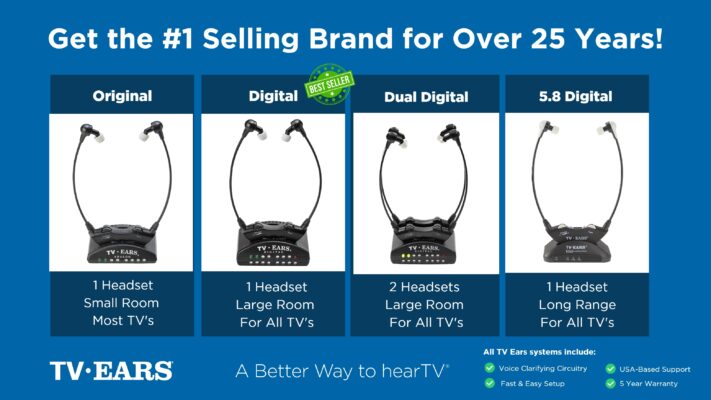 Ready to take your TV audio to the next level? Explore our Wireless Headphones and Headsets collection today! And don’t miss our custom audiologist-designed speaker system. At TV Ears, we are committed to ensuring that everyone can enjoy TV to the fullest. Our range of speakers for TV and wireless headphones and headsets are designed to cater to diverse needs and preferences, making your home entertainment experience truly exceptional. Don’t let hearing difficulties or differing audio preferences hold you back from enjoying your favorite shows and movies. Explore TV Ears’ solutions and rediscover the joy of TV-watching.
Stay Tuned for More TV Ears Insights
If you’re passionate about enhancing your TV-watching experience, you won’t want to miss our other blog posts. We regularly publish articles on the latest audio technology, home entertainment tips, and more. Check out our latest blogs below:
Enhance Your TV Viewing Experience with Wireless Headphones for Watching TV
Elevate Your TV Experience with TV Ears: The Ultimate Headphones for Televisions
Enjoy Ultimate Freedom with TV Ears: Enhance Your TV with Wireless Headphones
Don’t miss out on valuable insights and tips from TV Ears experts. Investing in the right speaker for your TV can dramatically enhance your home entertainment experience. Whether you’re an audiophile or simply want to enjoy your favorite shows and movies with exceptional sound, a speaker for TV is a worthwhile addition to your setup. Explore TV Ears’ wide range of speakers, headphones and headsets today and start enjoying TV like never before.
Frequently Asked Questions
Will using these headphones mean no one else can hear the TV? That’s a common worry, but most dedicated TV listening systems are designed to solve this exact problem. They allow sound to play through both the headphones and your TV speakers at the same time. This means you can have the clear, amplified sound you need, while your family and friends can listen at a volume that’s comfortable for them. It brings harmony back to the living room.
I already have hearing aids. How would these work with them? Many TV listening devices are designed to work alongside your hearing aids. Some over-the-ear headphones are large enough to fit comfortably over your hearing aids. Other styles, like the under-the-chin headsets offered by TV Ears, don’t interfere with your ears at all, giving you the option to wear them with or without your hearing aids for the best possible sound.
Why shouldn’t I just use a standard pair of Bluetooth headphones with my TV? While it seems like a simple solution, standard Bluetooth headphones can often cause a frustrating delay between the video and the audio. You might see an actor’s lips move a split second before you hear their words. Specialized TV headphones are built with low-latency technology specifically to eliminate that lag, ensuring the sound is perfectly synced with the picture.
Are these systems difficult to connect to my television? Not at all. Most systems that come with a transmitter base are incredibly simple to set up. You just plug the base into an audio output port on the back of your TV, and it wirelessly sends the sound to your headphones. It’s a straightforward, one-time setup that doesn’t require you to navigate any complicated on-screen menus.
Do these headphones just make the TV louder, or do they do something more? This is the most important difference. Instead of just making everything louder—including distracting background music and sound effects—these devices use voice-clarifying technology. This technology intelligently separates dialogue from other sounds, lifting the voices out and making them crisp and clear. It’s about helping you understand what’s being said, not just blasting the volume.
Key Takeaways
- Choose Clarity Over Volume: The solution to muffled TV dialogue isn’t just more volume. Look for headphones with voice-clarifying technology that specifically isolates and enhances speech while minimizing background noise.
- Ensure Sound and Picture Stay in Sync: To avoid the distracting delay between an actor’s lips moving and hearing their words, choose a system with low latency. Dedicated Radio Frequency (RF) or Infrared (IR) systems are built for this.
- Match the Features to Your Needs: Before buying, check your TV’s audio output ports and consider practical features like long battery life, simultaneous audio playback through the TV speakers, and support for multiple headsets.
