
We’ve all been in the middle of the “volume war.” One person needs the TV louder to catch the dialogue, while for everyone else, it’s blasting. Reaching for the remote to turn it up seems like the obvious fix, but it rarely works. Instead of making the words clearer, it just amplifies everything—the music, the sound effects, the background noise—into a jumbled mess. This common frustration isn’t just about volume; it’s about clarity. Thankfully, there are fantastic tools designed specifically to solve this problem. This guide will walk you through the best options for watching TV for hearing impaired individuals, helping you find a solution that brings clear sound and peace back to your living room.
Discover a World of Clear Sound with TV Ears: The Premier Option for TV Listening Devices for Hearing Impaired
Hey there, TV enthusiasts! We’ve all been there – you’re trying to enjoy your favorite show, but the dialogue is as clear as a mumbled secret. Fret not, because in this blog post, we’re diving into the world of TV listening devices for hearing impaired folks, and let me tell you, the options are as vibrant and varied as the shows you love to watch!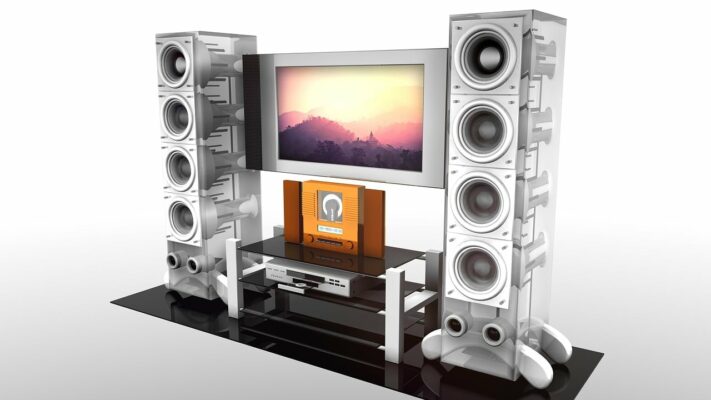
Why Just Turning Up the Volume Doesn’t Work
When you can’t quite catch what the characters on screen are saying, your first instinct is probably to reach for the remote and press the “volume up” button. It seems like the most straightforward solution, right? But more often than not, this quick fix just makes things worse. Instead of clarifying the dialogue, it amplifies everything—the dramatic music, the background noise, the sound effects—turning the audio into a jumbled mess. According to experts at Healthy Hearing, simply turning up the TV isn’t a good solution because it can make the sound unclear and is often too loud for others in the room, creating a frustrating experience for everyone.
The real problem is that volume is a blunt instrument. It can’t separate the crisp dialogue you want to hear from the ambient sounds you don’t. In fact, some find that turning up the volume can make speech harder to understand and might even be harmful to your hearing over time. A much better approach is to use a device that delivers sound directly to your ears. This method isolates the TV audio, cutting through room chatter and other distractions to provide a clear, personalized listening experience. You get to set the volume to your perfect level without starting a remote-control war with your family.
Introducing TV Listening Devices for Hearing Impaired: A Game-Changer
Do you ever feel like your TV is speaking in its own secret language, leaving you utterly confused? TV listening devices for hearing impaired individuals are here to save the day! These nifty gadgets are designed to amplify sound, making every line of dialogue, every punchline, and every whispered plot twist crystal clear.## Start with These Free TV and Room Adjustments Before you invest in a new device, it’s worth checking if a few simple, free adjustments can make a difference. Sometimes, the solution is hidden right in your TV’s menu or in the way your room is set up. These small changes can significantly improve sound clarity and might be all you need to start enjoying your favorite shows again. Think of it as a first step—a way to test the waters and see what improvements you can make without spending a dime. Let’s walk through some of the easiest and most effective tweaks you can try right now. ### Fine-Tune Your TV’s Audio Settings Your television has more audio options than just volume up and down. Buried in the settings menu is a control panel that can help you customize the sound to better suit your hearing needs. Most modern TVs are designed with features to enhance dialogue, but they aren’t always turned on by default. Taking a few minutes to explore your TV’s audio settings can be a real game-changer, turning muffled conversations into clear, understandable speech. It’s a simple action that can bring immediate relief and reduce the strain of trying to follow along. #### Look for “Clear Voice” or “Speech” Modes Many televisions come equipped with preset audio modes designed for specific situations. Look for settings labeled “Clear Voice,” “Speech Enhance,” or “Dialogue Clarity.” Activating one of these modes tells your TV to prioritize and amplify the frequencies where human speech occurs, making voices stand out from background music and sound effects. This is often the quickest and most effective adjustment you can make. It’s a one-click fix that can instantly make it easier to hear what characters are saying without affecting the overall sound mix too dramatically. #### Manually Adjust the Equalizer If your TV has a sound equalizer (EQ), you have even more control. An equalizer allows you to adjust different sound frequencies individually. To make speech clearer, try turning up the “treble,” which controls high-frequency sounds like the letters ‘S’ and ‘T’. At the same time, you can turn down the “bass,” which controls low-frequency sounds. Too much bass from explosions or deep music can often muddy the dialogue, so reducing it can help the voices cut through more distinctly. It might take a little experimentation to find the perfect balance for you. #### Disable Extra Sound Enhancements Sometimes, the features meant to improve sound can actually make things worse for dialogue clarity. Features like “Surround Sound,” “Virtual Surround,” or other cinematic enhancements can add echo and spread the audio around, which can distort speech. Try turning these extra features off to see if a more direct, simple sound profile helps. This often results in a flatter but much clearer audio output, making it easier to focus on conversations instead of ambient noise. A straightforward stereo sound is often best for understanding dialogue. ### Position Your TV for Better Sound The acoustics of your room play a big role in how you hear your TV. Sound waves bounce off hard surfaces like walls, floors, and furniture. You can use this to your advantage. Placing your television in a corner or against a large wall can help amplify and direct the sound toward your seating area. Soft furnishings like rugs, curtains, and upholstered chairs can also help by absorbing stray echoes that might otherwise interfere with sound clarity. Experimenting with your TV’s placement can be a surprisingly effective way to improve your listening experience without touching a single setting. ## Exploring TV Listening Aids and Devices If you’ve tried adjusting your TV and room setup but still find yourself struggling to hear, it might be time to explore dedicated listening aids. These devices are specifically designed to solve the problem of unclear TV audio for individuals with hearing loss. They range from accessories that work with existing hearing aids to standalone systems that deliver sound directly to your ears. The goal of these tools is to provide a personalized listening experience, allowing you to hear every word clearly without making the volume uncomfortably loud for others in the room. This is where technology really steps in to bridge the gap and bring back the joy of watching television together. ### Solutions for Hearing Aid Wearers If you already use hearing aids, you have several great options for connecting them directly to your TV’s audio source. This is often the ideal solution, as the sound is optimized for your specific hearing needs by your own devices. These technologies bypass the room’s acoustics entirely, sending a clean audio signal right to your hearing aids. This direct connection eliminates background noise and the distortion that can happen when sound travels from the TV speakers to your ears, providing an incredibly clear and immersive experience. Let’s look at some of the most common options available. #### TV Streamers A TV streamer is a small box that connects to your television and wirelessly transmits the audio directly to your hearing aids. Think of it as creating a personal, invisible connection between you and the TV. Most major hearing aid brands offer their own compatible streamers. Once set up, the sound is streamed in real-time, perfectly synchronized with the picture on the screen. This gives you clear, crisp audio tailored to your hearing loss, and you can often control the TV volume independently through an app on your phone. #### Hearing Loops (Telecoils) Some hearing aids are equipped with a feature called a telecoil, or T-coil. This small copper wire picks up sound from an induction loop system. You can create a “hearing loop” in your living room by connecting a loop system to your TV. When you switch your hearing aids to the T-coil setting, you’ll hear the TV audio directly through them. This technology is great because it cuts out all the background noise in the room, giving you a very clear signal. It’s a popular and effective solution for many hearing aid users. #### Bluetooth and FM Systems Modern hearing aids often come with Bluetooth capability, allowing them to connect to various devices, including TVs. If your TV has Bluetooth, you may be able to pair your hearing aids directly. If not, a small Bluetooth transmitter can be plugged into your TV to send the sound to your hearing aids. Similarly, FM systems use radio frequencies to transmit sound from the TV to a receiver that you wear, which then communicates with your hearing aids. Both systems offer a reliable way to get clear TV audio without disturbing others. #### Specialized Hearing Aid Programs Don’t forget to talk to your audiologist or hearing professional. They can often create a custom program on your hearing aids specifically for watching television. This program can be tailored to amplify the frequencies most common in speech and reduce the amplification of other sounds. With the push of a button, you can switch to your “TV program” when you sit down to watch your favorite show, instantly optimizing your hearing aids for the best possible listening experience. It’s a personalized solution that uses the technology you already have. ### Other Helpful Tools and Strategies Beyond devices that connect to hearing aids, there are many other tools and strategies that can make watching TV more accessible and enjoyable. These options are great for everyone, whether you wear hearing aids or not. They include standalone devices that offer a powerful, clear sound experience and simple, built-in TV features that many people overlook. Combining these strategies with other adjustments can create a comprehensive solution that brings clarity and ease back to your TV time, ensuring you never miss a critical plot point or a funny one-liner again. #### Assistive Listening Devices (ALDs) For those who don’t wear hearing aids or want a dedicated TV solution, Assistive Listening Devices (ALDs) are an excellent choice. These systems typically consist of a transmitter connected to the TV and a wireless headset or receiver that you wear. Products like TV Ears are a perfect example of this technology. They capture the TV audio and transmit it directly to a comfortable headset, delivering crystal-clear sound right to your ears. This approach is fantastic because it separates the TV sound from other noises in the room and allows you to set your own volume without affecting what anyone else hears. #### Using Closed Captioning One of the simplest and most effective tools is already built into your TV: closed captioning (CC). Turning on captions provides a text version of the dialogue and other important sounds on the screen. This can be a lifesaver for catching missed words or clarifying mumbled speech. Many people find that using captions in addition to their listening device gives them the best of both worlds—they can listen comfortably while having the text as a backup. It’s a free, easy-to-use feature that dramatically improves comprehension for millions of viewers. #### Finding Sign Language Interpretations For individuals who use sign language, an increasing number of broadcasts and streaming services are offering sign language interpretations. You can often check your TV guide or the channel’s website to find shows that include this feature. The interpretation is typically displayed in a picture-in-picture window on the screen. While not available for all programming, it is a wonderful and inclusive option that makes television content accessible to the Deaf and hard-of-hearing community. It’s always worth checking to see if your favorite shows offer this valuable service.
Options Galore: What’s Out There?
Wireless Headphones Imagine a world where you can enjoy your favorite shows without worrying about turning up the volume to max. Wireless headphones are a go-to option for TV enthusiasts who crave a private listening experience. With these sleek devices, you can immerse yourself in the world of your show without disturbing others. TV Soundbars TV soundbars are like magic wands for your entertainment setup. These slim, stylish bars enhance your TV’s audio, making even the faintest whisper resonate with clarity. Some soundbars even come with customizable settings, so you can tailor the sound to your unique hearing needs. Closed Captioning Glasses How about a twist on the traditional TV listening devices? Closed captioning glasses project subtitles right onto the lenses, so you can read along as you watch. It’s like watching your favorite show with a personal subtitle assistant right before your eyes! Streaming Devices with Enhanced Sound Did you know that some streaming devices now come with built-in sound enhancement features? They use cutting-edge technology to make dialogue clearer and background noise a thing of the past. These devices are like the superheroes of the TV listening world, rescuing your viewing experience from the clutches of unclear sound.
TV Ears: The Ultimate Choice for Clarity
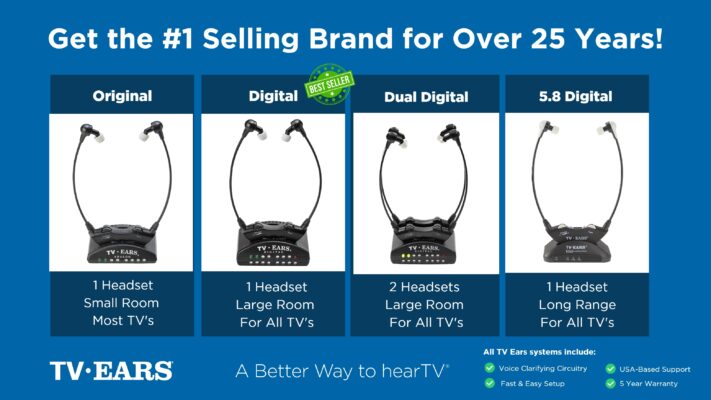
Now, let’s talk about the rock star of the TV listening devices for hearing impaired world – TV Ears! If you’re seeking the premier option that combines innovation, comfort, and unmatched clarity, look no further. With TV Ears, you’re not just getting a device – you’re gaining a ticket to a world of entertainment that’s accessible and enjoyable. TV Ears offers a range of options tailored to your preferences. Whether you’re into sleek wireless headphones, lightweight earbuds, or user-friendly TV soundbars, TV Ears has got you covered. Their commitment to providing high-quality sound and comfort is truly remarkable, and their products are designed to seamlessly integrate into your TV setup. Experience TV Ears Today: Your Entertainment, Your Way Are you ready to embark on a journey where the dialogue is crisp, the soundscapes are immersive, and your favorite characters’ voices ring true? It’s time to explore the TV Ears lineup and choose the perfect companion for your TV viewing adventures. Say goodbye to straining to hear and hello to a world of clear sound! In conclusion, the world of TV listening devices for hearing impaired individuals is a diverse playground of possibilities. Whether you’re a fan of wireless headphones, innovative soundbars, or groundbreaking streaming devices, there’s something out there for everyone. And if you’re aiming for the cream of the crop, TV Ears is the name you need to remember. So, what are you waiting for? Dive into the realm of clear sound and unforgettable TV moments by exploring the TV Ears lineup today. Your ears – and your favorite shows – will thank you for it!
When to Seek Professional Advice
Sometimes, the issue with hearing the TV goes beyond simple volume adjustments. If you’ve tried different devices and settings but still find that words get jumbled or lost in the background noise, it might not be about how loud the sound is, but how your brain is processing it. This is a common experience for many, and it’s a sign that it might be time to chat with a professional who can offer more specific guidance and help you find the right path forward.
Understanding Auditory Processing Disorder (APD)
Have you ever felt like you can hear just fine, but you can’t always understand what’s being said? This could be related to something called Auditory Processing Disorder, or APD. With APD, your ears are picking up the sound correctly, but your brain has a tough time interpreting it. This can make it especially hard to follow TV show dialogue when there’s music or background noise. Research shows this difficulty in separating speech from other sounds is a key part of the condition, which can make watching TV a frustrating experience. If this sounds familiar, understanding Auditory Processing Disorder is the first step toward finding a solution that truly works for you.
Why an Audiologist Can Help
An audiologist is the expert you’ll want to see for these kinds of challenges. They do much more than just test for hearing loss; they can perform specialized assessments to figure out exactly how your brain processes sound. This detailed evaluation helps distinguish APD from other conditions, ensuring you get the right support. Based on their findings, an audiologist can recommend specific strategies and tools. This might include assistive listening devices, like our TV Ears systems, which are designed to clarify dialogue and bring it directly to you. Getting a professional opinion can point you toward the most effective solutions for auditory processing disorders and get you back to enjoying your favorite shows without the struggle.
If you are struggling with hearing your favorite program, TV Ears has several top-rated, audiologist-designed systems that can help, find more at www.tvears.com.
Looking for more? Check out the recent stories on the TV Ears blog:
TV Ears: The Perfect Choice for Wireless Headphones for a TV with Hearing Loss
Hearing Aids Online: Your Ultimate Guide to Finding the Perfect Fit
AudioFetch: A New Competitor in the TV Headset Market Challenges TV Ears
Enhancing Your TV Experience with a High-Quality Headset from TV Ears
Forget Ears Bluetooth! Upgrade Your TV Audio with TV Ears’ Audiologist-Designed Voice Clarifying Technology
Elevate Your TV Experience Beyond TV Speakers: Discover the Power of TV Ears!
Unveiling the Truth: The Pros and Cons of As Seen on TV Hearing Aids
Enhancing TV Enjoyment for Seniors: The Power of TV Hearing Devices for Seniors
Frequently Asked Questions
Can other people still listen to the TV at their own volume while I use a TV listening device? Yes, absolutely. That’s one of the best parts about using a dedicated system like TV Ears. The device sends the TV audio directly to your headset, allowing you to control your personal volume completely separately. This means you can have the sound as loud and clear as you need it, while everyone else in the room can listen to the TV’s main speakers at a comfortable level for them. It’s a simple way to end the remote control battles for good.
I already wear hearing aids. Do I need a separate device for the TV? Not necessarily, but you might want one for a better experience. Many modern hearing aids can connect to the TV through tools like a TV streamer, which sends audio directly to them. However, a dedicated assistive listening device is designed specifically to clarify the frequencies of human speech from a television. It can provide an even clearer sound and is a great option if you don’t have a compatible streamer or if you want a simple, grab-and-go solution just for watching your favorite shows.
What makes a dedicated device like TV Ears different from just using regular Bluetooth headphones? While standard Bluetooth headphones can deliver TV audio wirelessly, they primarily just make the existing sound louder. A specialized device like TV Ears is engineered with voice clarifying technology. This means it actively separates speech from background noise and music, amplifying the dialogue to make it crisp and easy to understand. It’s a more targeted approach that focuses on clarity, not just volume.
I’ve tried adjusting my TV’s audio settings, but it’s still not clear enough. What should I do next? If you’ve already explored your TV’s built-in settings like “Clear Voice” mode or the equalizer without success, the next logical step is to try a device that delivers sound directly to your ears. This bypasses any issues with your TV’s speakers or the room’s acoustics. An assistive listening device is designed precisely for this situation, giving you a direct, clear audio feed that you can control.
Is it difficult to set up one of these systems? Not at all. Most TV listening systems, including TV Ears, are designed to be very user-friendly. The setup typically involves plugging a small transmitter box into the audio output port on your television and then into a power outlet. Once that’s done, the headset connects to the transmitter wirelessly. It’s a straightforward process that usually takes just a few minutes to get up and running.
Key Takeaways
- Start with Your TV’s Built-in Tools: Before buying anything, check your TV’s audio menu for settings like “Clear Voice” or an equalizer. Adjusting these can make dialogue stand out from background noise, often solving the problem for free.
- Get Sound Delivered Directly to You: For the clearest audio, use a device that sends sound straight to your ears. TV listening systems, like TV Ears, or hearing aid streamers bypass room noise and let you control your own volume, ending the remote-control battle for good.
- Know When to Get More Support: Don’t forget about free tools like closed captioning, which can fill in any gaps. If you’ve tried different solutions and still struggle to understand dialogue, an audiologist can help determine the root cause and recommend the best path forward.
