
Hearing aids are life-changing for everyday conversations, but you might find they don’t quite solve the unique challenge of hearing the television. That’s because TV audio is a complex mix of dialogue, music, and sound effects all competing for your attention. Your hearing aids are optimized for the real world, not necessarily for the highly produced soundscape of a Hollywood movie. This doesn’t mean your hearing aids aren’t working; it just means you might need a tool specifically for this task. There are fantastic ways to bridge this gap, from streaming audio directly to your hearing aids to using dedicated tv listening devices that work with them to provide unparalleled clarity. This article will show you how to get the most out of your TV time.

Why Is It So Hard to Hear the TV?
If you find yourself constantly asking, “What did they say?” while watching your favorite shows, you’re not alone. It’s a common frustration that can turn a relaxing evening into a stressful one. The problem often isn’t just about the volume; it’s a combination of how our hearing changes and how modern televisions are designed. Understanding the root causes can help you find the right solution to bring back the enjoyment of watching TV without a struggle. Many people, even those with perfect hearing, find it difficult to catch every word of dialogue amidst loud music and sound effects. This is because today’s TVs are built to look good, with slim profiles that leave little room for quality speakers. When you add hearing loss to the mix, the challenge becomes even greater. Let’s look at why simply cranking up the volume often isn’t the answer.
It’s About Clarity, Not Just Volume
Have you ever turned the TV volume up so high that the background music and explosions were deafening, but you still couldn’t make out the dialogue? This happens because the issue is often about clarity, not loudness. As Consumer Reports notes, turning up the volume just makes everything louder, including the distracting background noise that drowns out voices. For people with hearing loss, certain sound frequencies—especially the higher pitches where human speech falls—are harder to perceive. Simply amplifying all the sounds together doesn’t separate the dialogue from the rest of the audio mix, leaving you with a louder, more jumbled mess.
Modern TVs Prioritize Picture Over Sound
The stunning, paper-thin televisions we have today are marvels of visual technology, but that sleek design comes at a cost to audio quality. To achieve that slim frame, manufacturers use small, downward- or rear-facing speakers that just can’t produce crisp, clear sound. According to the experts at Hearing Doctors, these built-in speakers often fail to deliver clear dialogue because the focus is on the screen, not the sound. The result is audio that can sound muffled or flat, forcing you to strain to hear conversations while the cinematic score overpowers everything.
How to Hear Your TV Better for Free
Before you invest in new equipment, it’s worth exploring the settings already built into your television. Many modern TVs come with features designed to make audio more accessible, but they are often hidden in menus you might not think to check. Taking a few minutes to experiment with these settings costs nothing and can make a surprising difference in your viewing experience. Don’t worry about messing anything up; you can almost always reset the audio to its factory defaults if you don’t like the changes you’ve made.
Adjust Your TV’s Built-in Sound Settings
Your TV’s audio menu is the first place you should look for a quick fix. Many televisions have preset sound modes like “Movie,” “Sports,” or “Music.” Try switching from a “surround sound” setting to “Stereo” or “Normal,” as these can sometimes make dialogue less distinct. Even better, look for a feature specifically designed to help with dialogue. Depending on the brand, this might be called “Clear Voice,” “Speech Boost,” or “Dialogue Enhancement.” Activating this setting tells your TV to prioritize the frequencies of human speech, making voices stand out from the background noise and music.
Use the Sound Equalizer (EQ)
If your TV has a sound equalizer (often labeled “EQ”), you have even more control over the audio. An equalizer allows you to adjust specific sound frequencies. Voices are typically in the mid-to-high frequency range, while bass-heavy sounds like explosions and music are in the low range. To make dialogue clearer, try going into the EQ settings and lowering the bass frequencies while slightly increasing the mid and high frequencies. This simple adjustment can help lift the voices out of the audio mix, making them much easier to understand without having to raise the overall volume.
Turn On Closed Captions (CC)
One of the most effective and widely available tools for understanding TV dialogue is closed captions. While it’s a visual aid rather than an audio fix, turning on captions ensures you never miss a word. It’s a perfect solution for those moments when accents are thick, characters are mumbling, or background noise is just too overwhelming. Nearly all broadcast channels, streaming services like Netflix and Hulu, and DVDs offer captioning. You can typically turn them on with a dedicated button on your remote or through the TV’s settings menu, giving you an instant, word-for-word script of your show.
Exploring Different Types of TV Listening Devices
If you’ve tried adjusting your TV’s settings and still find yourself struggling to hear, it might be time to consider an external audio device. From soundbars that fill the room with richer audio to personal listening systems that deliver sound directly to your ears, there are many options available to fit different needs and budgets. These devices are designed to overcome the limitations of built-in TV speakers and provide a clearer, more enjoyable listening experience for everyone in the room—or just for you.
Soundbars for Room-Filling Sound
A soundbar is a long, thin speaker system that sits below your TV and offers a significant upgrade over the television’s built-in speakers. They provide richer, fuller audio that can make the entire viewing experience more immersive. Many soundbars are designed with dialogue in mind and come with their own “voice enhancement” features, similar to the settings on your TV but often more powerful and effective. A soundbar is a great option if everyone in the room has trouble hearing the TV, as it improves the overall sound quality for the whole household.
Other Personal Speakers and Earbuds
For a more personalized solution, TV listening systems are designed to deliver clear audio directly to you without disturbing others. These devices, like our TV Ears headsets, use advanced technology to clarify dialogue and dampen distracting background sounds. They typically consist of a transmitter that connects to your TV and a lightweight, wireless headset that you wear. This setup allows you to control your own volume and tone, creating a customized audio experience tailored to your specific hearing needs. It’s the perfect way to end the volume war and ensure you can hear every word in crystal-clear detail.
Over-the-Ear Wireless Headphones: Functional and Affordable
One of the most budget-friendly categories of TV listening devices is over-the-ear wireless headphones. These headphones work like wireless speakers, picking up the audio signal from your TV and delivering it directly into your ears. Wireless headphones range greatly in hearing device price from about $50 on the low end to $250 or more on the high end. More affordable models still provide robust sound enhancement capabilities, while pricier options add premium features like support for surround sound, rechargeable batteries, and Bluetooth connectivity. Key benefits of wireless over-the-ear headphones include:
- Enhanced volume and sound clarification
- Ambient noise reduction
- Wireless range up to 100 feet for room-to-room mobility
- Multiple wearers can listen in using multi-pair models
- Easy plug-and-play setup
So, if you’re looking for a simple and affordable option, over-the-ear wireless headphones check all the boxes. They make listening to your favorite TV shows effortless without breaking the bank.
Hearing Amplifiers: Customizable Sound Enhancement
Hearing amplifiers take TV listening to the next level with advanced audio processing in a compact device. About the size of a cell phone or external battery pack, hearing amplifiers connect directly to your TV audio output to amplify sound and make critical adjustments. There is wide variability in features and hearing device price, with basic models starting around $175 and high-performance amplifiers with maximum customization reaching $600+. Here are some key benefits offered by hearing amplifiers:
- Volume boosts up to +70dB for severely impaired hearing
- Multi-channel noise control and reduction
- Custom sound settings tuned for your hearing loss profile
- Rechargeable battery for continuous use
- Discrete, portable profile for use at home and on the go
For those with mild to profound hearing impairment looking for robust control over audio settings, hearing amplifiers are a top choice that enhances your experience.
TV Listening Systems: Hassle-Free and Voice Clarifying
All-in-one TV listening systems take an integrated approach with a unified transmitter-receiver combination optimized specifically for TV audio. This setup provides seamless interference-free transmission and the industry’s best audio processing technology. TV listening systems range in price from about $100 on the extremely affordable end all the way up to $500+ for premium versions. Mid-tier models with excellent performance typically cost between $200 and $300. Benefits provided by these specialized systems include:
- Crystal-clear voice transmission thanks to DTX technology
- Background noise reduction with advanced noise canceling
- 40+ channels to eliminate interference
- Multiple customizable listening profiles
- Low-maintenance wireless setup
With their focus on dialogue clarity and ambient noise minimization, TV listening systems excel at allowing you to easily hear every word of TV audio customized precisely for your hearing abilities. No fussing with settings or readjusting required.
How TV Ears Systems Work
If you’re looking for a straightforward solution dedicated to television audio, a specialized system might be the perfect fit. At TV Ears, we design listening systems that focus on one thing: making TV dialogue crisp and understandable. Our systems typically include a wireless headset and a transmitter base that connects directly to your television. The transmitter captures the audio signal and sends it to the headset using infrared technology, which works similarly to your TV remote. This creates a secure connection that clarifies voices and reduces background noise, allowing you to set your own volume without affecting anyone else in the room.
Connecting Hearing Aids Directly to Your TV
For those who already use hearing aids, you might be able to use them to hear the television more clearly. Many modern hearing aids are powerful, miniature computers that can connect to other electronic devices, including your TV. This integration allows the TV’s audio to be streamed directly to your ears, customized by your hearing aid’s personal settings. It’s a fantastic way to leverage a device you already own for a better entertainment experience. Depending on the technology in your hearing aids and television, there are a few common ways to make this connection happen. Let’s look at the most popular methods: direct Bluetooth pairing, using a media streamer, and utilizing an induction loop system.
Bluetooth Connections
One of the simplest ways to connect your hearing aids to your TV is through a direct Bluetooth connection. Many new smart TVs come with Bluetooth built-in, allowing them to pair with other wireless devices just like your smartphone does. If you have Bluetooth-compatible hearing aids, you can often pair them directly in your TV’s settings menu. This creates a seamless, wireless link that sends the TV audio right to your hearing aids. It’s a convenient option that doesn’t require any extra hardware, but success depends on the compatibility between your specific hearing aid model and your television.
Media Streamers
What if your TV or hearing aids don’t have Bluetooth? A media streamer is your answer. This small device acts as a bridge, connecting to your TV with a cable and then wirelessly broadcasting the audio directly to your hearing aids. Most major hearing aid manufacturers offer their own proprietary streamers designed to work perfectly with their devices. This method provides a stable, high-quality audio stream and is an excellent solution for getting clear TV sound without needing the latest smart TV or Bluetooth-enabled hearing aids. It’s a reliable way to ensure you get a strong, clear signal every time you watch.
Induction Loops (Hearing Loops)
Another effective technology is an induction loop, also known as a hearing loop. This system uses a wire that creates a magnetic field to transmit sound. To use it, your hearing aids must have a feature called a telecoil or T-coil. When you switch your hearing aids to the T-coil setting, they pick up the sound from the loop system and deliver it directly to your ears, cutting out background noise. While often found in public venues like churches and theaters, you can install a personal loop system in your living room. You can also use smaller, portable versions like neckloops that you wear around your neck to achieve the same effect.
Key Features to Look for in a TV Listening Device
When you start shopping for a TV listening device, the number of options can feel overwhelming. To find the right one for your needs, it helps to focus on a few key features that make the biggest difference in your viewing experience. Beyond just making the sound louder, the best devices offer clarity, reliability, and comfort. Thinking about how a device will fit into your daily life is just as important as its technical specifications. To help you make a confident choice, let’s break down the most important features to consider, including audio synchronization, compatibility with your TV, battery performance, and overall comfort.
Audio Sync and Latency
Have you ever watched a video where the sound doesn’t quite match the picture? That annoying delay is called latency, and it can make following dialogue incredibly difficult. When choosing a TV listening device, look for one that promises low latency or “instant audio sync.” This ensures that the words you hear align perfectly with the actors’ lips moving on screen. High-quality wireless systems, especially those that use infrared or dedicated radio frequencies, are often excellent at minimizing this delay. A seamless audio-visual experience is essential for enjoying your favorite shows and movies without frustration.
TV Compatibility and Connections
Before you buy any device, it’s crucial to make sure it will work with your television. Take a quick look at the back of your TV to see which audio output ports you have. The most common types are a digital optical port (often labeled “Toslink”), red and white RCA jacks, or a 3.5mm headphone jack (sometimes labeled “AUX”). Your TV listening device should come with the correct cables to connect to one of these ports. Checking for compatibility beforehand will save you a lot of time and potential headaches during setup, ensuring you can start enjoying clearer sound right away.
Battery Life and Charging Method
For any wireless device, battery life is a key consideration. Think about how you watch TV. Do you enjoy settling in for a long movie or binge-watching an entire season of a show? If so, you’ll want a device with a long-lasting battery that won’t die in the middle of a critical scene. Many devices offer several hours of use on a single charge. Also, consider the charging method. Some headsets rest on a convenient charging base that also acts as the transmitter, so they’re always charged and ready to go. Others may use a standard USB cable, which offers more flexibility for charging.
Comfort and Device Style
Since you’ll be wearing your listening device for hours at a time, comfort is non-negotiable. TV listening devices come in several styles, so you can choose what feels best for you. Over-the-ear headphones are great for blocking out external noise, but some people find them heavy. In-ear buds are lightweight and discreet. Another popular option is the stethoscope-style headset, like the ones we’ve perfected at TV Ears, which rests lightly under your chin. The right choice depends on your personal preference, so consider factors like weight, adjustability, and the material of the ear tips.
Get the Right Hearing Device Price from TV Ears
As you explore options for enhancing TV listening in the comfort of your home, look no further than the experts at TV Ears. With many of experience offering TV listening systems specifically for the hearing impaired, we understand the features and customization required to meet each customer’s unique hearing needs. Our full lineup provides unparalleled voice clarification to ensure you never miss a line of dialogue again. With effortless setup and all-day battery life, our systems never get in the way of your enjoyment. And with budget-friendly options under $100 as well as premium features like rechargeable batteries and surround sound capability, we have the perfect listening to TV solution no matter your lifestyle and budget. Rather than settling for straining to understand standard TV audio, explore our full range of products specially engineered by hearing experts for improving accessibility. Contact us today to find your customized match and experience immersive home entertainment again!
Find Your Perfect TV Headphone or Headset Today
Discover the difference TV Ears wireless headphones and headsets can make in your TV-watching experience. Whether you’re looking for comfortable over-ear headphones or a compact, stylish headset, we have options to suit your needs. 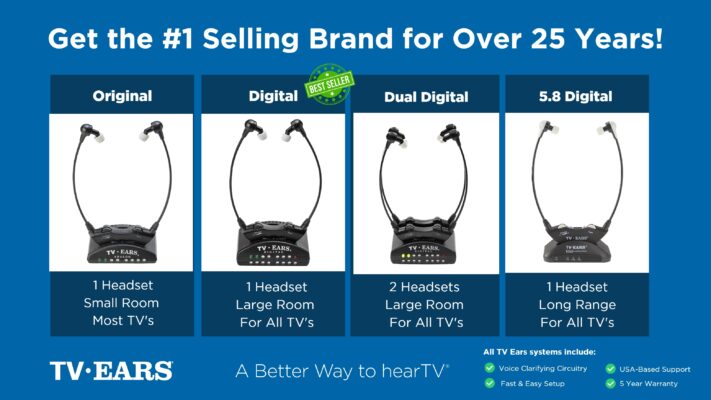 Ready to take your TV audio to the next level? Explore our Wireless Headphones and Headsets collection today! And don’t miss our custom audiologist-designed speaker system. At TV Ears, we are committed to ensuring that everyone can enjoy TV to the fullest. Our range of speakers for TV and wireless headphones and headsets are designed to cater to diverse needs and preferences, making your home entertainment experience truly exceptional. Don’t let hearing difficulties or differing audio preferences hold you back from enjoying your favorite shows and movies. Explore TV Ears’ solutions and rediscover the joy of TV-watching.
Want More Home Entertainment Tips?
If you’re passionate about enhancing your TV-watching experience, you won’t want to miss our other blog posts. We regularly publish articles on the latest audio technology, home entertainment tips, and more. Check out our latest blogs below:
The Wireless Wonders: Unleash the Magic of Wireless Headphones!
The Wireless Headphones for TV Experience: Elevate Your Entertainment!
Hear Every Word Clearly: Exploring Fun TV Listening Devices for Hearing Impaired
Don’t miss out on valuable insights and tips from TV Ears experts. Investing in the right speaker for your TV can dramatically enhance your home entertainment experience. Whether you’re an audiophile or simply want to enjoy your favorite shows and movies with exceptional sound, a speaker for TV is a worthwhile addition to your setup. Explore TV Ears’ wide range of speakers, headphones and headsets today and start enjoying TV like never before.
The Importance of a Hearing Test
If you find yourself constantly reaching for the volume remote, the first step isn’t always a new device—it’s understanding the root of the issue. Simply cranking up the volume can distort the sound, making dialogue even harder to decipher while creating a blaring experience for everyone else in the room. Before you invest in any new technology, it’s a great idea to get a clear picture of your hearing health. A professional hearing test with an audiologist or hearing specialist can pinpoint the specific frequencies you’re struggling with, which is crucial for finding the right solution for your needs.
Adjusting Your Current Hearing Aids
For those who already use hearing aids, struggling to hear the TV can be particularly frustrating. You’ve already taken a significant step to improve your hearing, yet the television remains a challenge. This is a common issue, and it doesn’t necessarily mean your hearing aids aren’t working. Often, they just need a tune-up. Your hearing aids can be programmed with specific settings optimized for different environments, including watching television. A quick visit to your hearing care professional can make a world of difference. They can adjust the settings to better focus on dialogue and reduce background noise from the TV’s audio track.
Why Doctor-Recommended Systems Make a Difference
When it comes to specialized listening devices, a recommendation from a healthcare professional carries a lot of weight. Doctors and audiologists understand the nuances of hearing loss and can suggest solutions that are not only effective but also safe and easy to use. They often recommend systems like TV Ears because these products are designed with one specific goal in mind: clarifying television dialogue. Unlike general headphones that just make everything louder, these systems use advanced technology to lift speech frequencies out of the background noise, making every word crisp and clear. This focus on voice clarity is why so many professionals suggest them to patients, even those who already wear hearing aids.
A doctor-recommended system provides peace of mind. You know you’re getting a product that has been vetted by experts and is trusted to help people with hearing difficulties. At TV Ears, we’ve spent years working with audiologists to create a better way to hear TV. Our systems are engineered to isolate and amplify speech, so you can follow the plot without straining or disturbing others. By choosing a system that professionals stand behind, you’re not just buying a gadget; you’re investing in a reliable, purpose-built solution that can bring back the joy of watching television with your loved ones.
Frequently Asked Questions
I already have hearing aids. Do I still need a separate TV listening device? That’s a great question. While your hearing aids are fantastic for everyday conversations, TV audio presents a unique challenge with its mix of dialogue, music, and sound effects. A dedicated TV listening device is specifically engineered to clarify speech frequencies from that complex audio mix. Think of it as a specialized tool that works alongside your hearing aids to give you the clearest possible sound, so you don’t have to choose between hearing the dialogue and wearing your aids.
What’s the real difference between a system like TV Ears and just using regular Bluetooth headphones? The main difference comes down to purpose. Most wireless headphones are designed to make all sounds louder, which can be unhelpful when the background music is already overpowering the dialogue. A specialized TV listening system, on the other hand, uses voice-clarifying technology to specifically isolate and enhance the frequencies of human speech. This means you get crisp, clear voices delivered directly to your ears without also amplifying distracting explosions or musical scores.
If I use a headset, can my family still hear the TV from its speakers? Yes, absolutely. Using a personal TV listening system allows you to have your own independent volume control without affecting what others hear. The transmitter connects to the TV, but the television’s own speakers can typically remain on and be adjusted with the regular remote. This is one of the best benefits, as it allows everyone in the room to enjoy the same show together at a volume that is comfortable for them.
My TV is a bit older. How do I know if one of these devices will connect to it? You don’t need the latest smart TV to use a listening device. Most systems are designed for universal compatibility and connect using the audio output ports found on the back of nearly every television, new or old. Before you buy, just take a quick look at the back of your TV for a digital optical port, the red and white RCA jacks, or a standard 3.5mm headphone jack. As long as you have one of those, you should be able to connect a device without any trouble.
Is the setup process difficult? I’m not very tech-savvy. Not at all. These systems are designed to be incredibly straightforward, often with a simple plug-and-play setup. You typically just connect a small transmitter box to your TV’s audio output port and plug it into a power source. The headset then wirelessly receives the sound from the transmitter. There’s no complicated software to install or confusing Bluetooth pairing to worry about, so you can get it working in just a few minutes.
Key Takeaways
- Start with Your TV’s Built-in Settings: Before you buy anything, explore your TV’s audio menu for free fixes. Activating features like “Clear Voice” or adjusting the sound equalizer (EQ) can make dialogue much easier to understand by separating it from background noise.
- Match the Solution to Your Household: A personal TV listening system allows you to control your own volume without disturbing others, making it ideal for shared spaces. If everyone struggles to hear, a soundbar can improve the audio for the whole room.
- Pay Attention to the Details: When choosing a device, prioritize key features for a frustration-free experience. Look for low latency to ensure audio syncs with the picture, confirm it’s compatible with your TV’s ports, and choose a style that’s comfortable for long-term wear.
