
Enjoying television should be a simple pleasure, not a source of strain or dependence. When you struggle to hear, you might find yourself relying on others to repeat lines or turning on captions when you’d rather just listen. This can chip away at the relaxing experience you deserve. Taking back control of your audio environment is key. You should be able to set the volume to a level that’s perfect for you, without having to ask for permission or disturb anyone else. The right pair of hearing loss tv headphones can restore that independence, providing a personalized sound experience that makes watching TV enjoyable again. Here’s how to find the perfect solution for your needs.
When it comes to enjoying your favorite TV shows and movies, the right audio experience can make all the difference. For individuals dealing with hearing loss, finding the perfect wireless headphones for a TV can be a game-changer. TV Ears offers an exceptional solution that combines cutting-edge wireless technology with hearing enhancement features, creating an unparalleled TV viewing experience. In this blog, we’ll explore why TV Ears is the go-to choice for those seeking wireless headphones for a TV, especially when coping with hearing loss.
How to Hear Your TV Better: Exploring Your Options
If you find yourself constantly reaching for the volume remote or asking, “What did they just say?” you’re not alone. Modern TVs often prioritize sleek design over powerful, clear speakers, leaving dialogue muddy and hard to distinguish from background music and sound effects. This can be especially frustrating when you’re trying to follow a complex plot or enjoy a quiet, character-driven scene. Fortunately, you have several options to improve your TV’s sound, ranging from simple setting adjustments to dedicated listening devices. Let’s walk through some of the most effective ways to make sure you catch every word of your favorite shows.
Adjust Your TV’s Built-in Audio Settings
Before you spend any money, it’s worth checking the audio settings on your television. Many TVs come with built-in features designed to make dialogue easier to understand, and you can usually find them in the “Audio” or “Sound” section of your TV’s menu. Making these adjustments can offer a noticeable improvement for everyone in the room. However, if you’re looking for a more personalized solution that allows you to set your own volume and tone without impacting others, you might find these settings are a good starting point but not the final answer to your audio needs.
Look for Dialogue Enhancement Features
Dig into your TV’s audio menu for settings with names like “Dialogue,” “Speech Boost,” or “Clear Voice.” As Consumer Reports notes, these modes are specifically engineered to isolate and amplify the frequencies of human speech, making voices stand out from other sounds. Activating this feature can be a quick and easy fix that significantly improves your ability to follow conversations on screen without having to crank up the overall volume.
Switch from Surround Sound to Stereo
Surround sound is fantastic for creating an immersive, cinematic experience, but it can sometimes make dialogue harder to hear. This is because it splits the audio into multiple channels, sending different sounds to different speakers. If you don’t have a full surround sound system, your TV might be struggling to process this complex audio. Switching the output from surround sound to a simpler “Stereo” or “Standard” mode can often help clarify dialogue by reducing the audio complexity and focusing the sound.
Use a Soundbar for Enhanced Dialogue
If your TV’s built-in speakers just aren’t cutting it, a soundbar is a great next step. Soundbars are external speakers that provide a significant audio upgrade in a compact package that sits below your TV. Many modern soundbars come equipped with the same dialogue-enhancement technology found in TVs, but with much more power and precision. They are designed to deliver richer, fuller sound and can make a world of difference in vocal clarity, ensuring that you hear every whisper and witty comeback clearly. It’s an investment that benefits everyone watching.
Turn on Closed Captions
One of the most straightforward solutions is to turn on closed captions. While it’s a visual aid rather than an audio one, reading along with the dialogue ensures you never miss a crucial plot point. Captions are available on almost all modern TVs, streaming devices, and cable boxes, and they can be a lifesaver, especially during scenes with heavy accents, fast talkers, or loud background noise. It’s a simple, effective tool that can immediately reduce the frustration of mishearing what’s being said and keep you fully engaged in the story.
Choosing a Dedicated TV Listening Device
When general solutions aren’t enough, a dedicated TV listening device can provide a personalized audio experience tailored to your specific hearing needs. These devices are designed to deliver clear sound directly to your ears, allowing you to set the volume to your perfect level without affecting what others in the room hear. This is the key to resolving the household “volume war” and creating a peaceful viewing environment for everyone. From wireless headsets to systems that work with your hearing aids, there’s a wide range of options available, so finding the right one involves considering key features and understanding the technology.
What to Look for When Shopping
When you start looking for a TV listening device, the number of choices can feel overwhelming. To narrow it down, focus on what matters most for a great viewing experience. Think about comfort for long-term wear, especially during a movie marathon, as well as ease of setup and how the device will fit into your daily routine. It’s also important to consider the specific technology that powers the device, as this will impact its range, reliability, and overall performance. Taking the time to understand these factors will help you select a product that truly meets your needs.
Key Features to Consider
One of the most critical features to look for is “no audio delay,” also known as low latency. This ensures that the sound you hear in your headphones perfectly matches the actors’ lips moving on the screen, preventing a distracting sync issue. You should also consider battery life, comfort, and how easy the device is to set up and use. Look for simple controls and a convenient charging base that makes it easy to keep your device ready for your next movie night.
Technical Specifications to Compare
Understanding the different wireless technologies can help you make an informed choice. The three main types are Radio Frequency (RF), Bluetooth, and Infrared (IR). Each has its own set of pros and cons regarding range, signal stability, and potential for interference. For example, some technologies can transmit sound through walls, while others require a direct line of sight. Comparing these technical specifications will help you find the best fit for your home and viewing habits.
Why a Hearing Check is a Good First Step
If you’re consistently struggling to hear the TV, a professional hearing check is an excellent starting point. An audiologist can assess your specific level of hearing loss and provide personalized recommendations. This insight can be invaluable when choosing a listening device, as it helps you understand which features will be most beneficial for you. A hearing specialist can guide you toward solutions that are best suited for your unique hearing profile, ensuring you invest in a device that will truly make a difference.
Understanding Different Device Styles
TV listening systems come in several different styles, each offering a unique way to experience TV audio. The right choice for you will depend on your personal comfort preferences, whether or not you wear hearing aids, and how you like to watch TV. From traditional over-ear headphones to discreet under-the-chin headsets, the design of the device plays a big role in your overall satisfaction. Let’s explore some of the most common styles you’ll encounter so you can find the perfect match for your needs.
Headsets and Earbuds
Traditional over-ear or on-ear headsets are a popular choice for TV listening. They are great at blocking out ambient room noise, allowing you to fully immerse yourself in what you’re watching. Wireless earbuds offer a more discreet and lightweight alternative. Both styles are widely available, but it’s important to choose a pair specifically designed for TV use to avoid audio lag and ensure a stable connection throughout your viewing session, as not all general-purpose headphones are optimized for this.
Stethoscope-Style Listeners
Stethoscope-style listeners, like the ones we’ve perfected at TV Ears, are a fantastic option for comfort and clarity. These lightweight headsets rest under the chin and direct sound right into your ears without messing up your hair or causing the discomfort that can come from bulky over-ear headphones. This design is especially popular among seniors because it’s incredibly easy to put on and take off, providing a simple and effective way to hear the TV clearly.
Neckloops for Hearing Aid Users
If you wear hearing aids with a telecoil (or t-coil) setting, a neckloop is an excellent accessory. This device is worn around your neck and wirelessly transmits the TV’s audio directly to your hearing aids. This turns your hearing aids into personal speakers, delivering sound that is already customized for your specific hearing needs. It’s a seamless way to integrate your existing hearing technology with your television for a crystal-clear audio experience.
Comparing Wireless Technologies
The technology that sends the sound from your TV to your ears is a key part of any wireless listening system. Each type of wireless signal has its advantages, and the best one for you depends on your home’s layout and your personal habits. Some offer greater freedom of movement, while others provide a highly reliable and interference-free connection. Understanding the basics of Radio Frequency (RF), Bluetooth, and Infrared (IR) will help you decide which system is the best match for your living space.
Radio Frequency (RF)
Radio Frequency (RF) systems are known for their strong signal and impressive range. One of the biggest benefits of RF is that the signal can pass through walls and other solid objects. This means you can walk into the kitchen for a snack and still hear what’s happening on the TV. This freedom of movement makes RF headphones a flexible and convenient option for those who don’t want to be tied to one spot while listening.
Bluetooth
Bluetooth is a familiar technology that connects a huge range of devices wirelessly. Its main advantage is convenience and compatibility with many modern TVs and sound systems. However, as mentioned earlier, some Bluetooth connections can have a slight audio delay, which can be frustrating when watching TV. While many newer devices have improved on this, it’s still something to be aware of when considering a Bluetooth-based system for television viewing.
Infrared (IR)
Infrared (IR) technology uses light waves to transmit sound, similar to how your TV remote works. This creates a highly reliable and interference-free audio signal, ensuring you get crisp, clear sound without static from other wireless devices like cordless phones. The one requirement is a direct line of sight between the transmitter and the headset. At TV Ears, we use IR technology because it delivers the clearest possible audio for dialogue, which is exactly what our users need.
Connecting Directly to Your Hearing Aids
For those who already use hearing aids, there are fantastic technologies available that allow you to stream TV audio directly to your devices. This approach provides the ultimate personalized listening experience, as the sound is amplified and clarified according to your specific hearing prescription. It eliminates the need for a separate headset and turns your hearing aids into a high-fidelity sound system for your television, making it easier than ever to catch every detail without disturbing anyone else in the room.
Media Streamers
Many modern hearing aids are Bluetooth-enabled and can connect to a small device called a media streamer. This streamer plugs into your TV and sends the audio signal directly to your hearing aids. It’s a seamless and effective solution that provides excellent sound quality. If you have compatible hearing aids, this can be one of the best ways to get clear TV sound, as it leverages the technology you already use and trust every day for better hearing.
Induction Loop Systems
An induction loop, or hearing loop, is another great option for hearing aid users with a t-coil setting. This system involves a wire that is placed around the room, creating a magnetic field that transmits sound directly to the t-coil in your hearing aids. Once you’re inside the loop, you can hear the TV clearly without any background noise. These systems can be installed in a single room or throughout an entire home for complete coverage, offering a powerful solution for accessibility.
Why Millions Have Chosen TV Ears
When it comes to finding a simple, effective, and reliable solution for hearing the television better, millions of people have put their trust in TV Ears. For over two decades, we’ve been dedicated to helping people reconnect with the shows and movies they love. Our system is specifically designed to address the most common problem people with hearing loss face: the inability to understand dialogue. We focus on one thing and do it exceptionally well—delivering clear, understandable voices directly to your ears so you never have to ask, “What did they say?” again.
A Doctor-Recommended Solution Since 1998
Since our beginning, TV Ears has been recommended by doctors to patients who struggle to hear the television. Our proprietary Voice Clarifying Circuitry® is the secret behind our success. This technology actively clarifies and amplifies human speech frequencies while lowering background noise, so you can hear dialogue clearly. This allows you to set your own volume with a lightweight, under-the-chin headset, while others in the room can listen at a comfortable level. It’s a simple solution that ends the volume war and brings harmony back to the living room, which is why we’re proud to offer a better way to hear TV.
Crystal-Clear Audio for Hearing Loss
TV Ears stands out as a leading provider of wireless headphones designed specifically for individuals with hearing difficulties. Its advanced technology ensures that the audio is transmitted directly to the headphones, bypassing any background noise or acoustics that may hinder hearing clarity. As a result, users experience crystal-clear dialogue and sound, making every TV show and movie enjoyable again.
Personalized Volume Control
One of the most frustrating aspects of TV watching with hearing loss is the constant need to adjust the volume to accommodate everyone in the room. With TV Ears wireless headphones for a TV, this problem becomes a thing of the past. Users can personalize the volume to their comfort level without affecting others’ TV experience, creating a harmonious environment for everyone.
Wireless Freedom and Flexibility
TV Ears’ wireless headphones are incredibly convenient, allowing users to move around freely while watching TV. The absence of cords or cables eliminates any risk of tripping hazards and ensures a hassle-free experience. Whether you’re sitting on the couch or grabbing a snack from the kitchen, the wireless design keeps you connected to your entertainment at all times.
Comfortable and Lightweight Design
Comfort is paramount when it comes to extended TV viewing. TV Ears takes this aspect seriously, offering wireless headphones designed for comfort during prolonged use. The lightweight and ergonomic design ensures that users can enjoy their favorite shows for hours on end without discomfort or irritation.
Easy Setup and Compatibility
Setting up TV Ears with your TV is a breeze, making it accessible to users of all technical levels. The user-friendly installation process means you can start using your wireless headphones in minutes. Moreover, TV Ears is compatible with almost all television models, so you can rest assured that it will work seamlessly with your device.
Hearing Aid Compatibility
For individuals already using hearing aids, TV Ears provides a compatible solution. The system works harmoniously with most hearing aid models, ensuring a hassle-free and enjoyable TV watching experience. When it comes to choosing the perfect wireless headphones for a TV, especially for individuals dealing with hearing loss, TV Ears emerges as the top choice. Its state-of-the-art wireless technology, personalized volume control, and hearing enhancement features combine to create an unmatched TV viewing experience. The comfort, ease of setup, and compatibility with hearing aids further solidify TV Ears as the go-to solution for enjoying television without missing a beat. Are you looking to enhance your TV viewing experience and regain the joy of watching your favorite shows? Take the first step by evaluating TV Ears today. Discover the world of clear audio, personalized volume control, and wireless freedom – all catered to meet your unique hearing needs. Embrace the unparalleled comfort and convenience of TV Ears wireless headphones for a TV, and immerse yourself in a world of immersive entertainment. Try TV Ears and redefine your TV watching experience today!
Finding the Right TV Ears System for You
With a few different options available, choosing the right TV Ears system comes down to your specific needs, like the size of your room and the type of connections your television has. We’ve designed our products to be straightforward and effective, so you can find the perfect fit without any confusion. Let’s walk through the different systems and accessories to help you decide which one will bring clear, crisp sound back to your TV time. Each system is designed with a singular goal: to help you hear dialogue clearly and comfortably.
TV Ears Wireless Systems
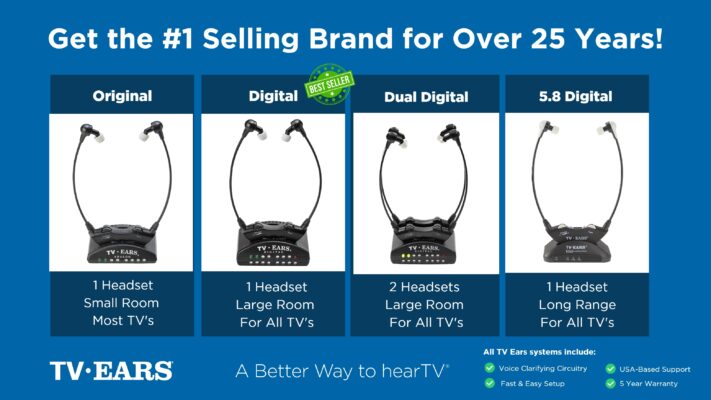
Our core products are our wireless TV listening systems. Each one includes a transmitter that connects to your television and a lightweight, comfortable headset that receives the audio. The main differences between them relate to the size of your space and the technology they use to deliver sound. Whether you’re watching in a cozy den or a large living room, there’s a system designed to provide an excellent listening experience. All of our systems allow you to set your own volume, independent of the TV’s main speakers.
The Original System
The Original System is our classic, time-tested solution and a fantastic starting point. It’s designed for smaller rooms and uses an analog connection to your TV to deliver clear audio directly to your ears. This system is incredibly simple to set up and is perfect for anyone looking for a reliable, no-fuss way to understand dialogue better. If you primarily watch TV in one room, like a bedroom or a small living area, the Original System provides everything you need to stop straining to hear and start enjoying your shows again.
The Digital System
If you have a larger living room or an open-concept space, the Digital System is an excellent choice. It offers enhanced audio clarity and greater versatility by supporting both analog and digital connections. Most modern televisions have a digital audio output (often called an optical or TOSLINK port), which can provide a cleaner, more interference-free sound signal. This ensures you’re getting the highest quality audio possible, making words and sound effects distinct and easy to understand, even from across the room.
The Long Range Digital System
For the ultimate freedom and coverage, the Long Range Digital System is our most powerful option. It uses a higher frequency to extend the wireless range, allowing you to listen from almost anywhere in your home. You can grab a drink from the kitchen or step out onto the patio without missing a single word. This system supports analog, digital, and even USB-C connections, making it compatible with nearly any TV or audio source. It’s the ideal solution for those who want maximum flexibility and the best possible coverage throughout their home.
Other Products and Accessories
Beyond our complete headset systems, we offer several products to further improve your listening experience and maintain your equipment. These accessories are designed to work seamlessly with your TV Ears system or as standalone solutions. From sound bars that benefit everyone in the room to extra parts that allow a partner to listen with you, these additions provide extra convenience and ensure your system serves you well for years to come.
TV Ears Sound Bar
Sometimes, the issue isn’t just personal hearing loss, but the poor quality of modern TV speakers. The TV Ears Sound Bar is a simple yet powerful solution that enhances dialogue clarity for everyone watching. It features three distinct sound modes, including one that specifically focuses on clarifying speech, making it easier to follow conversations without cranking up the volume. It’s a great addition for family movie nights, ensuring a more enjoyable experience for all viewers.
Extra Headsets and Transmitters
Many couples and families enjoy watching TV together, and our systems are designed to accommodate that. You can purchase extra headsets to work with a single transmitter, allowing two people to listen at their own preferred volumes simultaneously. If you have televisions in multiple rooms, you can also get an additional transmitter. This allows you to use your favorite headset in the living room, bedroom, or den without having to move any equipment around.
Replacement Accessories
To ensure your TV Ears system continues to perform at its best, we offer all the necessary replacement accessories. Over time, ear tips can wear out and batteries will eventually lose their ability to hold a full charge. You can easily find affordable replacement ear tips and batteries on our website. This makes it simple to maintain your system, ensuring you can rely on it for clear TV audio for many years.
Ready to Hear Your TV Better? top-rated, audiologist-designed systems that can help, find more at www.tvears.com.
Looking for more? Check out the recent stories on the TV Ears blog:
Why settle? When looking for headphones for TV wireless is the best
Exploring the Pros and Cons of a Wireless TV Headphone system
When looking for hearing aids non prescription check out TV Ears, a top choice for TV watching for two decades
Enhance Your TV Watching Experience with TV Ears: Specialized Hearing Aids as Seen on TV
Unveiling the Importance of Hearing Aids Quality: Empowering Better Hearing
Headphones for TV for seniors, 6 reasons you’ll love them
Wireless Headphone for the TV: Rediscover Crystal-Clear Audio with TV Ears
Enhancing the TV Experience: Why Audio Matters to TV Listeners
Frequently Asked Questions
How are TV Ears different from the regular wireless headphones I use with my phone? While standard Bluetooth headphones are great for music, they often aren’t optimized for television. Many have a slight audio delay, which means the sound doesn’t perfectly match the picture—a frustrating distraction. TV Ears systems use Infrared technology to eliminate that lag. More importantly, they are built with Voice Clarifying Circuitry®, which is designed to specifically lift and sharpen dialogue from the background noise, so you’re not just getting louder sound, you’re getting clearer speech.
Can other people in the room still hear the TV while I’m using the headset? Yes, absolutely. The TV Ears system works independently from your television’s speakers. This means you can have the headset volume set to your perfect level while your family and friends listen to the TV’s built-in speakers at a volume that’s comfortable for them. It’s the ideal way to end the household conflict over the remote control and create a peaceful viewing experience for everyone.
I wear hearing aids. Will TV Ears still work for me? Many of our customers wear hearing aids. Our under-the-chin headset design is lightweight and typically doesn’t interfere with common behind-the-ear hearing aids. The ear tips rest gently in the ear canal, allowing you to get clear TV audio without having to remove your hearing aids. It provides a great listening experience whether you use hearing aids or not.
Is the system complicated to set up? Not at all. We designed TV Ears to be incredibly simple to install, so you can start using it right away. The process involves plugging the transmitter into a power outlet and connecting it to the audio-out port on your television. Once it’s connected, you just place the headset on the charging base and you’re all set.
What if my spouse and I both need help hearing the TV? This is a very common scenario, and our systems are designed for it. You can easily add a second headset to your existing TV Ears transmitter. This allows two people to watch the same program together, with each person able to control their own volume independently. It’s a perfect solution for couples who want to enjoy their favorite shows together without compromising on comfort.
Key Takeaways
- Start with Your TV’s Free Audio Fixes: Before you buy anything, check your TV’s sound menu for settings like “Clear Voice” or “Dialogue Enhancement.” This is a simple first step that can improve clarity for everyone, but a personal listening device is the best solution if you need your own volume control.
- Regain Control with a Personal Listening Device: A dedicated headset allows you to set the perfect volume for your ears without affecting anyone else in the room. Look for a comfortable design, long battery life, and technology that prevents audio lag for the best experience.
- Choose Technology Designed for Voices, Not Just Volume: For the clearest sound, select a system that specifically clarifies speech. Technologies like TV Ears’ Voice Clarifying Circuitry® amplify dialogue frequencies while lowering background noise, making it much easier to follow conversations.
