
Is the television volume a constant source of debate in your home? It’s a familiar story: you turn up the sound to catch the dialogue, only for a family member to complain it’s blasting. This frustrating cycle happens because simply increasing the volume also amplifies loud background music and sound effects, making the voices even harder to distinguish. The problem isn’t about loudness; it’s about clarity. Thankfully, you don’t have to rely on subtitles to follow your favorite shows. This guide is designed to help you find the ‘best buy tv hearing devices’ by exploring solutions that specifically isolate and enhance speech, so you can finally end the volume war and enjoy television peacefully together.
Why Is TV Dialogue So Hard to Hear?
If you find yourself constantly reaching for the remote to turn the volume up, you know how frustrating it can be when the dialogue in your favorite show gets lost in a sea of background music and sound effects. This is a common issue, and it’s not always about how well you can hear in general. Modern television shows and movies are often mixed with a huge dynamic range, meaning the whispers are incredibly quiet while the explosions are booming. This cinematic sound design can be great in a theater, but it often makes dialogue difficult to distinguish in a home environment. The result is a constant battle with the volume, which can disrupt the viewing experience for you and everyone else in the room.
The problem is that simply making the TV louder often makes things worse. It amplifies everything equally, so the already-loud background noise just gets louder, further obscuring the spoken words you’re trying to catch. This can lead to what’s often called the “TV volume war,” where one person needs the sound cranked up to understand the plot, while another finds the noise level unbearable. It’s a challenge that stems from a combination of how audio is produced for television and how our ears process sound, especially as we age. Finding a solution is about achieving clarity, not just increasing volume.
When Turning Up the Volume Isn’t the Answer
You might think the logical first step to hearing the TV better is to just turn it up. However, as many people discover, this rarely solves the core problem. When you increase the volume, you’re not just making the voices louder; you’re also amplifying the car chases, musical scores, and ambient noise. According to audio experts, simply making the TV louder can make the background noise even worse, not better. This is because your ears are then forced to process a wider range of loud sounds, making it even harder to isolate and understand speech. The issue isn’t loudness, but a lack of clarity and separation between dialogue and other audio elements.
Understanding Age-Related Hearing Loss
For many people, difficulty hearing the TV is one of the first signs of age-related hearing loss, a condition known as presbycusis. This is a gradual process that often affects the ability to hear high-frequency sounds first. The consonants in speech, like ‘S’, ‘F’, and ‘T’, are high-frequency sounds that are essential for distinguishing one word from another. When you have trouble hearing these frequencies, speech can sound muffled and unclear, even if you can still hear lower-frequency sounds like background music perfectly well. This is why you might feel like you can “hear” but can’t “understand” what’s being said on television.
Simple Solutions to Try Before Buying a Device
Before you invest in a new device, there are a few simple adjustments you can make that might improve your TV-watching experience. These solutions are often built right into your existing television or streaming services and can make a surprising difference in dialogue clarity. Taking a few minutes to explore these options is a great first step toward ending the volume battle in your living room. They don’t work for everyone, as the effectiveness can depend on your specific type of hearing loss and your TV model, but they are certainly worth a try.
Adjust Your TV’s Sound Settings
Most modern televisions have audio settings that can help emphasize dialogue. Take a look at your TV’s remote for a “Menu” or “Settings” button, and then find the “Audio” or “Sound” section. Here, you can often find preset sound modes. Try choosing a mode labeled “News,” “Voice,” or “Speech,” as these are designed to make spoken words clearer. If your TV has a sound equalizer, you can also try turning down the bass and turning up the treble. Bass frequencies carry the rumbles and explosions, while treble frequencies control the crispness of speech, so this adjustment can help dialogue cut through the mix.
Use Closed Captions
One of the most straightforward ways to follow along with dialogue is to turn on closed captions. This feature displays the spoken words as text on the screen, ensuring you never miss a line. It’s a standard feature on virtually all modern TVs and streaming services. However, some people find it difficult to read and watch the action at the same time. Additionally, automated captions can sometimes be inaccurate or delayed, which can be distracting. Despite these potential drawbacks, captions are an excellent tool that can immediately solve the problem of inaudible dialogue for many viewers.
Use a Streaming App
If you use services like Netflix, Amazon Prime Video, or HBO Max, check their audio options for a feature often called “Dialogue Boost” or something similar. This setting prioritizes vocals over background sounds, making speech much easier to understand. Another approach is to use a streaming app on a personal device like a tablet or smartphone with headphones. Some people find that using dedicated headphones provides a clearer, more direct sound than their hearing aids when watching TV. This creates a personalized listening experience where you can set the volume to your exact preference without affecting anyone else.
Key Things to Look for in Hearing Aids for TV
If you feel like you’re always reading subtitles or rewinding to catch what you missed, you need a device tailored for hearing your television audio comfortably and completely. As you evaluate different options for TV listening devices, keep these key factors in mind:
- Voice Clarifying Power – Look for technology engineered specifically for television audio instead of general hearing aids. Features like speech enhancement and customized tone adjustments help ensure you’ll hear consonants and vowels accurately.
- Comfort and Convenience – Opt for lightweight, ergonomic designs that allow comfortable long-term wear as you binge multiple episodes. Recharging docks, transmitter/receiver flexibility, and wireless or Bluetooth connectivity also improve ease of use.
- Affordability – While there are high-end TV hearing devices costing upwards of $2,000 or more, quality entry-level models are available for under $100 as well. Carefully balance costs with the customized audio support you need.
Separate Volume Control
One of the most common points of friction in any household is the TV volume. When one person needs it loud to hear and another finds it blasting, it can quickly lead to frustration. This is where having separate volume control becomes a game-changer. Look for a device that allows you to adjust the volume in your headset independently from the television’s main speakers. This feature is a huge help for avoiding arguments with family, as it lets you listen at your perfect level while everyone else enjoys the show at a volume that’s comfortable for them. It creates a peaceful and personalized viewing experience for the entire room.
Support for Multiple Listeners
What if you’re not the only one in the house who struggles to hear the TV? Many couples face this issue together. Instead of buying two separate systems, consider one that supports multiple listeners. Some wireless headphone systems and Bluetooth transmitters are designed to let two people listen at the same time from a single base. This is an ideal solution for partners or family members who want to watch their favorite shows together without compromising on audio clarity. Each person can wear their own headset and often control their own volume, ensuring both viewers get the best possible sound without disturbing each other.
Battery Life and Comfort
When you’re settling in for a movie night or a binge-watching session, the last thing you want is to be interrupted by a dead battery or uncomfortable headphones. Pay close attention to battery life and the physical design of the device. You’ll want headphones that are lightweight and comfortable enough to wear for several hours straight. Many modern devices offer long-lasting rechargeable batteries, with some lasting up to 30 hours on a single charge. At TV Ears, our headsets are designed to be exceptionally lightweight, so you can focus on the plot twists, not on any discomfort.
Custom Sound Modes
Simply making the sound louder doesn’t always make it clearer. Muffled dialogue, loud background music, and explosive sound effects can make it difficult to follow conversations on screen. That’s why custom sound modes are so important. Some devices offer features like a “Speech Mode” specifically designed to make voices clearer and easier to understand. Our TV Ears products use Voice Clarifying Circuitry®, a technology that specifically targets and amplifies the frequencies of human speech. This helps separate dialogue from background noise, so you can catch every word without having to crank up the overall volume.
Connection Types
Before you make a purchase, it’s a good idea to check how the device will connect to your television. Different systems use various methods, including analog (RCA), digital optical, or even USB-C. Take a quick look at the back of your TV to see what audio output ports are available. Most modern listening devices, including TV Ears systems, come with multiple connection options to ensure they are compatible with nearly any television, whether it’s brand new or several years old. This flexibility makes setup simple, so you can start enjoying clearer audio in just a few minutes.
Types of Hearing Solutions Available at a Hearing Aids Store
From over-the-ear headphones to miniature earbuds and transmitters, various form factors can provide that crucial audio boost while watching television. Here are some of the most common to consider when buying a hearing aid from a hearing aids store:
- Over-the-Ear TV Headphones
These headphones sit comfortably over your ears and use innovative hearing technology to clarify even subtle tones and background sounds you’d otherwise miss. Look for features like separate volume controls, rechargeable batteries, and even surround sound simulation for a true home theater audio experience.
- In-Ear TV Listening Buds
Miniature earpieces fit directly in your ear canal to discretely transmit enhanced TV audio straight to your eardrum. Adjustable tips allow you to customize the fit, and some models even have interchangeable domes to match your level of hearing loss. These are extremely portable for TV listening on the go.
- Hearing Aid Compatible Headsets
For those who already wear traditional behind-the-ear or in-the-ear hearing aids, specialized headsets allow you to transmit television audio directly into your existing devices. No need for the hassle of switching between regular hearing aids and alternate TV listening accessories. You can easily buy this from a reputed hearing aids store.
- Wireless Transmitters and Receivers
These clever systems feature a transmitter device that connects directly to your television audio output. The signal gets broadcast wirelessly to a tiny receiver you wear to pick up that boosted sound. Use the transmitter for multiple TVs around your home while easily moving the receiver between rooms.
Voice-Clarifying Speakers
If the main issue is that dialogue gets lost in a sea of background music and sound effects, a voice-clarifying speaker might be your perfect match. Unlike standard soundbars that amplify all sounds equally, these speakers are specifically engineered to make spoken words louder and clearer. They use advanced technology to isolate and enhance the frequencies of human speech, bringing conversations to the forefront. This means you can finally understand what the characters are saying without having to crank up the volume on the entire soundtrack, making for a much more pleasant viewing experience for everyone in the room. It’s a straightforward solution that targets the exact problem of muffled TV voices.
Induction Loop Systems
For those who use hearing aids with a telecoil (or t-coil) setting, an induction loop system is a fantastic option. This technology creates a small, personal magnetic field around your viewing area. A transmitter connected to your TV sends the audio signal into this loop, and your hearing aid’s t-coil picks it up directly. The sound is sent straight to your ear without any background noise interference from the room. It’s a seamless way to get crystal-clear TV audio delivered right through your existing hearing aids, turning them into personalized wireless speakers just for you and leveraging the technology you already own.
Wearable Neck Speakers
Imagine having your own personal surround sound system that doesn’t require you to wear headphones or earbuds. That’s the idea behind wearable neck speakers. These unique devices rest on your shoulders and direct sound up toward your ears, creating an immersive audio bubble just for you. It’s a great solution if you find headphones uncomfortable for long periods or want to remain aware of your surroundings while you watch. You get the benefit of close-range, clear audio without completely blocking out the sounds of your home, like the doorbell or a family member calling your name from another room.
Bone Conduction Headphones
Bone conduction headphones offer a completely different approach to listening. Instead of sending sound waves through your ear canal, they use vibrations on your cheekbones to transmit sound directly to your inner ear. This innovative design leaves your ears open, allowing you to hear what’s going on around you while still enjoying your show. Some people find this method provides a clearer sound for TV dialogue compared to traditional headphones, especially if they have certain types of hearing loss. It’s an interesting alternative that bypasses the outer and middle ear, delivering audio in a whole new way.
Graphic Equalizers
If you’re a bit more tech-savvy and enjoy fine-tuning your setup, a graphic equalizer can give you precise control over your TV’s sound. This device allows you to adjust specific audio frequencies independently. For example, if you have trouble hearing dialogue over loud background music, you can use the equalizer to lower the bass frequencies where music often sits and increase the mid-range frequencies where human voices are most prominent. It’s like having a custom sound mixer for your television, letting you change specific sound levels to perfectly suit your hearing needs and preferences.
Connecting Hearing Aids Directly to the TV
Many modern hearing aids are equipped with technology that allows them to connect directly to other devices, including your television. This creates a streamlined listening experience by sending the TV audio straight to your ears without the need for extra headsets or speakers. This direct connection can significantly reduce background noise and deliver a much cleaner, clearer sound than you’d get from the TV’s speakers alone. It’s a convenient feature that leverages the technology you already use every day, making TV time simpler and more enjoyable. Let’s look at a couple of ways this works.
Direct Bluetooth Connection
With Bluetooth-enabled hearing aids, you can pair them directly with a compatible smart TV or a small Bluetooth transmitter. This wireless connection sends the audio signal right to your hearing aids, and one of the biggest advantages is the ability to control your own volume independently from the TV’s main speakers. This means you can set the volume to your perfect level while your family listens at a volume that’s comfortable for them. It’s a simple change that can finally end the remote-control battles for good and make watching shows together a peaceful experience again.
Improving Hearing Aid Technology
Hearing aid technology is constantly advancing, and newer models are becoming so effective at processing sound that some users find they no longer need a separate streaming device for the television. The built-in programs and sound processing features are often sophisticated enough to clarify TV dialogue on their own, automatically adjusting to the soundscape of the room. If you’re considering new hearing aids, it’s worth asking your audiologist about models that are specifically designed to perform well while watching television. You might find that the right hearing aid is the only device you need for a great TV experience.
The Future of TV Audio: Auracast
A new technology on the horizon called Auracast is set to change shared listening experiences. This Bluetooth feature will allow a single device, like a TV, to broadcast audio to an unlimited number of nearby receivers. Imagine a whole family watching a movie together, where each person can connect their own Auracast-enabled hearing aids or earbuds to the TV. Everyone could then set their own personal volume and audio settings, creating a perfectly customized listening experience for each individual. It’s an exciting development that promises more inclusive and personalized entertainment for everyone in the near future.
Visit a Premier hearing aids store for Hearing Impaired TV Solutions
If you’re tired of cranking up sitcoms to window-rattling volumes just to catch some punchlines or constantly rewinding your favorite courtroom drama, better TV listening options await. Having trouble making sense of television shows dampens the entertainment value exponentially. Luckily, specialized technologies from hearing aids store leaders like TV Ears help you rediscover the joy of easy audio accessibility from your living room, kitchen, bedroom and even backyard. Visit their site today to explore the full lineup of clever gadgets engineered for clarity and comfort. Finally laugh along with situational comedies, follow every twist and turn of complex crime dramas, and cheer on contestants in rousing game shows without audio confusion or distraction. With TV Ears, you can get back to enjoying television instead of struggling to hear it!
Explore TV Ears’ Range of Wireless Headphones and Headsets
Discover the difference TV Ears wireless headphones and headsets can make in your TV-watching experience. Whether you’re looking for comfortable over-ear headphones or a compact, stylish headset, we have options to suit your needs. 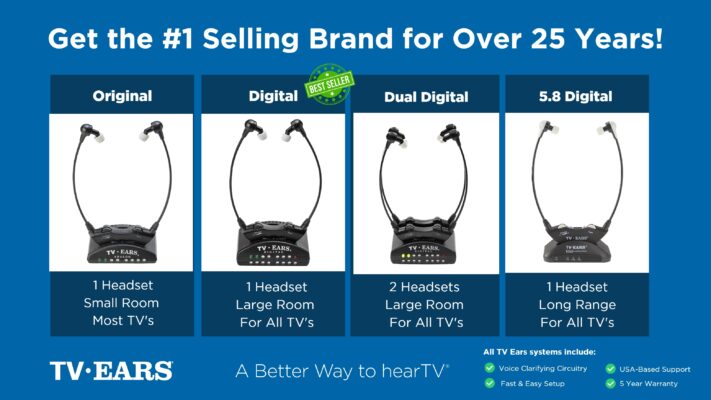 Ready to take your TV audio to the next level? Explore our Wireless Headphones and Headsets collection today! And don’t miss our custom audiologist-designed speaker system. At TV Ears, we are committed to ensuring that everyone can enjoy TV to the fullest. Our range of speakers for TV and wireless headphones and headsets are designed to cater to diverse needs and preferences, making your home entertainment experience truly exceptional. Don’t let hearing difficulties or differing audio preferences hold you back from enjoying your favorite shows and movies. Explore TV Ears’ solutions and rediscover the joy of TV-watching.
More Tips for Better TV Listening
If you’re passionate about enhancing your TV-watching experience, you won’t want to miss our other blog posts. We regularly publish articles on the latest audio technology, home entertainment tips, and more. Check out our latest blogs below:
The Wireless Wonders: Unleash the Magic of Wireless Headphones!
The Wireless Headphones for TV Experience: Elevate Your Entertainment!
Hear Every Word Clearly: Exploring Fun TV Listening Devices for Hearing Impaired
Don’t miss out on valuable insights and tips from TV Ears experts. Investing in the right speaker for your TV can dramatically enhance your home entertainment experience. Whether you’re an audiophile or simply want to enjoy your favorite shows and movies with exceptional sound, a speaker for TV is a worthwhile addition to your setup. Explore TV Ears’ wide range of speakers, headphones and headsets today and start enjoying TV like never before.
Frequently Asked Questions
Why is a dedicated TV listening device better than just turning up the volume? Simply raising the TV volume makes everything louder, including the background music and sound effects that are already drowning out the dialogue. A dedicated TV listening device, especially one with voice-clarifying technology, is designed to specifically isolate and enhance the frequencies of human speech. This brings the dialogue to the forefront, so you can understand conversations clearly without having to blast the overall sound.
Will a TV hearing device interfere with my hearing aids? Not at all. In fact, many TV listening systems are designed to work alongside your hearing aids. Some headsets are comfortable enough to wear over them, while other technologies like induction loops can transmit the TV audio directly into your hearing aids. This gives you a clear, direct sound feed without any extra hassle.
Are these devices difficult to install? Most modern TV listening devices are designed for a simple, straightforward setup. They typically connect to an audio output port on the back of your television, like a digital optical or analog port. Most systems, including those from TV Ears, come with all the necessary cables and clear instructions, so you can usually get everything connected and working in just a few minutes.
Can my family still listen to the TV’s main speakers while I use my device? Yes, and this is one of the biggest benefits. Most TV listening systems allow you to control your headset volume independently from the television’s speakers. This means you can set the volume to the perfect level for your needs, while your family and friends can listen at a volume that is comfortable for them. It’s the perfect way to end the arguments over the remote control.
What if I don’t want to wear headphones? Are there other options? Absolutely. If you find headphones uncomfortable for long periods, you have other great choices. Voice-clarifying speakers, for example, sit near your TV and work to make dialogue clearer for everyone in the room. Another option is a wearable neck speaker, which rests on your shoulders and creates a personal sound zone just for you without covering your ears.
Key Takeaways
- Focus on Clarity, Not Just Volume: The problem isn’t that the TV is too quiet; it’s that dialogue gets lost in the mix of music and sound effects. Instead of just making everything louder, look for solutions that specifically lift voices out from the background noise.
- Check Your TV’s Built-In Settings First: Before you buy a new device, explore your television’s audio menu for modes like “Dialogue,” “Speech,” or “News.” These free, simple adjustments can make a significant difference in how well you hear conversations.
- Get a Device with Independent Volume Control: To create a peaceful viewing experience for everyone, choose a listening device that lets you adjust your own volume separately from the TV’s main speakers. This feature is a game-changer for couples and families with different hearing needs.
