
Modern televisions look incredible. They’re thinner, sleeker, and have more brilliant pictures than ever before. But that slim design comes with a hidden cost: terrible sound. To fit into those ultra-thin frames, manufacturers use tiny speakers that often face downwards or backwards, away from your ears. This design choice is one of the biggest reasons why you can’t hear dialogue on TV, as voices get muffled and lost against background music and sound effects. It’s not just you; it’s the technology. Ahead, we’ll break down how these design flaws, along with cinematic sound mixing, create this common problem and show you exactly how to compensate for it with simple settings tweaks and smart upgrades.
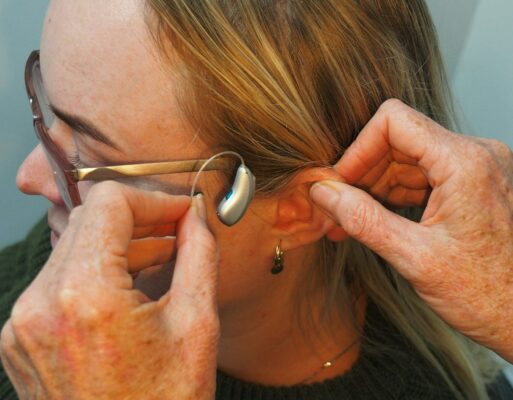
More than 1.72 billion homes around the world own a television. Although smartphones and the internet have become popular mediums for entertainment, TV remains the number one choice in terms of daily media usage. Whether you watch news, TV shows, or movies, having a good experience is indeed important. To fully enjoy your entertainment, you must ensure you can hear TV dialogue clearly. Let’s discuss what can be possible reasons for the issue.
Why Is TV Dialogue So Hard to Understand?
You’re Not Alone in Using Subtitles
If you find yourself constantly asking, “What did they just say?” while watching TV, you’re in good company. It’s a common frustration that has led many of us to rely on subtitles just to keep up with the plot. In fact, it might surprise you to learn that nearly half of all Americans watch shows and movies with the captions on. The primary reason isn’t for language learning or watching in a noisy environment; it’s simply because the dialogue is too difficult to hear clearly. This struggle can take the enjoyment out of what should be a relaxing activity, turning movie night into a constant effort to decipher muffled conversations.
So, what’s causing this widespread issue? A major culprit is the design of modern televisions. As TVs have become thinner and more streamlined, the built-in speakers have shrunk and are often placed in less-than-ideal locations, like facing downward or backward. This can result in tinny, weak audio that struggles to project clear voices, especially when competing with loud music or explosive sound effects in an action scene. Even if your hearing is perfect, the physical limitations of these small speakers can make it incredibly difficult to distinguish speech from the rest of the soundscape, leaving you reaching for the remote to constantly adjust the volume.
The problem isn’t always with your equipment, though. Sometimes, the issue is an intentional choice made during the filmmaking process. Directors and sound designers often create a dynamic audio mix to make action sequences feel more immersive, which means making explosions and music much louder than spoken words. While this can be effective for cinematic impact, it often leaves dialogue sounding quiet and indistinct by comparison. This artistic decision means you might be straining to hear a crucial piece of conversation one moment and then getting blasted by a loud sound effect the next, creating a frustrating and uneven viewing experience.
Reasons You Can’t Hear TV Dialogue Clearly
- Volume Settings: The TV volume may be set too low, or the dialogue may be drowned out by background music or sound effects. Adjust the volume settings accordingly.
- Speaker Quality: Poor speaker quality on your TV or external speakers can make dialogue difficult to understand. Consider upgrading your speakers or using a soundbar for better audio quality.
- Audio Settings: Incorrect audio settings on your TV, such as the wrong audio mode (e.g., stereo instead of surround sound), can affect dialogue clarity. Check and adjust the audio settings to match your preferences.
- Closed Captions: Enabling closed captions can help you follow the dialogue by providing on-screen text. Check if this feature is available and activate it if needed.
- Room Acoustics: The acoustics of your room can affect sound quality. Excessive noise or echoes in the room can make dialogue-less clear. Consider using rugs, curtains, or acoustic panels to improve the room’s sound.
- Hearing Impairment: If you have hearing difficulties, consider using hearing aids or assistive listening devices to enhance dialogue clarity.
- Poor TV Placement: The placement of your TV may affect how well you hear the dialogue. Ensure that the TV is positioned at an appropriate height and distance from your seating area.
- Soundbar or Sound System: If using a soundbar or external sound system, ensure it is properly connected and configured to enhance dialogue clarity.
- Source Quality: The quality of your watching content can also impact dialogue clarity. Streaming services or cable providers may have different audio quality standards.
Modern TV Design and Speaker Placement
Have you noticed how incredibly thin modern TVs have become? While they look sleek mounted on the wall, that slim design comes at a cost: speaker quality. To fit inside such a narrow frame, TV speakers are often small and positioned to fire sound downwards or even backwards, away from you. As one person on Reddit noted, this design can make voices sound muffled and indistinct, as the sound waves bounce off the wall or TV stand before ever reaching your ears. This means you’re not getting direct, clear audio, which is essential for understanding dialogue.
Theatrical Sound Mixing vs. Home Setups
Another piece of the puzzle is how movies and shows are produced. Sound engineers mix audio for the immersive, powerful sound systems found in movie theaters, which have a huge dynamic range—the difference between the quietest whisper and the loudest explosion. When that complex audio is compressed to play through your TV’s simple speakers, the balance gets lost. As explained in a YouTube video on the topic, this compression squishes the sound, making it much harder to pick out the dialogue from the background noise, music, and sound effects that were all designed for a different environment.
When Quiet Dialogue is an Artistic Choice
Sometimes, muffled dialogue isn’t an accident—it’s a creative decision. Directors like Christopher Nolan are known for mixing dialogue to sound more natural and realistic, which often means it’s quieter and competes with other sounds in the scene, just as it would in real life. While this can create a more immersive artistic experience, it can also be frustrating when you’re just trying to follow the plot. This intentional choice, as Tom’s Guide points out, means that even with a perfect sound system, some movies are simply designed to have less prominent dialogue.
The Wide Sound Range of Streaming Services
If you’ve ever found yourself grabbing the remote to turn the volume down during an action scene only to turn it back up moments later for dialogue, you’re not alone. Unlike broadcast television, which has regulations to keep audio levels within a consistent range, streaming services don’t have the same rules. This freedom allows for a much wider dynamic range, meaning you can go from a nearly silent conversation to a deafening explosion in seconds. This inconsistency forces you to constantly adjust the volume just to keep up with the story.
It Might Not Be the TV’s Fault
After learning about TV design, sound mixing, and artistic choices, it’s clear that the problem isn’t always your fault or even your TV’s. The issue often starts long before the sound ever reaches your living room. However, there can also be personal factors at play. For some, difficulty distinguishing speech from background noise can be related to how the brain processes sound. It’s worth considering all possibilities, from the technology in your home to your own hearing, to find the right solution for enjoying your favorite shows again.
Understanding Auditory Processing Disorder (APD)
Sometimes, the issue isn’t just about volume but about clarity. Auditory Processing Disorder (APD) is a condition that affects how the brain understands sound. As the Cleveland Clinic explains, someone with APD can hear the words being said, but their brain may take longer to process and make sense of them, especially with background noise. If you find yourself frequently asking “what did they say?” even when the volume is up, it might be related to how you process sound, not just how you hear it.
How to Adjust Your TV Settings for Clearer Dialogue
Before you invest in new equipment, it’s worth exploring the settings already built into your television. Most modern TVs come with a variety of audio options designed to improve your listening experience, but they aren’t always enabled by default. Taking a few minutes to go through your TV’s audio menu can make a significant difference in dialogue clarity. These adjustments are simple, free, and can often solve the problem without any extra hassle. Let’s walk through some of the most effective settings you can change right now.
Check Your Audio Output (Stereo vs. Surround)
One of the most common culprits for muffled dialogue is an incorrect audio output setting. Many TVs and streaming devices default to a “5.1 Surround Sound” setting, which assumes you have a full home theater system with multiple speakers. If you’re just using your TV’s built-in speakers, you’re missing the center channel speaker where most dialogue is sent. As a helpful Reddit tip suggests, go into your audio settings and change the output to “Stereo” or “2.1.” This tells your TV to send all the audio, including dialogue, through its two speakers.
Look for a “Speech Enhancement” or “Clear Voice” Mode
Your TV likely has preset audio modes designed for different types of content. Buried in the sound settings, you can often find a mode specifically for dialogue. These modes might be called “Clear Voice,” “Speech Enhancement,” “Dialogue,” or “News.” According to CNET, enabling one of these settings tells your TV to identify and amplify the frequencies associated with human speech, making voices stand out more from the background music and sound effects. Try cycling through the different presets to see which one works best for you.
Try “Night Mode” or “Volume Leveling”
If you’re tired of the constant volume adjustments between loud action scenes and quiet conversations, look for a setting called “Night Mode,” “Volume Leveling,” or “Dynamic Range Compression.” This feature automatically reduces the gap between the loudest and softest sounds. By making explosions quieter and whispers louder, it creates a more consistent and comfortable listening experience. This is especially useful for late-night viewing when you don’t want to disturb others in the house, as it makes it easier to hear dialogue clearly at lower volumes.
Turn Down the Bass and Turn Up the Treble
If your TV allows for manual sound adjustments, you can fine-tune the audio yourself. Low-frequency bass sounds, like explosions and deep music, can often overpower the mid-to-high frequencies of human speech. Try turning down the bass and slightly increasing the treble. As CNET recommends, this simple equalization trick can make voices sound crisper and more defined, cutting through the muddy background noise. It’s a small change that can have a big impact on overall clarity.
Select the Correct TV Placement Setting
Here’s a setting you might not know exists: TV placement. Some televisions have an audio setting that lets you specify whether the TV is sitting on a stand or mounted on a wall. This seemingly minor detail changes how the TV processes and directs sound to compensate for its position. For example, a wall-mounted setting might adjust the audio to prevent sound from being absorbed by the wall. Check your menu for this option and make sure it matches your setup—it could be an easy fix for muffled sound.
Improving Your Physical Sound Setup
If you’ve tried all the settings on your TV and are still struggling to hear dialogue, it might be time to look beyond the screen. The physical environment of your room and the hardware you use play a huge role in sound quality. From adding external speakers to simply rearranging your furniture, there are several practical steps you can take to create a better listening environment. These solutions can make a world of difference, transforming a frustrating viewing experience into an enjoyable one.
The Role of a Center Channel Speaker or Soundbar
The single best hardware upgrade for clearer dialogue is a soundbar. Even an affordable soundbar is a massive improvement over the tiny, built-in speakers in most TVs. As Tom’s Guide explains, most soundbars have a dedicated center channel speaker, which is specifically designed to handle dialogue. This separates the voices from the rest of the audio mix, allowing them to come through with much greater clarity. It’s a straightforward solution that directly addresses the core problem of muddled conversations in movies and shows.
Fine-Tuning Your External Speakers
If you already have a soundbar or a surround sound system, don’t forget to fine-tune its settings. Many systems allow you to adjust the volume of each channel independently. Go into your speaker’s menu and try increasing the volume of the center channel. This will make the dialogue louder without affecting the volume of the music or sound effects coming from the other speakers. This simple adjustment ensures that voices are front and center, just as the sound engineers intended, and can make a huge difference in your ability to follow conversations.
A Simple Fix: Change Your Seating Position
Sometimes the simplest solution is the most effective. The acoustics of your room and your distance from the TV can significantly impact what you hear. If you’re sitting far away, ambient noise from around the house can interfere with the TV audio. Try moving your chair or couch closer to the screen. This can help minimize background distractions and ensure that you’re in the optimal spot to hear the sound directly from the speakers, making it easier to catch every word of dialogue.
Use Headphones for a Private Listening Bubble
For a truly personal and clear audio experience, headphones are an excellent solution. They create a private listening bubble, delivering sound directly to your ears and blocking out distracting room noise. This is especially helpful when one person needs the volume higher than others. For those with hearing loss, a standard pair of headphones might not be enough. That’s where assisted listening devices like TV Ears come in. Designed specifically for television, our headsets use Voice Clarifying Circuitry® to amplify human speech frequencies above background noise, making even whispers and accents crystal clear. You can set your own volume without affecting what others hear, finally ending the household volume wars.
Hear TV Dialogue Clearly With TV Ears
Looking for a solution to hearing TV dialogue? TV Ears, headphones, and headsets are the solution you’ve been looking for. The wireless system will take your TV-watching experience to the next level. Here’s why you should consider investing in TV Ears for your TV-watching experience.
- Wireless Transformation: The best part of our headsets is you can turn any TV into a semi-smart TV. Connect the audio jack with the headset gearbox and transmit audio to the wireless headset. Hear TV dialogue clearly from the bed, sofa, chair, or any part of the room comfortably. The ultra-lightweight headsets offer 4–6 hours of battery life to enjoy your shows.
- Crystal Clear Audio Reception: TV Ears Digital System is designed to provide an exceptional audio experience. It features naturally angled ear tips that fit comfortably inside the ear canal, directing the sound straight into your ears. This innovative design ensures you receive a much clearer and richer TV listening experience every time.
- Voice Clarifying Circuitry: TV Ears incorporates voice-clarifying circuitry using a microchip. This technology optimizes the audio for television, making words jump out of the audio track. You can hear the dialogue even in the presence of background music, special effects, or other loud sounds commonly found in TV soundtracks. This means you can easily enjoy dialogue, whispers, accents, and hard-to-hear conversations.
- Snap-Fit Charging Technology: Our headsets feature a new charging mechanism called Snap-Fit Charging. It ensures a secure fit and consistent charge every time. When you place the headset in the charging base, it securely snaps into place, and the charging light illuminates.
- Versatility and Freedom: Unlike traditional hearing aids with limitations, TV Ears allows you to move around and mute the TV. It delivers sound directly to your ears without interruption. This means you can enjoy your favorite shows without disturbing others in the room. Besides, volume options allow you to control the sound of your TV and your headphones separately.
- Affordable Price: We offer a wide range of TV headsets with different features and prices. Besides, we have kept the price reasonable for our beloved customers. So that you can make the gears part of your daily life. The headset comes with everything you need to charge, connect, and use it. So there is no need to spend money on other items after you have purchased a headset from us.
- Doctor and Audiologist Recommended: TV Ears is popular among users and highly recommended by doctors and audiologists. We currently have more than 2 million satisfied customers. Our products are designed in such a way that they won’t hurt your ear or impact your hearing.
- Easy Setup: Setting up TV Ears is a breeze. Simply connect the transmitter to your TV’s audio output, adjust the tone and volume to your liking, and you’re ready to enjoy TV without complex pairing or processes.
- Additional Features: Our headphones support Infrared transmission, offer a wide audio frequency response and have a maximum sound pressure level of 120 dB. It includes everything you need in the box, including a rechargeable TV headset, digital transmitter, audio cords, and an owner’s manual. Having over 20 years of trust and millions of users worldwide, we have built a reputation you can rely on.
There can be a number of reasons why you might be unable to hear TV dialogue clearly. Using speakers or changing your TV sound panel can temporarily solve the issue. However, if you’re looking for a permanent solution to the problem, you should consider trying our dedicated TV headgear. Our wireless TV headsets will help you achieve a personalized experience. Upgrade your TV listening experience today with the TV Ears Digital System. It’s a trusted brand that has stood the test of time, delivering clear and crisp TV audio directly to your ears. Enjoy immersive and enjoyable TV watching without straining to hear dialogue. We also offer a limited 5-year product warranty for our TV headsets.
Find Your Perfect TV Headset
Discover the difference TV Ears wireless headphones and headsets can make in your TV-watching experience. Whether you’re looking for comfortable over-ear headphones or a compact, stylish headset, we have options to suit your needs. 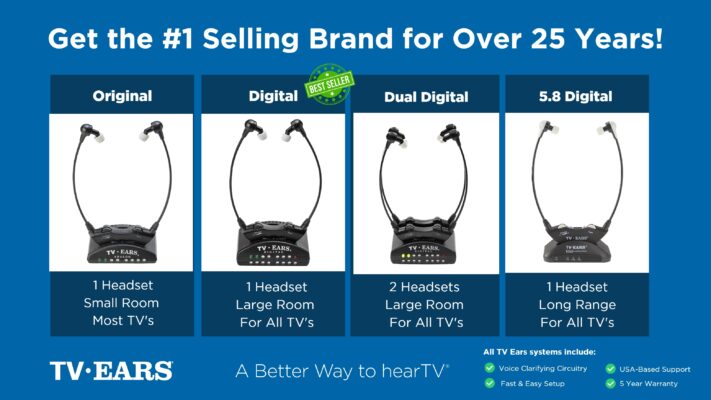 Ready to take your TV audio to the next level? Explore our Wireless Headphones and Headsets collection today! And don’t miss our custom audiologist-designed speaker system. At TV Ears, we are committed to ensuring that everyone can enjoy TV to the fullest. Our range of speakers for TV and wireless headphones and headsets are designed to cater to diverse needs and preferences, making your home entertainment experience truly exceptional. Don’t let hearing difficulties or differing audio preferences hold you back from enjoying your favorite shows and movies. Explore TV Ears’ solutions and rediscover the joy of TV-watching.
More Tips for Better TV Sound
If you’re passionate about enhancing your TV-watching experience, you won’t want to miss our other blog posts. We regularly publish articles on the latest audio technology, home entertainment tips, and more. Check out our latest blogs below:
The Wireless Wonders: Unleash the Magic of Wireless Headphones!
The Wireless Headphones for TV Experience: Elevate Your Entertainment!
Hear Every Word Clearly: Exploring Fun TV Listening Devices for Hearing Impaired
Don’t miss out on valuable insights and tips from TV Ears experts. Investing in the right speaker for your TV can dramatically enhance your home entertainment experience. Whether you’re an audiophile or simply want to enjoy your favorite shows and movies with exceptional sound, a speaker for TV is a worthwhile addition to your setup. Explore TV Ears’ wide range of speakers, headphones and headsets today and start enjoying TV like never before.
Frequently Asked Questions
Is it my hearing, or is TV dialogue actually harder to understand now? It’s definitely not just you. This is a widespread issue, and it stems from two main things: TV design and movie production. Modern TVs are incredibly thin, which means their built-in speakers are tiny and often face down or away from you, muffling the sound. At the same time, movies and shows are often mixed with a huge range between quiet dialogue and loud explosions. When that sound gets compressed for home viewing, the voices often get lost in the mix.
I keep turning the volume up for dialogue, but then the action scenes are way too loud. What can I do? This is a classic sign of a wide dynamic range, common on streaming services. Your best first step is to check your TV’s audio settings for a feature called “Night Mode,” “Volume Leveling,” or “Dynamic Range Compression.” This feature automatically makes the loud parts quieter and the quiet parts louder, creating a more even and comfortable listening experience without you having to constantly grab the remote.
Will buying a new, more expensive TV solve this sound problem? Unfortunately, probably not. While a new TV will have a stunning picture, the focus on ultra-slim designs means that even high-end models compromise on sound. The built-in speakers are almost always too small to produce rich, clear audio. Instead of investing in a new screen, your money is much better spent on a separate audio solution, like a soundbar or a personal listening device, which will make a far bigger difference.
I’ve tried all the settings on my TV and still can’t hear clearly. What’s the next best step? If you’ve adjusted the settings and are still struggling, it’s time to consider an external audio device. A soundbar is a great upgrade because most have a dedicated center speaker just for dialogue, which makes voices much clearer. For a more personal solution that won’t disturb others, a good pair of TV headphones is an excellent choice. They deliver sound directly to your ears, cutting out any room noise or echo.
How are TV Ears different from just using regular headphones? While any headphones can help, TV Ears are designed specifically for this problem. They use special Voice Clarifying Circuitry® that actively separates speech from background noise and music, then amplifies the vocal frequencies. This makes dialogue sound crisp and clear, not just louder. It allows you to have your own independent volume control, so you can listen at the perfect level without affecting the TV’s main volume for everyone else in the room.
Key Takeaways
- Modern TVs and movie sound mixing are the main culprits: Your TV’s slim design forces it to use small, poorly aimed speakers, while cinematic audio often buries quiet dialogue under loud sound effects, making it difficult to follow the plot.
- Master your TV’s audio menu for immediate improvement: Before spending any money, go into your TV’s settings. Change the audio output to “Stereo” and activate features like “Speech Enhancement” or “Volume Leveling” to make voices clearer and more consistent.
- Upgrade your audio hardware for a permanent solution: A soundbar is a great step up, but for a personal fix, a TV listening system is ideal. It delivers clear dialogue directly to your ears, letting you control your own volume and finally end the household volume wars.
