
Is the television volume a constant point of debate in your home? It’s a familiar story: one person needs the sound cranked up just to follow the dialogue, while for everyone else, it’s uncomfortably loud. This nightly “volume war” can turn a relaxing evening into a frustrating one for the whole family. The good news is, you don’t have to choose between missing the plot and blasting your loved ones out of the room. The solution isn’t just about turning it up; it’s about getting the right sound to the right person. In this guide, we’ll explore the best assistive listening devices for tv, designed to deliver crystal-clear audio directly to you, so everyone can enjoy watching together again.
Why Hearing the TV Can Be a Challenge
It’s a familiar scene in many homes: the TV is on, but the dialogue is a muffled mess, lost beneath a booming soundtrack or loud sound effects. You might find yourself constantly asking, “What did they just say?” This struggle isn’t always a sign of significant hearing loss; sometimes, it’s the way modern shows and movies are produced. Sound designers often mix audio to create an immersive, cinematic experience, but this can leave spoken words in the dust. For anyone, this can be frustrating, but for individuals with even mild hearing loss, it can make following a simple plot feel like an impossible task. The issue isn’t just about loudness; it’s about the clarity and balance of the sounds coming from your television.
The challenge is compounded by the nature of age-related hearing loss. This condition typically affects our ability to perceive higher-frequency sounds first, which is exactly where the consonants that give speech its clarity are found. So, when you lose the “s,” “f,” and “th” sounds, words like “see,” “four,” and “think” can become a jumble. This is why simply making the entire audio track louder often fails to solve the problem. It amplifies everything equally—the explosions, the music, and the dialogue—which can make the speech you’re trying to hear even more difficult to distinguish from the background noise. You need a solution that can specifically target and clarify voices.
The Problem with Simply Turning Up the Volume
The most common reaction to not hearing the TV is to reach for the remote and press the “volume up” button. While it seems like a logical fix, it often creates more problems than it solves, from household “volume wars” to distorted audio. As one source on assistive TV products points out, simply making everything louder can make speech even harder to understand. Instead of just cranking the volume, the goal should be to make the dialogue clearer. This is where assistive listening devices (ALDs) offer a much smarter approach. They capture audio directly from the TV and deliver crisp, clear sound to your ears, allowing you to personalize your listening experience without disturbing anyone else.
What to Look for in Hearing Assistive Devices
A visit to your local hear aid store will reveal many types of listening systems designed to make TV watching more enjoyable. When selecting a TV listening device, here are some key features to consider:
- Volume Level: Can the device amplify sound to a level that’s comfortable for you? Many amplify sound up to 125dB.
- Tone Control: Does it allow you to adjust bass and treble to customize sound quality? This helps improve speech clarity.
- Wireless Connectivity: Does it connect wirelessly to your TV to avoid unsightly cables? Modern RF and Bluetooth technology enable wireless connectivity up to 100 feet.
- Comfort: Is the device comfortable enough to wear for extended viewing sessions? Over-ear headphones and in-ear buds are available.
- Convenience Features: Does it have handy extras like rechargeable batteries, memory presets, and audio inputs to connect to other devices? These add versatility and ease of use.
With the right device, you’ll be able to immerse yourself in TV shows, movies and more without constantly adjusting the volume or missing important dialogue.
Understanding Wireless Technologies
When you’re looking for a TV listening device, you’ll notice that most options are wireless. This is a huge plus, as it means you won’t have to worry about tripping over long cables stretched across the living room floor. Wireless systems work by sending the audio signal from a transmitter connected to your TV to a receiver, which is typically a headset or earbuds. The main difference between these systems lies in the technology they use to send that signal. The most common types are Infrared (IR), Radio Frequency (RF), and Bluetooth, and each offers a slightly different experience depending on your viewing habits.
Infrared (IR) Technology
Infrared technology works much like your standard TV remote control. It sends a signal using infrared light, which means it requires a direct, unobstructed line of sight between the transmitter and the headset. This makes it a very reliable option if you tend to watch television from a specific spot, like your favorite recliner. As long as nothing is blocking the path between you and the transmitter, you’ll get a clear, high-quality audio stream. It’s a straightforward and effective solution for enjoying your shows from a dedicated viewing area.
Radio Frequency (RF) and Bluetooth
Unlike IR, Radio Frequency and Bluetooth technologies don’t need a direct line of sight. They use radio waves to transmit sound, which can pass through walls and other solid objects. This gives you the freedom to move around the house while still listening to your program. You can get up to grab a drink from the kitchen or let the dog out without missing a single word of dialogue. Many modern devices, including some hearing aids, use Bluetooth, which can make for seamless integration with the technology you already own and use.
The Benefit of Direct-to-Ear Audio
Regardless of the wireless technology, the greatest advantage of these systems is their ability to deliver direct-to-ear audio. This means the sound from your television travels straight to your headset, bypassing the room’s ambient noise. The result is a listening experience that is incredibly clear and personalized. You can set the volume to a level that is comfortable for you, without making it too loud for anyone else. This method is especially effective at improving speech intelligibility, which is the core principle behind systems like TV Ears. By delivering audio designed to clarify voices directly to your ears, you can catch every whisper and punchline, turning a frustrating viewing experience into an enjoyable one while keeping the peace in your household.
Hearing Aid Compatible Headphones
One simple option for better TV listening is to use a good pair of headphones designed for use with hearing aids. Many popular over-ear headphones and earbuds now include hearing aid compatibility, including budget-friendly models all the way up to high-end noise-cancelling headphones. To work seamlessly with hearing aids, the headphones must include a magnetic induction coil. This allows them to wirelessly receive the TV audio signal directly from a hearing aid or cochlear implant equipped with a telecoil. The sound quality is excellent since the audio bypasses background noise for a clear, amplified signal. Be sure to look for the “HAC” (Hearing Aid Compatible) logo when headphone shopping for hearing aid wearers. This ensures the product is engineered to strict FCC standards for reducing electromagnetic interference. You can get the help of your hear aid store to pick the right option.
TV Streamers
If you wear hearing aids, a TV streamer is one of the most popular and effective ways to get clear audio. This small device plugs into your television and wirelessly sends the sound directly to your hearing aids. The biggest advantage here is that you bypass any environmental factors that can make listening difficult, like poor room acoustics or the TV’s low-quality built-in speakers. This direct connection makes dialogue crisp and easy to understand. It also creates a personalized listening experience, allowing you to set your own volume without affecting what anyone else in the room hears from the TV.
Neckloops and Hearing Loops
A neckloop is another great tool that acts as a wireless link between your TV and your hearing aids. You wear the loop around your neck, and it connects to the television either with a cable or through Bluetooth. The neckloop then transmits the audio signal to a feature in your hearing aid called a telecoil, or T-coil. Many modern hearing aids come equipped with a T-coil, which is a tiny copper wire that picks up magnetic signals from devices like neckloops. This system delivers clear sound right to your ears, cutting out distracting background noise and making it much easier to follow along with your favorite shows.
FM Systems
An FM system works similarly to a personal radio station for your ears. It uses two main parts: a transmitter that you plug into your TV and a small receiver that you attach to your hearing aid. The transmitter captures the audio from the television and sends it wirelessly to the receiver using FM radio waves. This direct transmission provides a strong, clear signal that isn’t easily blocked by walls or furniture. Many people appreciate FM systems because they are often very straightforward to use, sending sound directly to your hearing device without you needing to adjust any complicated settings.
Personal Sound Amplification Products
On the lower end of the price spectrum, personal sound amplification products (PSAPs) essentially serve as basic sound amplifiers without the bells and whistles. They lack wireless capability so must connect to the audio source via headphone cables. However, PSAPs make a great budget option for boosting TV volume affordably. And in some cases, advanced features can be added via smartphone apps for more control. Though limited, some PSAP models still offer decent sound quality improvement tailored to compensate for common high-frequency hearing loss.
Stethoset Style Headphones
If you’re looking for a lightweight and straightforward solution, stethoset style headphones are an excellent choice. These wireless earphones are designed to rest comfortably in your ears, similar to a stethoscope, delivering sound directly without the bulk of traditional over-ear headphones. They are especially helpful for individuals with hearing loss because they enhance the clarity of TV audio, making dialogue crisp and easy to understand. Most importantly, these devices allow you to control your own volume and tone settings completely independently of the television’s speakers. This means you can have the sound at the perfect level for you, while others in the room can listen at a volume that’s comfortable for them, resolving the common “volume war” in many households.
Soundbars with Voice Enhancement
For those who want to improve the TV’s sound for everyone in the room, a soundbar with voice enhancement technology is a fantastic option. Standard TV speakers often fall short, mixing dialogue with loud music and sound effects, which can make conversations difficult to follow. These specialized soundbars are engineered to specifically identify and amplify the frequencies of human speech, lifting dialogue out of the background noise. This provides a significant upgrade to your TV’s built-in audio, making it much easier to catch every word. Many models come with adjustable settings, allowing you to customize the audio output to best suit the room and your personal hearing needs, ensuring a better listening experience for the whole family.
Simple TV Adjustments to Try First
Before exploring specialized devices, it’s worth checking if a few simple changes to your current television setup can improve your viewing experience. Sometimes, the solution is just a few button clicks away. These adjustments are completely free and can make a surprising difference in how clearly you hear your favorite shows. Let’s walk through a couple of things you can try right now to make television dialogue easier to understand without just cranking up the main volume.
Using Closed Captions and Subtitles
One of the most straightforward solutions is to turn on closed captions or subtitles. This feature displays the dialogue and other relevant audio cues as text on your screen. If you find that voices get lost in the mix of background music and sound effects, captions ensure you never miss a word of the conversation. They provide a simple way to read dialogue, making it much easier to follow along with complex plots or fast-paced scenes. Most modern TVs and streaming services allow you to turn on captions with a dedicated button on the remote or through the settings menu.
Exploring Your TV’s Audio Settings
Many people never touch their TV’s audio settings, but there are often powerful tools hidden in the menu that can significantly clarify sound. Take a moment to explore the audio or sound section of your TV’s settings. You might find options to adjust the bass and treble, which can help you reduce rumbling background noises and emphasize the higher frequencies of human speech. Some televisions even have preset sound modes like “Clear Voice” or “Dialogue Enhance” specifically designed to make conversations stand out. Adjusting your TV’s audio settings can tailor the sound to your specific hearing needs.
Visit a Hear Aid Store for the Right TV Listening Solution
With this overview of the variety of TV listening products available, which option is right for your hearing needs and lifestyle? We recommend visiting a hear aid store and testing different systems live with your hearing aids or cochlear implants. This gives you the best idea of sound quality, comfort and ease of use before purchasing. Here at TV Ears, we specialize in wire-free listening systems designed specifically for television. Our systems are engineered to enhance speech, reduce background noise and deliver distortion-free audio optimized for those with hearing impairment. Whether you choose one of our acclaimed wireless headphone systems or our top-of-the-line Hear Digital Amplifier, we aim to make TV enjoyable again!
Consulting an Audiologist
While exploring options on your own is a great start, getting professional advice is a crucial step in finding the right long-term solution. It’s always best to consult with an audiologist to find the best fit for your specific hearing loss. An audiologist is a hearing health expert who can perform a thorough evaluation and provide personalized recommendations based on your unique needs and lifestyle. They can help you understand the nuances of different technologies and guide you toward a device that will truly enhance your TV watching experience, rather than just making everything louder. This expert guidance can save you time and frustration, ensuring you choose the most effective product from the start.
Choosing a Device: With or Without Hearing Aids
The path to clearer TV audio looks a little different depending on whether or not you already use hearing aids. If you wear them, a TV streamer or a neckloop from your hearing aid manufacturer is often the most effective choice. These accessories send the television’s audio signal directly to your hearing aids, providing a seamless and clear listening experience. If you don’t wear hearing aids, you have some excellent and simple solutions available. Wireless headphones or a dedicated soundbar can make a world of difference. Products like TV Ears are designed specifically for this purpose, focusing on clarifying dialogue and allowing you to set your own personal volume without affecting others in the room, giving you crisp, clear sound sent directly to your ears.
Ready to Hear TV Clearly? Explore Our Solutions
Discover the difference TV Ears wireless headphones and headsets can make in your TV-watching experience. Whether you’re looking for comfortable over-ear headphones or a compact, stylish headset, we have options to suit your needs. 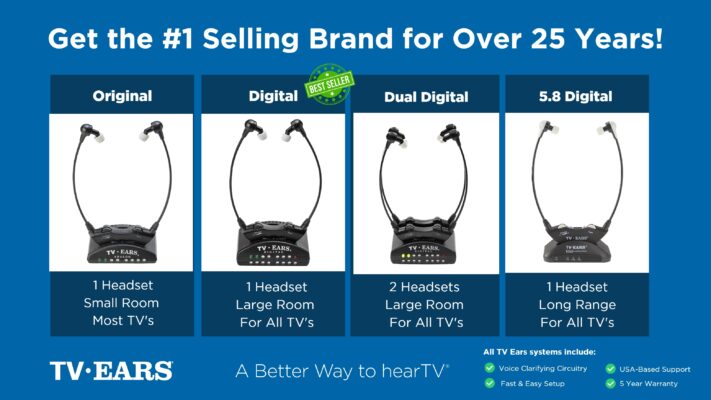 Ready to take your TV audio to the next level? Explore our Wireless Headphones and Headsets collection today! And don’t miss our custom audiologist-designed speaker system. At TV Ears, we are committed to ensuring that everyone can enjoy TV to the fullest. Our range of speakers for TV and wireless headphones and headsets are designed to cater to diverse needs and preferences, making your home entertainment experience truly exceptional. Don’t let hearing difficulties or differing audio preferences hold you back from enjoying your favorite shows and movies. Explore TV Ears’ solutions and rediscover the joy of TV-watching.
Stay Tuned for More TV Ears Insights
If you’re passionate about enhancing your TV-watching experience, you won’t want to miss our other blog posts. We regularly publish articles on the latest audio technology, home entertainment tips, and more. Check out our latest blogs below:
The Wireless Wonders: Unleash the Magic of Wireless Headphones!
The Wireless Headphones for TV Experience: Elevate Your Entertainment!
Hear Every Word Clearly: Exploring Fun TV Listening Devices for Hearing Impaired
Don’t miss out on valuable insights and tips from TV Ears experts. Investing in the right speaker for your TV can dramatically enhance your home entertainment experience. Whether you’re an audiophile or simply want to enjoy your favorite shows and movies with exceptional sound, a speaker for TV is a worthwhile addition to your setup. Explore TV Ears’ wide range of speakers, headphones and headsets today and start enjoying TV like never before.
Frequently Asked Questions
Do I need to have hearing aids to use a TV listening device? Not at all. There are excellent options available whether you wear hearing aids or not. If you don’t use hearing aids, standalone wireless headset systems like TV Ears are designed specifically for you. They deliver clear audio directly to your ears. If you do wear hearing aids, you can look into accessories like TV streamers that send the sound from your television right to your existing devices.
If I use a wireless headset, can other people in the room still hear the TV? Yes, and this is one of the biggest benefits. These systems work independently from your television’s speakers. This means you can have the volume in your headset set to your perfect level, while your family and friends can listen to the TV’s main speakers at a volume that’s comfortable for them. It’s a simple way to end the household volume debate for good.
What makes these devices different from a standard pair of headphones? While any headphones can make the TV louder, assistive listening devices are engineered to make the TV clearer. Many standard headphones amplify all sounds equally, which can make dialogue even harder to distinguish from loud music or sound effects. Devices designed for TV listening often use special technology to isolate and enhance the frequencies of human speech, so you can follow conversations without just blasting the overall volume.
Are these systems complicated to set up? Most are designed to be very user-friendly. A typical setup involves plugging a small transmitter base into your television’s audio output port and a power source. Once that’s connected, the wireless headset is usually ready to use right away. The goal is to get you listening clearly in just a few minutes, without needing a technical manual to get started.
Will the sound cut out if I get up and walk around? It depends on the type of wireless technology the device uses. Systems that use Infrared (IR) technology require a direct line of sight, much like your TV remote, so the sound might cut out if you leave the room. However, devices that use Radio Frequency (RF) or Bluetooth can transmit sound through walls and objects, giving you the freedom to move around the house without missing any of the audio.
Key Takeaways
- Focus on Voice Clarity, Not Overall Volume: Simply turning up the TV amplifies everything, including distracting background noise. The best solutions specifically target and lift dialogue out of the sound mix, so you can follow conversations without blasting the volume.
- Check Your TV Settings First: Before you shop for a new device, try the free solutions already available to you. Explore your TV’s audio menu for a “Clear Voice” setting and turn on closed captions to instantly make dialogue easier to follow.
- Find the Right Personal Listening Device: The best long-term solution delivers clear audio directly to your ears. If you use hearing aids, a TV streamer is a great choice. If not, wireless TV headphones let you control your own volume and tone, ending the household volume wars for good.
