
The battle over the TV remote is a classic, but the fight over the volume button can be even more frustrating. When one person needs the sound cranked up just to follow the dialogue, it can make the experience too loud for everyone else in the room. This simple conflict can turn a relaxing evening into a stressful one. A great pair of wireless TV headphones solves this problem instantly, giving everyone their own personal volume control. This guide will walk you through everything you need to know to find the best wireless headphone tv setup, from crucial features like voice clarification to ensuring a comfortable fit for hours of watching.
Why You’ll Love Wireless Headphones for Your TV
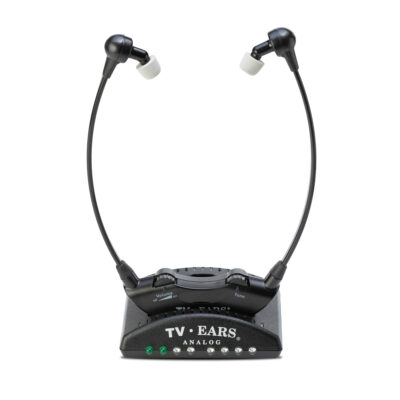 When it comes to enjoying your favorite TV shows or movies, having the perfect audio experience is essential. If you’re in the market for headphones specifically designed for TV, wireless options are undoubtedly the best choice. In this blog post, we’ll delve into the reasons why headphones for TV wireless outshine their wired counterparts, providing you with the freedom to immerse yourself in the audio world without limitations.
Move Freely Without Missing a Beat
One of the key advantages of wireless headphones for TV is the freedom of movement they provide. With no wires to limit your range, you can comfortably move around your living room or even grab a snack from the kitchen without interrupting your audio experience. Whether you’re sitting on the couch or reclining in your favorite chair, wireless headphones offer the convenience and flexibility you need.
Binge-Watch in Total Comfort
Wired headphones can often be cumbersome, with tangled cords and limited maneuverability. Headphones for TV wireless eliminate these concerns, offering a lightweight and ergonomic design for extended periods of use. You can say goodbye to tangled cords and discomfort, as wireless options allow you to immerse yourself in the audio while enjoying optimal comfort.
Enjoy Crystal-Clear, Interference-Free Audio
Headphones for TV wireless use advanced technology, such as Bluetooth or RF (Radio Frequency), to transmit audio signals. This wireless transmission eliminates the risk of interference from other devices or electrical signals, ensuring a clear and uninterrupted sound experience. With better sound quality and reduced background noise, wireless headphones allow you to fully appreciate the nuances of dialogue, music, and sound effects in your favorite TV shows and movies.
Get Set Up in Just a Few Simple Steps
Connecting wireless headphones to your TV is a straightforward process. Most modern televisions come equipped with Bluetooth or have a dedicated audio output specifically designed for wireless headphones. Pairing your wireless headphones with your TV is as simple as following a few quick steps, allowing you to enjoy hassle-free connectivity and ease of use.
Use Them with Your TV, Tablet, and More
Headphones for TV wireless are not limited to just your television. They are often compatible with other devices such as smartphones, tablets, and computers. This versatility enables you to seamlessly switch between devices and enjoy your audio experience on various platforms, whether you’re watching TV, gaming, or listening to music.
Key Features to Look For in TV Headphones
Shopping for TV headphones can feel overwhelming with all the technical jargon out there. But finding the right pair comes down to a few key features that make all the difference for an enjoyable viewing experience. It’s not just about sound; it’s about clarity, comfort, and reliability. A great set of TV headphones should make you forget you’re even wearing them, letting you get lost in your favorite show. We’ll walk through the most important things to consider, from the technology that prevents that annoying lip-sync delay to the design features that let you binge-watch for hours in total comfort.
Solving the Lip-Sync Problem: Understanding Latency
Have you ever watched a video where the sound doesn’t quite match the speaker’s mouth? That distracting delay is called latency, and it’s one of the biggest issues with using standard wireless headphones for television. When the audio lags behind the video, it can completely pull you out of the moment. For watching TV, especially dialogue-heavy scenes, having the sound perfectly synchronized with the picture is absolutely essential for comprehension and enjoyment. This is why looking for headphones specifically designed for TV is so important—they are built to solve this exact problem.
What is Audio Latency?
Audio latency is simply the time it takes for the sound to travel from its source—in this case, your TV—to your ears. As one tech publication puts it, “Latency refers to the delay between the audio signal being sent and the sound being heard.” With wireless devices, this delay is caused by the time it takes to process and transmit the audio signal wirelessly. While a tiny delay is unnoticeable when you’re just listening to music, it becomes a major problem when you’re watching people speak on screen. A high-latency connection creates that frustrating lip-sync issue, making your viewing experience feel disjointed and unnatural.
Why Low Latency is Crucial for TV
For television, low latency isn’t just a nice-to-have feature; it’s a must-have. To keep the audio and video in perfect harmony, experts agree that “the sound must match the picture (under 100 milliseconds of delay is good).” Anything higher than that, and your brain will start to notice the mismatch. Headphones designed for TV prioritize low-latency technology to ensure that dialogue aligns perfectly with the actors’ lip movements. This creates a seamless and immersive experience, allowing you to focus on the story without any distracting technical glitches getting in the way.
Choosing the Right Wireless Technology
The term “wireless” covers a few different technologies, and the one you choose can have a big impact on your TV watching. The two main players are Radio Frequency (RF) and Bluetooth. While Bluetooth is fantastic for listening to music from your phone, it wasn’t originally designed for the demands of television audio, where timing is everything. Understanding the key differences will help you select headphones that deliver a reliable, high-quality connection without the common frustrations of audio lag or interference, ensuring your movie night goes off without a hitch.
Radio Frequency (RF) vs. Bluetooth
When it comes to TV headphones, Radio Frequency (RF) technology often has the upper hand. As The New York Times notes, “RF (Radio Frequency) systems generally work better for TV. They have less ‘latency’ (delay between sound and picture) and often work over longer distances.” This means you can walk to the kitchen for a snack without losing the signal or experiencing that annoying lip-sync delay. While some newer Bluetooth versions have improved latency, RF headphones are typically more reliable for a dedicated home theater setup, offering a stable connection that’s less prone to interference from other devices in your home.
Digital vs. Analog Signals
Within RF technology, you’ll find both analog and digital signals. While both can work, a digital connection is the clear winner for audio quality. According to Philips, a digital signal “gives clearer, richer sound with very little noise and almost no delay.” An analog signal, on the other hand, can sometimes pick up static or interference from other household electronics like microwaves or cordless phones. For the cleanest, most detailed sound, look for headphones that use a digital wireless signal. This ensures you’re hearing every word and sound effect exactly as the creators intended, without any distracting background hiss.
The Future: Auracast Technology
While RF is currently a top choice for TV, technology is always moving forward. Keep an eye out for a new standard called Auracast. This emerging technology is part of the new Bluetooth standard and is designed to fix many of the latency and connection issues of traditional Bluetooth. The goal of Auracast is to allow multiple headphones to connect to a single source, like a TV, with very low delay. While it’s not widely available just yet, it shows a promising future for wireless audio and could become a new standard for shared listening experiences in homes and public spaces.
Essential Features for the Best Experience
Beyond the core technology, several other features contribute to a great pair of TV headphones. Think about how you’ll be using them day-to-day. Are you planning to watch for hours at a time? Do you struggle to hear dialogue over loud background music? Do you share the TV with a partner who also wants to listen? Considering these practical aspects will help you find a pair that not only sounds great but also fits seamlessly into your life, making your TV time more relaxing and enjoyable for everyone.
Comfort and Design
Comfort is king, especially when you’re settling in for a movie marathon. The last thing you want is headphones that pinch your ears or feel heavy after an hour. A good pair should be lightweight and well-padded, allowing you to “wear them for a long movie or several TV episodes without your ears hurting.” Consider the style that works best for you. Over-ear headphones can offer great immersion, while lightweight stethoscope-style headsets, like our TV Ears systems, rest under the chin and don’t mess up your hair, making them incredibly comfortable for long-term wear.
Battery Life and Charging Docks
Nothing ruins a cliffhanger ending like your headphones dying mid-scene. That’s why good battery life is essential. You’ll want a pair that can last through at least a few movies or a full day of binge-watching. Many dedicated TV headphones come with a convenient charging dock that also serves as the transmitter. This makes storage and charging effortless—simply place the headphones back on the base when you’re done, and they’ll be fully charged and ready for your next viewing session. This eliminates the hassle of searching for cables and ensures your headphones are always ready to go when you are.
Voice Clarification Technology
If you find yourself constantly asking “What did they say?” while watching TV, then voice clarification technology is a game-changer. This feature is specifically designed to make human speech clearer and easier to understand by separating it from background noise and music. Many systems “offer special modes to make voices clearer,” which can be a huge help for anyone with hearing loss. This is the core principle behind TV Ears products, which use our proprietary Voice Clarifying Circuitry® to lift dialogue out of the soundtrack so you can hear every word with incredible clarity.
Multi-User Support
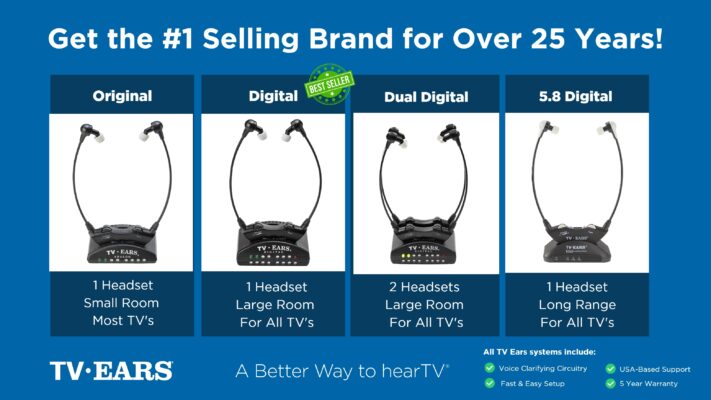
Do you and your partner have different volume preferences? Many TV headphone systems are designed to solve this common household problem by allowing multiple headsets to connect to a single transmitter. This means two people can watch the same show together, each with their own personal volume control. Some systems can even support up to 100 headphones at once, making them perfect for families or assisted living communities. It’s a fantastic feature that brings harmony back to the living room, allowing everyone to enjoy the show at a level that’s comfortable for them.
Hearing Aid Compatibility
For those who use hearing aids, finding compatible headphones is a crucial consideration. Some over-ear headphones are large enough to fit comfortably over hearing aids, but this can sometimes cause feedback or discomfort. An alternative is a headset that doesn’t interfere with your hearing aids at all. For example, stethoscope-style headsets that sit in the ear canal can often be used by simply removing your hearing aids while you watch TV. It’s always a good idea to check if a specific model is designed to “work well with hearing aids” to ensure a comfortable and effective listening experience.
How to Connect Headphones to a TV
Getting your new wireless headphones set up is usually a simple process, but it starts with knowing what you’re working with. Before you even make a purchase, it’s a good idea to take a quick look at the back of your television. The type of audio ports your TV has will determine which headphones are compatible and what kind of connection you’ll use. Most modern headphones come with multiple connection options, so you’re likely to find one that works, but a little prep work can save you a headache later on.
Check Your TV’s Audio Output Ports
The first step is always to “check the back or side of your TV for audio output ports.” These are the jacks that send sound out from your TV to another device, like a soundbar or your new headphones. Don’t confuse them with input ports (like HDMI In), which bring signals into your TV. You’re looking for ports labeled “Audio Out” or “Digital Audio Out.” The most common types you’ll find are Optical Digital, RCA Stereo, and a 3.5mm headphone jack. Identifying which of these your TV has will make choosing and connecting your headphones a breeze.
Optical Digital
An Optical Digital output, also known as TOSLINK, is one of the most common ports on modern TVs. It looks like a small, square-shaped door and often has a red light inside when the TV is on. This port sends a high-quality digital audio signal through a fiber optic cable, providing clear, interference-free sound. It’s an excellent choice for connecting your headphone transmitter because it delivers pristine audio, ensuring you get the best possible sound quality from your TV shows and movies. Most dedicated TV headphone systems will come with an optical cable included in the box.
RCA Stereo Jacks
If you have a slightly older TV, you’ll likely find a pair of RCA stereo jacks. These are the classic red and white circular ports that have been used for audio equipment for decades. They provide a reliable analog audio signal. To use them, you’ll simply connect the corresponding red and white plugs from your headphone transmitter’s cable to the “Audio Out” ports on your TV. It’s a straightforward and time-tested connection method that works perfectly for sending TV audio to your headphones, and it’s a common connection option for many wireless systems.
3.5mm Headphone Jack
The 3.5mm headphone jack is the same type of port you’d find on a smartphone or laptop. While it’s becoming less common on newer, ultra-thin TVs, many models still include one. This port provides a simple, all-in-one analog audio connection. If your TV has one, you can often plug the headphone transmitter directly into it. One thing to note is that on some TVs, plugging something into the headphone jack will automatically mute the TV’s internal speakers, which is perfect if you’re the only one watching.
Common Pitfalls to Avoid When Shopping
When you’re looking for the right TV headphones, it’s easy to get swayed by a low price tag or a long list of features you may not need. However, some of these budget-friendly options can come with significant drawbacks that ultimately ruin the viewing experience. Knowing what to watch out for can help you avoid buyer’s remorse and invest in a product that truly meets your needs. The biggest red flags often relate to sound quality and that all-important latency issue we discussed earlier.
Signs of Low-Quality Headphones
The most telling sign of a low-quality pair of headphones is poor performance. According to reviews from trusted sources, many models are not recommended “because of issues like noticeable sound delays (lip-sync problems) and poor sound quality.” If you’re reading customer reviews and see repeated complaints about muffled audio, static, or a persistent lag between the video and sound, it’s best to steer clear. A cheap price isn’t a bargain if the product is too frustrating to use. Investing in a reputable brand known for low latency and clear audio will always be worth it in the long run.
Alternatives to Using Headphones
While headphones are a fantastic solution for many, they aren’t the only option for hearing the TV better. Perhaps you don’t like the feeling of wearing something on your head or in your ears for long periods. Or maybe you want a solution that benefits everyone in the room without isolating the listener. Fortunately, there are other excellent tools and built-in features that can help make TV dialogue clearer and more understandable for everyone, ensuring you can catch every word of your favorite program.
Voice Clarifying TV Speakers
If you want to improve the audio for everyone in the room, a voice-clarifying TV speaker is an excellent alternative to headphones. Unlike standard soundbars that amplify everything, “these speakers are specially made to make dialogue (talking) louder and clearer.” They use technology similar to that found in hearing aids to analyze the audio signal and specifically enhance speech frequencies. A product like the TV Ears Voice Clarifying TV Speaker can sit right in front of your television and provide a dramatic improvement in dialogue comprehension without having to crank up the overall volume.
Using Your TV’s Built-in Settings and Captions
Before you buy any new hardware, it’s worth exploring the settings on your current TV. Many modern televisions have built-in audio modes like “Clear Voice” or “Dialogue Enhancement” that can make a noticeable difference. Another incredibly useful and free tool is closed captions. Simply “turning on captions” allows you to read the dialogue on the screen, ensuring you never miss a critical plot point. While it’s a different experience from hearing the audio clearly, it’s a highly effective way to follow along with any show or movie.
Need Clearer Dialogue? Why TV Ears Is a Top Choice
For individuals with hearing difficulties, TV Ears is a premier solution that has been providing exceptional audio clarity and amplification for over two decades. Their wireless headphones for TV offer a tailored experience, enhancing dialogue and sound effects for individuals with hearing challenges. With TV Ears, you can enjoy your favorite shows without missing a single word. Experience the freedom and clarity of wireless headphones for TV with TV Ears. Visit their website at www.tvears.com to explore their range of products and find the perfect solution for your hearing needs.
If you are struggling with hearing your favorite program, TV Ears has several top-rated, audiologist-designed systems that can help, find more at www.tvears.com.
Looking for more? Check out the recent stories on the TV Ears blog:
Crackling sounds in ears? 6 possible causes
TV speaker for hard of hearing? There may be a better option
Affordable hearing aids? Trust the best-selling brand since 1998s
The Basics of Hearing Aids Repair: Regaining Sound Quality
Does Tinnitus Go Away? Understanding its Impact on TV Watching
Hearing aids evaluation: What you should know
Frequently Asked Questions
Why can’t I just use my regular Bluetooth headphones with my TV? While you can technically connect many Bluetooth headphones to a TV, they often aren’t the best choice for watching shows and movies. The biggest issue is a noticeable delay, or latency, which causes the audio to be out of sync with the picture. This lip-sync problem can be very distracting. Headphones designed specifically for TV use low-latency technology to ensure the sound perfectly matches the action on screen.
Will these headphones work if I already wear hearing aids? This is a common concern, and the answer depends on the style of the headphones. Large over-ear headphones might fit over your hearing aids, but this can sometimes be uncomfortable or cause whistling feedback. An alternative, like the stethoscope-style headsets from TV Ears, is designed to be worn without your hearing aids. They rest lightly in your ears and deliver dialogue so clearly that you won’t need your hearing aids while watching.
Can my spouse and I use our own headphones at the same time? Yes, and this is one of the best ways to bring peace back to the living room. Many dedicated TV headphone systems are built to support multiple headsets from a single transmitter. This allows two people to watch the same program together, with each person having complete control over their own personal volume.
What if my TV is older and doesn’t seem to have the right audio ports? You’re probably in luck, as most TVs have a way to connect. Even if your TV doesn’t have a modern Optical port, it likely has the classic red and white RCA “Audio Out” jacks. Most TV headphone systems come with adapters for all the common connection types, so you should be able to get set up easily no matter how old your television is.
I don’t like wearing anything on my head. Are there other ways to make the dialogue clearer? Absolutely. If headphones aren’t for you, a voice-clarifying TV speaker is a fantastic alternative. These speakers are specifically engineered to enhance the frequencies of human speech, making dialogue much easier to understand without dramatically increasing the overall volume. You can also check your TV’s audio menu for a “Clear Voice” setting or simply turn on the closed captions.
Key Takeaways
- Choose the Right Tech for Perfect Sync: To avoid that distracting lag between what you see and what you hear, opt for headphones with low-latency technology like Radio Frequency (RF). This ensures dialogue and on-screen action are always perfectly synchronized.
- Prioritize Features That Clarify Voices: If you constantly struggle to understand dialogue over background music, look for headphones with built-in voice clarification. This technology isolates and enhances speech, letting you hear every word clearly without raising the overall volume.
- Check Your TV’s Connections Before You Shop: A quick look at the back of your TV will show you which audio output ports you have—usually Optical, RCA (red and white), or a 3.5mm jack. Knowing this ahead of time makes it easy to pick a compatible system and guarantees a simple setup.
