
Everyone’s hearing is unique. So why do we settle for a one-size-fits-all audio experience from our televisions? If you live with hearing loss, you know that simply turning up the volume doesn’t always make things clearer—it just makes everything louder. You need a solution that’s tailored to your specific needs. Creating a personal sound bubble with home entertainment headphones allows you to control not just the volume but also the tone, making dialogue crisp and easy to understand. This way, you can immerse yourself in your favorite programs without disturbing family members. Let’s look at how you can find the right headphones to create your perfect, personalized listening environment.

Why Use Headphones for TV?
There are several compelling reasons why more and more people are opting for headphones for TV viewing. Whether it’s to improve sound quality, allow for private listening, or accommodate hearing impairments, here’s why headphones for TV are a game-changer:
- Enhanced Audio Clarity: Built-in TV speakers don’t always provide the best sound quality, especially for dialogue-heavy shows. Headphones for TV allow you to hear every word with crystal clarity, especially during low-volume scenes.
- Private Viewing: If you live in a shared space, headphones for TV let you enjoy your shows at any time of day without disrupting others. This is especially useful for night owls or early risers who don’t want to disturb the rest of the household.
- Personalized Volume Control: If you or someone in your home has hearing difficulties, headphones for TV can be a perfect solution. Each person can set their preferred volume, so no one is forced to endure overly loud or quiet sound.
How to Choose the Right Headphones for TV
Selecting the right headphones for TV is crucial for maximizing your viewing experience. Here’s what you should consider:
- Wired vs. Wireless: Both wired and wireless headphones for TV have their benefits. Wireless options allow for more freedom to move around without being tethered to the TV, while wired options can offer more consistent sound quality and don’t require recharging.
- Sound Quality: The type of content you enjoy most should influence your choice. If you’re primarily watching action movies or sporting events, look for headphones for TV with rich bass and dynamic range. If you’re into talk shows or dramas, opt for those that enhance dialogue clarity.
- Comfort and Design: Comfort is key for long viewing sessions. Look for headphones for TV that have cushioned ear cups, adjustable headbands, and lightweight designs to minimize fatigue during extended use.
Wireless Headphones for TV: A Popular Choice
Among the many options available, wireless headphones for TV are one of the most popular. With wireless technology, you can enjoy the freedom of moving around the room or even stepping into another while still hearing your show. TV Ears offers a wide range of wireless headphones for TV, designed specifically to meet the needs of those who require clear and consistent sound without interruption. Wireless headphones for TV are also incredibly easy to set up, often connecting to your TV through a base station or Bluetooth technology, eliminating the need for extra cords.
Finding the Right Fit: Headphone Types
When you start looking for TV headphones, you’ll quickly notice they come in a few different styles. The right fit for you depends entirely on your personal comfort and what you hope to get out of the experience. Do you want to completely block out the world, or do you need to keep an ear open for the doorbell? Are you planning to watch for hours on end? Thinking about these questions will help you narrow down the options and find a pair that feels like it was made just for you. Let’s walk through the most common types to see which one might be your perfect match.
Over-Ear and On-Ear Headphones
Over-ear and on-ear headphones are the classic styles you probably picture first. Over-ear models have large cups that completely enclose your ears, while on-ear versions have smaller pads that rest directly on them. Both are great at creating a private listening bubble. In fact, headphones that block out outside noise well, like many over-ear designs, can be a good choice because you won’t feel the need to turn the volume up as high to hear clearly. This is perfect for getting lost in a movie without distractions. The main thing to consider is comfort during long viewing sessions, as some people find them a bit bulky or warm after a while.
In-Ear Headphones
In-ear headphones, often called earbuds, are a lightweight and discreet alternative. They fit directly into your ear canal, which can provide surprisingly good sound isolation. Because they’re so small, they are easy to wear for long periods without feeling heavy. However, it’s important to keep them clean, as wearing any type of in-ear device for a long time can sometimes lead to irritation if moisture gets trapped. For TV viewing, the key is finding a pair with a long enough cord if they’re wired, or a reliable wireless connection so you can sit back comfortably on the couch.
Bone Conduction Headphones
Bone conduction headphones are a unique option that is gaining popularity. Instead of sending sound through your ear canals, they rest on your cheekbones and transmit vibrations directly to your inner ear. This leaves your ears completely open, which is a huge advantage if you need to stay aware of your surroundings. While they are often marketed to athletes, they can be a fantastic solution at home. If you want to hear the TV clearly but also need to listen for a family member, a ringing phone, or the dog barking, this style lets you do both at the same time.
Understanding Key Technologies
Once you’ve settled on a style, the next step is to understand the technology that makes wireless TV listening possible. This might sound complicated, but it really comes down to one thing: getting the sound from your TV to your ears without any hiccups. The biggest potential issue is “lag” or “latency,” which is a tiny delay between what you see on screen and what you hear. For music, a small delay isn’t a big deal, but for TV, it can make dialogue look out of sync and completely ruin the experience. Let’s look at the technologies that solve this problem.
RF vs. Bluetooth: Minimizing Audio Lag
Most wireless headphones use either Bluetooth or Radio Frequency (RF) technology. While Bluetooth is great for connecting your phone to a speaker, it wasn’t originally designed for video. This can sometimes cause that annoying audio lag. On the other hand, dedicated wireless TV headphone systems, especially those that use RF technology, are built specifically for this purpose. They generally perform better for TV watching because they have much lower latency, ensuring the words you hear perfectly match the actors’ lips. This is why systems like TV Ears often use technologies designed to deliver clear, synchronized sound without delay.
How to Connect Headphones to Your TV
Getting your headphones connected to your TV is usually straightforward. The first step is to take a look at the back or side of your television to see what kind of audio output ports you have. Most TVs will have at least one of three common types: a standard 3.5mm headphone jack, an optical digital audio out, or red and white RCA stereo jacks. Your headphone system will come with a transmitter base that plugs into one of these ports. Don’t worry if the plugs don’t seem to match at first—many TV headphone systems include adapters to ensure they can connect to virtually any television, new or old.
The Future: What is Auracast?
Technology is always moving forward, and there’s an exciting new development on the horizon called Auracast. Think of it as the next generation of Bluetooth, designed to fix some of the common issues we see today. The goal of Auracast is to provide high-quality audio with very low lag, making it perfect for watching TV. It also aims to make it much easier to connect multiple headphones to a single source, like a TV in a living room or even in a public space like a gym or airport. It’s still new, but it’s something to keep an eye on for the future of wireless listening.
Evaluating Performance and Features
Now that you know the different types and technologies, you can focus on the features that will make the biggest difference in your day-to-day use. A great pair of TV headphones should feel like a natural extension of your television, making everything easier and more enjoyable to hear. It’s not just about volume; it’s about clarity, comfort, and convenience. When you’re comparing different models, focusing on a few key performance indicators will help you make a confident choice that you’ll be happy with for years to come.
What Expert Reviews Measure
When experts test and review TV headphones, they look at a specific set of criteria to judge performance. According to reviewers, the most important factors are long battery life, low latency (to avoid that audio lag), comfort for extended wear, overall sound quality, and how easy the system is to set up and use. These are the exact things you should consider, too. A system that is simple to connect, comfortable to wear for a whole movie, and provides clear, synchronized sound is one that you’ll find yourself using every single day.
Sound Quality: Setting Realistic Expectations
It’s important to remember that headphones designed for TV have a different goal than those made for listening to music. While high-end music headphones are built to reproduce every note in a symphony, TV headphones are optimized to make dialogue and voices stand out. They focus on clarifying the frequencies where human speech occurs, so you can catch every word of a quiet conversation or a fast-paced news report. So, while they will make your shows sound great for TV, they may not offer the same booming bass as headphones designed for audiophiles—and that’s by design.
Solutions for Multiple Viewers
What if more than one person in your home wants to use headphones? This is a common situation, and thankfully, many systems are designed to accommodate it. Some RF systems come with a transmitter that can send the audio signal to two or more headsets simultaneously. This is a perfect solution for couples who have different volume preferences but want to watch together. Each person can have their own headset with its own volume control. Some advanced systems can even support dozens of headphones from one transmitter, though for most homes, a system that supports two, like many TV Ears models, is the ideal setup.
Best Headphones for TV with Hearing Needs
For those who are hard of hearing, specialized headphones for TV like TV Ears provide a solution that enhances both the clarity and volume of TV audio. These headphones for TV are designed to work seamlessly with hearing aids, ensuring that every word and sound effect is transmitted clearly. This is especially important for seniors or individuals with mild to moderate hearing loss, who can struggle with ordinary TV speakers.
The 60/60 Rule for Safe Listening
When you’re settled in for a movie marathon, it’s easy to lose track of time and volume. But protecting your hearing is just as important as catching every plot twist. A great guideline to follow is the 60/60 rule. Audiologists recommend listening at no more than 60% of the maximum volume for no longer than 60 minutes at a time before taking a short break. This simple practice gives your ears a rest and can help prevent long-term damage. So, after an episode or two, try pausing the show, taking off your headphones, and giving your ears a few minutes of quiet before you press play again. It’s a small habit that makes a big difference for your long-term hearing health.
How Noise Isolation Protects Your Hearing
Have you ever found yourself turning up the TV volume to drown out background noise like the air conditioner, traffic, or a conversation in the next room? This is where noise isolation becomes so valuable. Headphones that effectively block out ambient sounds allow you to hear the TV audio clearly at a lower, safer volume. Because you aren’t competing with external distractions, you don’t need to crank up the sound to catch quiet dialogue. This is a core principle behind TV Ears products, which are designed to clarify speech and bring it directly to your ears. By isolating the sound from your television, you can enjoy a more immersive experience without putting unnecessary strain on your hearing.
Keeping Your Earbuds and Headphones Clean
Just like any other personal item, your headphones need regular cleaning to stay in good shape. Over time, they can accumulate dust, earwax, and oils from your skin, which can lead to skin irritation or even ear infections if moisture gets trapped. It’s a good habit to wipe down your headphones with a soft, dry, lint-free cloth after a few uses. For in-ear styles, be sure to gently clean the tips to keep them clear of any buildup. Maintaining clean headphones not only ensures better hygiene but also helps you get the best possible sound quality and comfort, especially when you’re settling in for a long viewing session with your favorite series.
Recognizing the Signs of Hearing Loss
Hearing loss often develops gradually, making it difficult to notice at first. Knowing the common signs of hearing loss can help you or a loved one identify potential issues early on. Do you frequently ask people to repeat themselves? Do you find it hard to follow conversations in noisy environments like restaurants? Perhaps you notice a persistent ringing in your ears, known as tinnitus, or find that you need the TV volume significantly louder than others in the room prefer. If any of these experiences sound familiar, it might be a good idea to schedule a check-up with an audiologist or your primary care doctor. Addressing hearing changes early can lead to better outcomes and improved quality of life.
Why TV Ears Headphones for TV Stand Out
TV Ears specializes in creating headphones for TV that prioritize both comfort and sound quality. The brand’s wireless models, in particular, have become a favorite among users looking for easy-to-use, high-quality headphones for TV. With TV Ears, you’re getting headphones that:
- Are easy to connect: No complicated setup processes.
- Feature voice-clarity technology: Which amplifies speech frequencies to make conversations and dialogue easier to hear.
- Provide exceptional comfort: Built for long sessions without discomfort.
Conclusion: The Best Headphones for TV Can Transform Your Viewing Experience
Investing in the right headphones for TV can make all the difference in your home entertainment setup. Whether you’re looking for wireless convenience, personalized sound control, or a solution for hearing difficulties, headphones for TV offer numerous benefits. With TV Ears, finding the perfect headphones for TV has never been easier. Their range of wireless and specialized headphones ensures that you’ll find the ideal fit for your needs.
Find Your Perfect TV Ears Headphones
Discover the difference TV Ears wireless headphones and headsets can make in your TV-watching experience. Whether you’re looking for comfortable over-ear headphones or a compact, stylish headset, we have options to suit your needs. 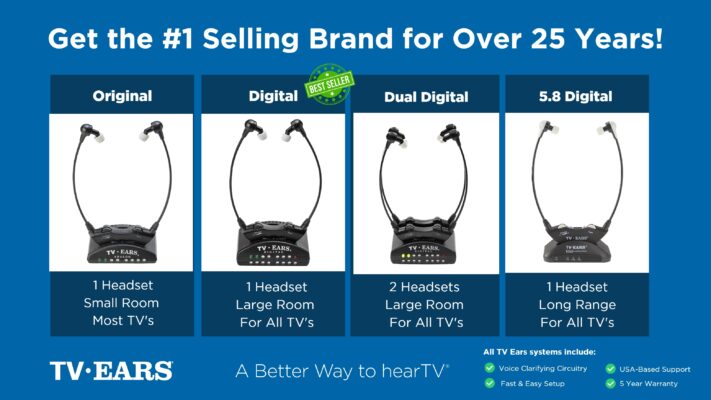 Ready to take your TV audio to the next level? Explore our Wireless Headphones and Headsets collection today! And don’t miss our custom audiologist-designed speaker system. At TV Ears, we are committed to ensuring that everyone can enjoy TV to the fullest. Our range of speakers for TV and wireless headphones and headsets are designed to cater to diverse needs and preferences, making your home entertainment experience truly exceptional. Don’t let hearing difficulties or differing audio preferences hold you back from enjoying your favorite shows and movies. Explore TV Ears’ solutions and rediscover the joy of TV-watching.
Want More TV Audio Tips?
If you’re passionate about enhancing your TV-watching experience, you won’t want to miss our other blog posts. We regularly publish articles on the latest audio technology, home entertainment tips, and more. Check out our latest blogs below:
The Wireless Wonders: Unleash the Magic of Wireless Headphones!
The Wireless Headphones for TV Experience: Elevate Your Entertainment!
Hear Every Word Clearly: Exploring Fun TV Listening Devices for Hearing Impaired
Don’t miss out on valuable insights and tips from TV Ears experts. Investing in the right speaker for your TV can dramatically enhance your home entertainment experience. Whether you’re an audiophile or simply want to enjoy your favorite shows and movies with exceptional sound, a speaker for TV is a worthwhile addition to your setup. Explore TV Ears’ wide range of speakers, headphones and headsets today and start enjoying TV like never before.
Frequently Asked Questions
How do I know if these headphones will work with my TV? You can be confident that most dedicated TV headphone systems are designed to be compatible with virtually any television, regardless of its age. Before you buy, just take a quick look at the back of your TV for the audio output ports—you’ll likely see a standard headphone jack, a digital optical port, or the red and white RCA jacks. TV headphone systems come with a transmitter that plugs into one of these ports, and they often include adapters to ensure a perfect fit.
Can I use TV headphones if I already wear hearing aids? Yes, you absolutely can. TV headphones are designed to be a helpful tool whether you use hearing aids or not. Some over-the-ear styles fit comfortably right over your hearing aids. Other systems, like many from TV Ears, are designed to clarify sound so well that you may find it more comfortable to take your hearing aids out and let the headset do all the work while you watch your show.
Why can’t I just use my regular Bluetooth earbuds to watch TV? While you can technically connect some Bluetooth earbuds to a TV, they often aren’t the best tool for the job. The biggest issue is a slight delay between the picture and the sound, which can make dialogue look out of sync with the actors’ mouths. Dedicated wireless TV headphones are specifically built to solve this problem, using technology like Radio Frequency (RF) to ensure the audio and video are perfectly matched, giving you a much more natural and enjoyable experience.
My partner and I both need to use headphones. Can we watch together? This is a very common situation, and many systems are designed for it. You can find TV headphone systems that allow a single transmitter to send the audio signal to two or more headsets at the same time. This is a fantastic solution for couples because each person gets their own headset and can set the volume to their own perfect level, allowing you to enjoy the show together without any arguments over the remote.
Are these headphones comfortable enough to wear for a whole movie? Comfort is a top priority in the design of TV headphones, precisely because they’re meant for long viewing sessions. They are typically made with lightweight materials, feature soft, cushioned ear cups, and have adjustable headbands to prevent fatigue. Unlike headphones made for the gym or a quick commute, these are built for settling in on the couch and enjoying a film from start to finish.
Key Takeaways
- Choose headphones that clarify dialogue: The goal isn’t just to make the TV louder, but to make voices and conversations easier to understand. Look for headphones specifically designed for TV that separate speech from background noise for a crisp, clear sound.
- Match the technology to your needs: To avoid frustrating audio lag where words don’t match the actors’ lips, choose a system with a low-latency connection like Radio Frequency (RF). Also, make sure the style is comfortable enough for you to wear through an entire movie.
- Protect your hearing for the long run: Remember the 60/60 rule—listen at 60% of the max volume for no more than 60 minutes before taking a break. Headphones that block outside noise also help you hear clearly at a lower, safer volume.
