
The familiar argument over the television remote is a scene played out in countless living rooms. When one person needs the volume cranked up just to follow the dialogue, it can become uncomfortably loud for everyone else. This simple disagreement can create daily frustration, turning a relaxing evening into a source of tension. The issue often isn’t just about volume, but about clarity. This guide is here to help restore peace. We’ll walk through practical solutions, from simple adjustments on your TV to dedicated tv hearing devices for seniors that deliver crystal-clear sound directly to you, allowing everyone to enjoy their favorite shows together again.

Why Is Watching TV So Hard with Hearing Loss?
As we age, it’s not uncommon for our hearing abilities to decline, making it difficult to enjoy television shows fully. Seniors dealing with hearing loss may struggle to discern dialogue, sound effects, and background music, causing frustration and a sense of disconnection. TV hearing devices for seniors bridge this gap by amplifying sound and providing clear and enhanced audio. These devices are specifically tailored to address the needs of individuals with hearing loss, allowing them to regain their enjoyment of television and reconnect with the world of entertainment.
Hearing Loss by the Numbers
If you or a loved one are finding it harder to hear the TV, you are certainly not alone. Hearing loss is a very common part of life, affecting millions of people. According to AARP, “About 48 million Americans have some hearing loss. This includes about one-third of people aged 65 to 74. Nearly half of those over 75 have hearing loss.” These numbers show just how widespread this experience is. Instead of feeling isolated by the challenge, it’s helpful to see it as a shared issue with a growing number of available solutions. Recognizing the prevalence of hearing loss is the first step toward finding a tool that can help you reclaim your television experience and enjoy your favorite shows again without strain.
It’s About Clarity, Not Just Volume
Have you ever turned the TV volume up, only to find that the dialogue is still muffled and hard to understand? This is a common frustration, and it highlights a key issue. As Consumer Reports notes, “Many people with hearing loss struggle to understand TV dialogue, even when the volume is very loud. The main problem is often clarity, not just how loud the sound is.” Simply making everything louder also amplifies background music and sound effects, which can drown out the words you’re trying to hear. The goal isn’t just to hear the TV, but to understand it. This is why specialized TV hearing devices are so effective; they are designed to separate speech from other noises, delivering crisp, clear dialogue directly to your ears.
When to Consult a Hearing Professional
While assistive listening devices offer a fantastic solution for watching television, it’s also wise to get a complete picture of your hearing health. If you’re unsure about the extent of your hearing loss or what options might be best for your specific situation, seeking professional advice is a great next step. As the experts at Healthy Hearing suggest, “If you’re not sure which option is best for you, visit a hearing professional. They can help you find the right device or solution.” An audiologist can conduct a thorough hearing evaluation and recommend a personalized plan, which may include hearing aids, assistive listening devices like TV Ears, or a combination of solutions to improve your quality of life.
Free Ways to Improve TV Audio
Before you consider buying new equipment, it’s a great idea to check the tools you already have. Your television has several built-in features that can significantly improve sound clarity, and they won’t cost you a thing. Many people are surprised to find that a few simple adjustments in the settings menu can make a world of difference, turning muffled dialogue into clear conversation. Let’s walk through a few simple adjustments you can try right now to make your favorite shows much easier to understand and enjoy.
Explore Your TV’s Built-in Audio Settings
Most modern televisions have an audio menu that gives you more control than just the volume buttons. Grab your remote and press the ‘Settings’ or ‘Menu’ button, then look for an option labeled ‘Audio’ or ‘Sound.’ This is where you’ll find some powerful tools to help clarify dialogue and make your favorite shows much easier to follow. Spending a few minutes exploring these settings can make a surprising difference and costs nothing to try. It’s the perfect first step in taking control of your TV viewing experience.
Look for “Dialogue Boost” or “Clear Voice”
Inside the audio menu, keep an eye out for settings with names like ‘Clear Voice,’ ‘Dialogue Boost,’ or ‘Speech Enhancement.’ TV manufacturers include these features specifically to help voices cut through background music and sound effects. When you turn this setting on, the TV automatically processes the audio to make dialogue sound crisper and more prominent. It’s one of the most effective and simple changes you can make, as noted by experts at Consumer Reports who recommend it for better TV sound.
Adjust the Equalizer (EQ)
If your TV has a more advanced audio section, you might find an ‘Equalizer’ or ‘EQ,’ often under a ‘Custom’ or ‘User’ sound mode. An equalizer lets you fine-tune different sound frequencies. For clearer speech, try lowering the bass and lower-midrange frequencies, which is where rumbles and background noise often live. Then, slightly increase the upper-midrange and higher frequencies, as this is the range where most human voices fall. It might take a little experimenting to get it just right, but this custom adjustment can be very effective.
Use “Night Mode” for Consistent Volume
You may also see a setting called ‘Night Mode,’ ‘Auto Volume,’ or ‘Volume Leveling.’ This feature is designed to even out the sound, making loud commercials or action scenes quieter and soft whispers louder. While it can be useful for late-night viewing, it sometimes makes dialogue harder to distinguish from other sounds by compressing the audio range. Try watching a show with this mode turned on, and then with it turned off, to see which you prefer. For some, disabling it actually improves speech clarity during regular viewing hours.
Turn On Closed Captions (CC)
One of the most straightforward ways to catch every word is by turning on closed captions (CC). This feature displays the dialogue as text on your screen, so you can read along with what’s being said. It’s a perfect backup for moments when accents are thick, characters are mumbling, or background noise is overwhelming. You can usually activate captions with a dedicated ‘CC’ button on your remote or within the TV’s main settings menu. The Federal Communications Commission (FCC) provides guides on enabling this feature, and most streaming services also have their own easy-to-access caption settings.
Alternative TV Listening Solutions and Their Drawbacks
While built-in TV settings and captions are a great starting point, you might be looking for a dedicated device to improve your listening experience. Many different technologies are available, each with its own set of pros and cons. Understanding how they work can help you decide which option best fits your lifestyle and hearing needs. Some solutions work with existing hearing aids, while others are standalone systems. It’s important to consider factors like cost, complexity, and whether the device offers a personal listening experience or simply makes the audio louder for everyone in the room. Let’s look at some of the most common alternatives to dedicated TV headsets.
Soundbars
A soundbar is a long, thin speaker that sits below your television to provide higher-quality audio than your TV’s built-in speakers. Many modern soundbars include features specifically designed to make dialogue easier to understand. For example, some brands offer technology that uses hearing aid principles to lift voices out of background noise, making every word crisp and clear. While this is a great improvement for the overall sound quality in a room, a soundbar doesn’t solve the core issue of differing volume needs. It plays the audio out loud for everyone, so if you need the dialogue significantly louder than your family does, you might still find yourself in a disagreement over the remote control.
Hearing Aid TV Streamers
For those who already use hearing aids, a TV streamer can feel like a perfect solution. These small devices plug into your television and wirelessly send the audio directly to your compatible hearing aids. This technology provides a discreet and personalized listening experience, allowing you to hear the TV at your preferred volume without affecting anyone else in the room. The primary drawback, however, is the reliance on specific, often expensive, hearing aids. If you don’t have a compatible model, this option isn’t accessible. It also means you must be wearing your hearing aids to watch TV, which may not always be comfortable or convenient, especially for late-night viewing.
Induction Loop Systems
Also known as hearing loops, these systems use a wire that creates a magnetic field around a room. This field transmits sound from your TV directly to a telecoil (or t-coil) setting in a hearing aid or a special loop receiver. One major benefit is that anyone in the room with a t-coil enabled device can hear the audio clearly. However, this solution requires specific equipment that not everyone has. The setup can also be more involved than other options, and the signal can sometimes experience interference from other electronics. If your hearing aids don’t have a t-coil, you would need to wear a separate receiver, adding another layer of complexity.
Personal Sound Amplifiers (PSAs)
Personal Sound Amplifiers, or PSAs, are over-the-counter devices designed to amplify sounds in your environment. They are generally more affordable and accessible than traditional hearing aids and can be used to make the TV louder. While they are simple to use, their main function is to make everything louder, not necessarily clearer. A PSA will amplify the TV dialogue, but it will also amplify other sounds in the room, like a fan, a conversation, or a ringing phone. This lack of sound isolation can be distracting and doesn’t address the specific challenge of separating speech from background noise, which is often the biggest hurdle for those with hearing loss.
How to Customize Sound for Clearer TV Audio
TV hearing devices for seniors offer adjustable volume controls, allowing users to find their optimal listening level. With the ability to personalize the amplification, individuals can eliminate the struggle to hear dialogue while preserving the clarity of other sounds. These devices also feature tone control, enabling users to modify the pitch and balance of the audio to suit their specific hearing needs. By tailoring the sound output, TV hearing devices for seniors make it easier to follow conversations, pick up on important details, and fully engage with the content they are watching.
Finally Hear Every Word of Your Favorite Shows
One of the key benefits of TV hearing devices for seniors is their ability to enhance speech clarity. Using advanced technology, these devices isolate and amplify speech frequencies, making dialogue more distinct and intelligible. Improved speech recognition empowers seniors to follow complex plotlines, understand character interactions, and appreciate the emotional depth of their favorite shows. By reducing the strain on their hearing, these devices enable seniors to actively participate in conversations about TV shows with family and friends, fostering a sense of connection and shared experiences.
Designed for All-Day Comfort and Ease of Use
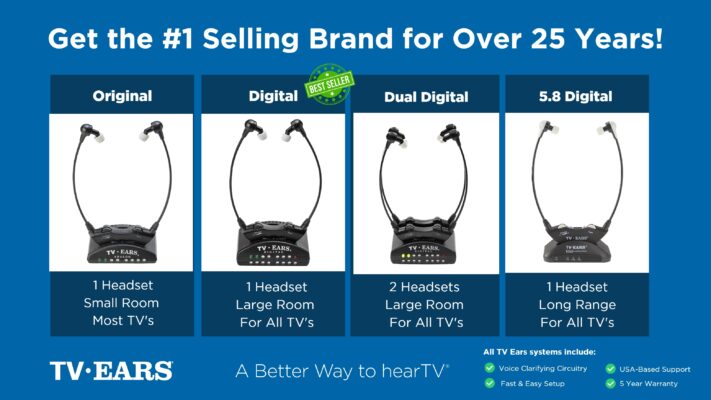
TV hearing devices for seniors are designed with their comfort and convenience in mind. Lightweight and discreet, these devices can be worn comfortably for extended periods. Many models offer wireless connectivity and rechargeable batteries, eliminating the hassle of constantly replacing disposable batteries. With the added convenience of wireless connectivity, users can stream audio directly from the television to their hearing device, ensuring a seamless and uninterrupted experience. Seniors can now enjoy TV viewing without compromising on comfort, style, or convenience. TV hearing devices for seniors have revolutionized the way individuals with hearing loss engage with television. By providing customized sound amplification, improved speech clarity, and enhanced comfort, these devices restore joy and connection to the TV viewing experience. If you or a loved one is struggling with hearing loss, it is essential to explore the options available. TV Ears, a leading provider of TV hearing devices for seniors, offers a range of reliable solutions. Take the first step towards enjoying television again by evaluating the options provided by TV Ears and rediscover the possibilities that await. Visit TV Ears’ website today to learn more about their extensive range of TV hearing devices for seniors. Evaluate the options and discover the transformative power they can bring to your TV viewing experience. Take control of your enjoyment and reconnect with your favorite shows with TV Ears.
Struggling to Hear the TV? Find Your Solution with top-rated, audiologist-designed systems that can help, find more at www.tvears.com.
Looking for more? Check out the recent stories on the TV Ears blog:
Why settle? When looking for headphones for TV wireless is the best
Exploring the Pros and Cons of a Wireless TV Headphone system
When looking for hearing aids non prescription check out TV Ears, a top choice for TV watching for two decades
Enhance Your TV Watching Experience with TV Ears: Specialized Hearing Aids as Seen on TV
Unveiling the Importance of Hearing Aids Quality: Empowering Better Hearing
Headphones for TV for seniors, 6 reasons you’ll love them
Wireless Headphone for the TV: Rediscover Crystal-Clear Audio with TV Ears
Enhancing the TV Experience: Why Audio Matters to TV Listeners
Frequently Asked Questions
Why is just turning up the TV volume not enough? Simply increasing the volume makes everything louder, including background music, sound effects, and explosions. This often makes the dialogue you’re trying to hear even more jumbled and difficult to understand. The real issue is usually about clarity, not loudness. A dedicated TV listening device is designed to separate speech from other noises, delivering crisp, clear words directly to you.
How are TV hearing devices different from hearing aids? Think of it like having reading glasses versus everyday glasses. Hearing aids are designed to help you with all the sounds in your environment throughout the day. TV hearing devices are specialists; their one job is to take the audio directly from your television and fine-tune it specifically for dialogue clarity, giving you the best possible experience for watching your favorite shows.
Can someone else in the room listen to the TV at a normal volume while I use a TV hearing device? Yes, absolutely. This is one of the biggest benefits and is exactly how you can restore peace in the living room. The device’s transmitter sends sound directly to your headset, so you can have the volume as loud and clear as you need it. Meanwhile, the TV’s own speakers can be set to a comfortable level for everyone else, or even muted entirely.
I already have hearing aids. Do I still need a separate device for the TV? While some hearing aids can connect to the TV with a streamer, a dedicated TV listening system can still be a great tool. These devices are built specifically for clarifying TV audio, which can sometimes provide a better result than a general-purpose streamer. Plus, it can be more comfortable to use a lightweight headset for a few hours of TV instead of wearing your hearing aids, especially in the evening.
Are these devices complicated to set up and use? Not at all. They are designed with simplicity in mind. The setup usually involves plugging a small transmitter box into your television’s audio port and then turning on the wireless headset. Most people find they can get everything up and running in just a few minutes without needing any technical help.
Key Takeaways
- Focus on Clarity, Not Just Volume: If dialogue sounds muffled even when the TV is loud, the real issue is clarity. The best solutions are tools that specifically isolate and enhance speech, making conversations easy to follow against background noise.
- Start with Your TV’s Free Settings: Before you buy anything, grab your remote and explore the audio menu. Features like “Clear Voice,” “Dialogue Boost,” or even closed captions can make an immediate, no-cost difference in how well you understand your shows.
- Get a Personal Device to End the Volume War: A soundbar makes the TV louder for everyone, which doesn’t solve disagreements. A personal TV listening system gives you independent volume control, allowing you to hear perfectly without disturbing others in the room.
