
You’ve invested in a beautiful, high-definition television with a stunning picture, but when you turn it on, the sound just doesn’t measure up. Modern TVs are incredibly thin and sleek, but that slim design comes at a cost. There simply isn’t enough physical space inside the frame to house a powerful, high-quality speaker. As a result, the audio often sounds tinny, flat, and completely disconnected from the vibrant visuals on screen. If you’re tired of audio that feels like an afterthought, you’re in the right place. We’ll explore why the speaker in your TV falls short and cover the best ways to get sound that finally matches your picture quality.
Discover How the Right Speaker for TV Can Transform Your Home Entertainment
Are you tired of straining to hear your favorite TV shows and movies? Are you looking for ways to elevate your home entertainment experience to a whole new level? Look no further because in this blog post, we’ll explore the world of speakers for TV and how they can make a significant difference in your audio experience.
Is Your TV’s Built-In Speaker Good Enough?
When it comes to watching TV, having crystal-clear audio is just as important as having a high-quality visual experience. Many TVs come equipped with built-in speakers, but they often fall short in delivering the immersive sound quality you desire. This is where investing in a dedicated speaker for TV can truly transform your entertainment setup.
So, What Exactly Is a TV Speaker?
A speaker for TV, also known as a soundbar, is a specialized audio device designed to enhance the sound quality of your television. These sleek, compact devices can be placed in front of or mounted below your TV and are designed to deliver powerful, clear, and dynamic sound. Whether you’re watching action-packed movies, gripping sports events, or your favorite TV shows, a good speaker for TV can make you feel like you’re right in the middle of the action.
Why Built-in TV Speakers Are Often Weak
Have you ever noticed how sleek and thin modern TVs are? While they look fantastic mounted on a wall, that slim design comes at a cost to audio quality. Because they’re so thin, there’s simply very little space for good built-in speakers. Sound quality is directly related to the size of a speaker, and the tiny ones inside a flat-screen TV can’t produce a full range of sound. This is especially true for deep bass tones that make movies feel immersive. More importantly, it often results in dialogue that sounds tinny or muffled, forcing you to crank up the volume just to understand what’s being said—a common frustration for everyone in the room.
Advanced Built-in Speaker Technology
While most standard TVs struggle with audio, some high-end models are trying to solve the problem with new technology. You might hear about features like “acoustic surface technology,” where the TV screen itself vibrates to create sound, making the audio feel like it’s coming directly from the characters’ mouths. For example, some premium televisions from Sony use this to create a more immersive experience. However, these advanced features are typically reserved for the most expensive models. For the vast majority of viewers, especially those who find it difficult to catch every word of dialogue, an external audio solution remains the most reliable and affordable way to get the clear, powerful sound you need.
How to Troubleshoot Common TV Sound Problems
If you’re finding it difficult to hear your television, you’re not alone. Muffled dialogue and inconsistent volume are common frustrations. Before you start shopping for a new sound system, it’s worth spending a few minutes checking for simple issues that you might be able to fix yourself. Often, the solution is surprisingly easy and doesn’t cost a thing. Walking through these basic troubleshooting steps can help you identify the root of the problem and can often restore your TV’s sound to its proper working order, saving you time and money.
Check All Volume Controls
This might sound obvious, but it’s the most common culprit. Your sound system involves multiple components, and each one can have its own volume setting. Start by making sure the volume is turned up on your television itself using the TV’s original remote or side buttons. Then, check the volume on your cable box, satellite receiver, or streaming device like an Apple TV or Roku. It’s very easy to accidentally press the mute button on one remote while turning the volume up on another, leading to silence or very faint audio. Systematically check each device to ensure none are muted or set too low.
Review TV Audio Settings
Modern TVs have a variety of audio settings that can sometimes get switched by mistake. Grab your TV remote and navigate to the main menu, usually by pressing a “Settings” or “Menu” button. Look for an option labeled “Audio” or “Sound.” Inside this menu, you’ll want to confirm that the audio output is set to the correct source. If you’re just using the speakers built into your television, this setting should say “TV Speakers” or “Internal Speakers.” If you’re trying to use a soundbar or other external device, you’ll need to select the appropriate output, such as “HDMI ARC” or “Optical.” You can find helpful guides on how to adjust these settings for most major brands.
Inspect Cables
A loose or faulty cable is another frequent source of sound problems. Take a moment to carefully inspect all the wires connected to your TV and any external audio devices. Check that your HDMI or optical audio cables are plugged in securely at both ends—one end in the TV and the other in your cable box, soundbar, or receiver. Look for any visible signs of damage, like fraying or bent pins. If you have a spare cable, try swapping it out to see if that resolves the issue. A poor connection can easily disrupt the audio signal, leading to static, intermittent sound, or no sound at all.
Power Cycle Your Equipment
Just like a computer, your TV and its connected devices can sometimes develop temporary glitches that a simple restart can fix. This process, known as a power cycle, is a go-to fix for many electronic issues. Start by turning off your television and any connected audio equipment. Then, unplug each device directly from the wall outlet. Wait for at least 60 seconds to allow the internal components to fully reset. Afterward, plug everything back in and turn your TV on. This simple action can clear out minor software bugs that may have been interfering with your sound.
Update TV Software
If you have a smart TV, it runs on software that occasionally needs to be updated. These updates often include bug fixes and performance improvements that can resolve a wide range of issues, including audio problems. To check for an update, go to your TV’s settings menu and look for a section called “System,” “Support,” or “About.” From there, you should find an option to “Check for Updates” or “Software Update.” If an update is available, follow the on-screen instructions to download and install it. Keeping your TV’s firmware current is a great way to ensure everything runs smoothly.
Hear What You’ve Been Missing: The Benefits of a TV Speaker
- Improved Sound Quality: A high-quality TV speaker can provide superior audio clarity, ensuring that you don’t miss a single word or sound effect.
- Enhanced Bass: Many TV speakers lack bass, but a dedicated speaker can provide that satisfying rumble during intense moments.
- Immersive Experience: With advanced audio technologies, speakers for TV can create a surround sound-like experience, pulling you deeper into the content.
- Sleek Design: Modern soundbars are designed to complement your TV setup, adding a touch of elegance to your living room.
- Easy Setup: Installing a speaker for TV is a breeze. Most options connect effortlessly through HDMI or Bluetooth.
Types of External Sound Systems
So, you’ve decided you want better sound from your TV. That’s a great first step! The next part is figuring out which type of external sound system is the right fit for your living room and your listening needs. The main goal of these systems is to fill the space with richer, clearer audio than your TV’s built-in speakers can produce on their own, making movie nights feel more like a trip to the theater. Your choice really comes down to your space, your budget, and the kind of experience you want to create. While both options can improve your audio, they offer very different experiences. To help you decide, let’s explore the two most common types of TV audio systems you’ll find when you start looking.
Soundbars
Soundbars are the most popular choice for upgrading TV audio, and for good reason. They are single, long speakers that greatly improve clarity and are designed to sit neatly in front of your television. They come in various configurations, from simple 2.0 channel bars (with left and right speakers inside) to more complex systems that include a separate subwoofer for deep bass and even rear speakers for a surround sound effect. Their sleek design and simple setup make them an easy and effective way to get better performance from your TV’s audio without cluttering your room with lots of wires and multiple components.
Home Theater Systems
For a true cinema experience, a full home theater system is the way to go. These systems use multiple speakers placed strategically around the room (such as in a 5.1 or 7.1 setup) to create an immersive surround sound environment. This setup makes you feel like you’re in the middle of the action, with sound effects coming from all directions. While they require more space and a more involved setup process, a home theater system is a great option for dedicated movie watchers who want to replicate the powerful audio experience of a commercial movie theater in their own home.
How to Pick the Perfect Speaker for Your TV
When shopping for a speaker for your TV, there are several factors to consider:
- Sound Quality: Look for models that offer clear dialogue, balanced audio, and customizable settings.
- Compatibility: Ensure that the speaker is compatible with your TV, and check if it offers various connectivity options.
- Size and Design: Consider the aesthetics of your living space and choose a speaker that blends seamlessly.
- Price: Set a budget and find a speaker that offers the best value for your money.
- Brand Reputation: Read reviews and consider reputable brands known for their audio quality.
Look for Dialogue Enhancement
If your main struggle is catching what characters are saying, you’re not alone. It’s frustrating when important plot points get lost in a mix of background music and sound effects. That’s why you should look for a speaker with a dialogue enhancement feature. Often called “Dialogue Mode” or “Voice Enhancement,” this setting intelligently adjusts the audio frequencies to make human speech stand out more clearly. This means you can follow the conversation without constantly reaching for the remote. For those who find that even this feature isn’t quite enough, specialized assisted listening devices are designed specifically to clarify and amplify television dialogue, providing a personalized volume that won’t disturb others in the room.
Consider Immersive Audio Formats
For a truly cinematic feel right in your living room, look for speakers that support immersive audio formats. Technologies like Dolby Atmos and DTS:X are designed to create a three-dimensional soundscape where audio feels like it’s coming from all around you, not just from the front. Imagine hearing the rain in a movie seem to fall from your ceiling or a car chase sound like it’s happening right outside your window. This technology can make action movies, live sports, and video games feel incredibly lifelike, pulling you into the experience like never before. It’s a feature that can dramatically change your home entertainment setup.
Check for Expandability
You don’t have to buy your entire dream sound system all at once. Some soundbars are designed to be modular, which gives you the flexibility to upgrade your setup over time as your needs and budget change. You could start with just the soundbar itself for clearer dialogue and better overall sound. Later, you might add a wireless subwoofer to get that deep, rumbling bass for movie nights, or add a pair of rear speakers to create a true surround sound environment. This approach allows you to build a full surround sound system at your own pace without having to replace your initial investment.
How to Connect Speakers to a TV
Once you’ve chosen a speaker, the next step is connecting it to your TV. Don’t worry, it’s usually a very straightforward process. Most speakers offer a few different ways to connect, so you can choose the one that works best for your television and setup. Here are the most common options you’ll find, from the highest quality to the most basic.
HDMI ARC/eARC
Using an HDMI cable with ARC (Audio Return Channel) or the newer eARC (Enhanced Audio Return Channel) is typically the best option. This single-cable connection sends high-quality audio from your TV to your speaker and, most importantly, allows you to control the speaker’s volume using your existing TV remote. There’s no need to juggle multiple remotes just to turn the sound up or down. Most modern TVs have at least one HDMI port labeled “ARC,” making this a simple and effective setup for achieving great sound with minimal fuss.
Optical Cable
If your TV doesn’t have an available HDMI ARC port, or if you’re using an older model, an optical cable is another excellent choice. This connection also transmits a high-quality digital audio signal, ensuring your sound is clear, crisp, and detailed. While it doesn’t offer the same convenient remote control integration as HDMI ARC, it’s a very reliable and widely available connection method. It provides a significant audio upgrade over your TV’s built-in speakers and is a solid backup if HDMI isn’t an option for you.
3.5mm Headphone Jack
The simplest way to connect a speaker is through the 3.5mm headphone jack, the same kind you’d use for a standard pair of headphones. This analog connection is easy to use and universally compatible with almost any TV. However, it generally provides the lowest sound quality compared to digital options like HDMI or optical because the audio signal is more susceptible to interference. While it’s certainly better than relying on weak built-in TV speakers, it should be considered a last resort if you want to get the best possible performance from your new speaker.
How Room Acoustics Affect Sound
The environment where you watch TV plays a huge role in how your speaker sounds, and it’s something many people overlook. The size, shape, and furnishings of your room can all impact audio quality. For example, large, open rooms with hard surfaces like bare walls, large windows, and hardwood floors can cause sound to bounce around, creating an echo that makes dialogue and effects sound muddy. To improve your listening experience, you can absorb sound by adding soft materials to the space. Simple additions like an area rug, thick curtains, and upholstered furniture can make a noticeable difference by reducing echo and helping you hear everything much more clearly.
Struggling to Hear the TV? Meet TV Ears Wireless Headphones
While a quality speaker for TV can greatly enhance your audio experience, we understand that some individuals may face unique challenges when it comes to hearing television audio. Whether it’s due to hearing impairment or the need for personalized audio levels, TV Ears offers a game-changing solution with our wireless headphones and headsets.
When Turning Up the Volume Isn’t Enough
Hearing difficulties can often make it frustrating to watch TV. You may find yourself constantly adjusting the volume, missing important dialogue, or straining to catch every word. This not only affects your enjoyment of the content but can also be a source of frustration for those around you.
How TV Ears Delivers Your Personal TV Sound
TV Ears wireless headphones and headsets are designed to provide a personalized audio experience, making TV-watching enjoyable for everyone, regardless of their hearing capabilities. Here’s why they are a game changer:
- Customized Audio: TV Ears headphones and headsets allow you to adjust the volume independently from the TV’s speakers. This means you can amplify the sound to a level that’s comfortable for you without affecting others.
- Clear Dialogue: Our specialized technology focuses on enhancing dialogue, ensuring that every word is crisp and clear. No more missing out on important plot points or punchlines.
- Wireless Freedom: With our wireless options, you can move around freely without being tethered to your TV. This is especially convenient if you need to step away but don’t want to miss a moment of your favorite show.
- Comfortable Design: TV Ears headphones and headsets are designed for extended wear. They’re lightweight, comfortable, and perfect for long TV-watching sessions.
- Compatibility: Our products are compatible with most TVs and come with easy setup instructions, so you can start enjoying better audio right away.
Ending the “Volume Wars” for Good
TV Ears wireless headphones and headsets aren’t just for those with hearing difficulties. They offer a versatile and inclusive solution for households where different family members have varying audio preferences. Now everyone can enjoy their favorite programs at their preferred volume without compromise.
Find Your Perfect Pair of TV Ears Headphones
Discover the difference TV Ears wireless headphones and headsets can make in your TV-watching experience. Whether you’re looking for comfortable over-ear headphones or a compact, stylish headset, we have options to suit your needs. 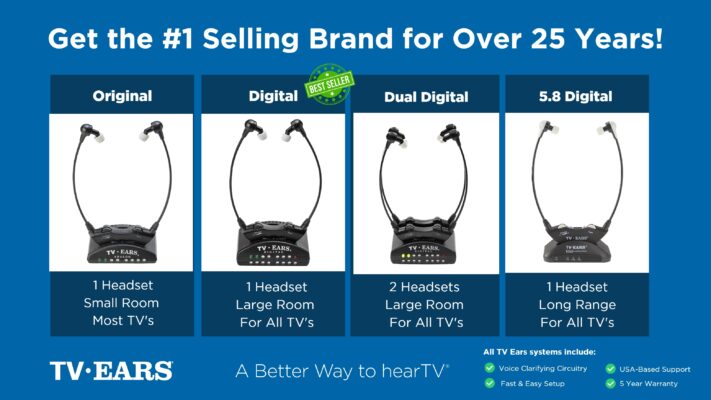 Ready to take your TV audio to the next level? Explore our Wireless Headphones and Headsets collection today! And don’t miss our custom audiologist-designed speaker system. At TV Ears, we are committed to ensuring that everyone can enjoy TV to the fullest. Our range of speakers for TV and wireless headphones and headsets are designed to cater to diverse needs and preferences, making your home entertainment experience truly exceptional. Don’t let hearing difficulties or differing audio preferences hold you back from enjoying your favorite shows and movies. Explore TV Ears’ solutions and rediscover the joy of TV-watching.
Stay Tuned for More TV Ears Insights
If you’re passionate about enhancing your TV-watching experience, you won’t want to miss our other blog posts. We regularly publish articles on the latest audio technology, home entertainment tips, and more. Check out our latest blogs below:
The Wireless Wonders: Unleash the Magic of Wireless Headphones!
The Wireless Headphones for TV Experience: Elevate Your Entertainment!
Hear Every Word Clearly: Exploring Fun TV Listening Devices for Hearing Impaired
Don’t miss out on valuable insights and tips from TV Ears experts. Investing in the right speaker for your TV can dramatically enhance your home entertainment experience. Whether you’re an audiophile or simply want to enjoy your favorite shows and movies with exceptional sound, a speaker for TV is a worthwhile addition to your setup. Explore TV Ears’ wide range of speakers, headphones and headsets today and start enjoying TV like never before.
Frequently Asked Questions
Why does turning up the volume on my TV make the sound louder, but not clearer? Think of your TV’s built-in speakers like a small lightbulb in a big room. Making it brighter (louder) doesn’t necessarily help you see the details more clearly. These tiny speakers amplify everything at once—background music, sound effects, and dialogue—all mixed together. This often makes the audio sound distorted and can actually make speech harder to understand, as it gets buried under all the other noise.
Will any soundbar make it easier to understand dialogue? While almost any external speaker is an improvement, not all are created equal when it comes to dialogue. If your main frustration is catching conversations, you should specifically look for a soundbar that has a “dialogue enhancement” or “voice clarity” feature. This technology intelligently identifies and boosts the frequencies of human speech, making words stand out from the rest of the audio mix.
I’m not very technical. Is setting up a new sound system complicated? Not at all. Most modern sound systems are designed for a simple, user-friendly setup. The most common connection, HDMI ARC, uses a single cable that sends audio to the speaker and even lets you control the volume with your regular TV remote. The process is usually as straightforward as plugging in the cable and changing one setting in your TV’s audio menu.
My family complains the TV is too loud, but I still struggle to hear it. What can I do? This is an incredibly common situation, and it’s the perfect scenario for a personal listening device. Instead of trying to fill the whole room with sound everyone can agree on, solutions like TV Ears deliver clear audio directly to you. This allows you to set a volume that’s perfect for your ears, while everyone else in the room can listen at a much lower, more comfortable level from the main TV speakers.
Do I need to rearrange my entire living room to get better sound? You definitely don’t need a complete makeover. The acoustics of a room do matter, but you can make a big impact with small changes. Hard surfaces like bare floors and large windows can cause sound to echo, making it sound muddled. Adding soft materials like an area rug, some throw pillows, or thicker curtains can absorb that echo and make your TV audio sound noticeably clearer.
Key Takeaways
- Rule Out Simple Fixes First: Before you buy new equipment, check for common issues that don’t cost anything to fix. Make sure the volume is up on both your TV and cable box, inspect your cables for a secure connection, and try unplugging your devices for a minute to reset them.
- Prioritize Clear Dialogue When Choosing a Speaker: If you decide to upgrade, focus on features that make voices easier to understand. Look for a soundbar with a “Dialogue Enhancement” or “Voice Mode” to lift conversations above background music and sound effects.
- Personal Listening Solves the Volume Conflict: When different people need different volumes, a personal listening system is the best solution. TV Ears headphones allow one person to have clear, amplified sound at their ideal level without disturbing others in the room.
