
If you struggle to hear dialogue on TV, you know the problem isn’t always about volume. Turning it up often just amplifies the loud explosions and swelling music, leaving conversations just as muffled as before. The real solution lies in technology that can intelligently separate speech from background noise, delivering crisp, clear dialogue directly to your ears. This guide will cover all the essential features to look for in a pair of headphones for tv watching wireless, from voice clarification technology and battery life to ensuring they are comfortable enough for a movie marathon. Let’s get you back to enjoying TV without the frustration.
Hear Your TV Perfectly with Wireless Headphones
What Are Wireless Headphones for TV Watching?
At their core, wireless TV headphones are designed to give you a personal, clear audio experience without being physically tethered to your television. As noted by The New York Times’ Wirecutter, they “let you watch TV or play games without bothering others in your home.” This simple function solves a common household dilemma: the battle over the TV volume. If you struggle to hear dialogue clearly, you might turn the volume up, only to find it’s uncomfortably loud for your spouse, family, or neighbors. Wireless headphones create a private listening bubble, allowing you to set the volume to your perfect level while others can keep the room quiet or listen at a much lower volume.
These devices are more than just standard headphones. They are specifically engineered for home entertainment. Unlike typical music headphones, the best models for TV focus on features like minimizing audio lag, ensuring a long and stable connection, and, most importantly, clarifying speech. For anyone who has ever had to ask, “What did they just say?” while watching a movie, these headphones can be a game-changer. They bring dialogue to the forefront, making it crisp and easy to understand, so you can follow the plot without constantly reaching for the remote or relying on subtitles.
How Wireless TV Headphones Work
Getting sound from your TV to a pair of headphones without a wire might seem like magic, but it’s all about reliable technology. The process involves two key components: the headphones you wear and a small transmitter that connects directly to your television. This transmitter is the heart of the system; it takes the audio signal from your TV and broadcasts it wirelessly to your headset. This dedicated connection is what sets TV headphones apart from simply pairing any old headphones with a smart TV, as it’s built for stability and clarity over long periods of use.
Understanding how this connection works is key to choosing the right pair for your needs. The technology used to send the signal, the role of the transmitter, the potential for audio lag, and the range you have to move around are all important factors. These elements work together to determine whether your viewing experience is seamless and enjoyable or frustrating and out of sync. Next, we’ll look at these components more closely so you can feel confident in how these systems deliver clear, uninterrupted sound right to your ears.
Understanding Wireless Technology: RF vs. Bluetooth
When you start looking at wireless headphones for TV, you’ll see two main technologies mentioned: Radio Frequency (RF) and Bluetooth. While Bluetooth is common for listening to music on your phone, RF is often the better choice for watching television. The biggest reason comes down to something called latency, or audio lag. As Wirecutter points out, “RF headphones generally have less delay (latency) between the sound and picture, which is important for TV watching.” This means the words you hear are perfectly synced with the actors’ lips moving on screen, creating a natural and immersive experience.
Bluetooth, on the other hand, can sometimes have a noticeable delay. This can be incredibly distracting, making it feel like you’re watching a poorly dubbed foreign film. RF technology, like that used in TV Ears systems, creates a direct, low-latency connection between the transmitter and the headphones. This ensures that the audio is delivered in real-time, preserving the timing and rhythm of your favorite shows and movies. For the best and most reliable TV audio, an RF system is almost always the way to go.
The Role of a Transmitter for a Stable Connection
The unsung hero of any great wireless TV headphone system is the transmitter. This small base unit is what makes a stable, high-quality audio connection possible. You simply plug the transmitter into your TV’s audio output port and a power source. It then takes the sound from your TV and broadcasts it as a wireless signal directly to your headphones. According to Wirecutter, “The best systems come with both headphones and a wireless box (transmitter) that plugs into your TV.” This all-in-one approach ensures that the components are designed to work perfectly together, eliminating the guesswork and compatibility issues that can arise from mixing and matching different devices.
This dedicated transmitter is crucial because it creates a private, interference-free connection. Unlike Bluetooth, which can sometimes be disrupted by other devices in your home like smartphones or microwaves, an RF transmitter provides a consistent and clear signal. It’s the foundation for a reliable listening experience, ensuring that your audio doesn’t cut out or stutter in the middle of a critical scene. Think of it as a personal radio station for your TV, broadcasting sound exclusively for you.
Why Audio Lag (Latency) Matters
Have you ever watched a video where the sound is just slightly off from the picture? It’s a small detail that can make the entire experience feel wrong. This frustrating phenomenon is called audio lag, or latency, and it’s a critical factor to consider when choosing wireless headphones for TV. When latency is high, you’ll see an actor’s lips move before you hear their words, which can completely pull you out of the story. It’s a jarring disconnect that can ruin a dramatic moment or make fast-paced dialogue impossible to follow.
This is precisely why the technology behind your headphones is so important. As mentioned earlier, “RF-based systems usually perform better for TV because they have less audio delay.” These systems are engineered to transmit audio almost instantaneously, ensuring the sound and picture are perfectly synchronized. While a slight delay might not matter when you’re just listening to music, it makes a world of difference when you’re watching television. A low-latency system ensures a seamless and natural viewing experience, letting you forget about the technology and just enjoy your show.
Wireless Range and Freedom of Movement
One of the greatest benefits of wireless headphones is the freedom to move. With a traditional wired headset, you’re stuck in one spot. But with a wireless system, you can get up to grab a drink from the kitchen, let the dog out, or fold laundry without missing a single word of dialogue. This freedom depends on the wireless range of the headphones, which is another area where RF technology truly shines. While Bluetooth range is often limited to around 30 feet, the range for RF headphones can be much greater.
In fact, some RF systems can reach far, up to 330 feet from the transmitter. This generous range means you can move freely throughout your home and even into your yard without the sound cutting out. You can stay engaged with your news program while making coffee or keep listening to the game while grilling on the patio. This level of mobility ensures that you don’t have to press pause on your life just to stay connected to your entertainment.
Key Features to Look For in TV Headphones
Once you understand how wireless TV headphones work, you can start focusing on the features that will make the biggest difference in your day-to-day use. It’s not just about hearing the TV; it’s about having a device that is convenient, comfortable, and tailored to your specific needs. The right features can transform your television viewing from a passive activity into a truly enjoyable and effortless experience. From how long the battery lasts to how easily it connects to your TV, every detail matters.
When comparing different models, there are a few key areas to consider. You’ll want to look at the battery life and charging method to ensure your headphones are always ready when you are. Compatibility with your television is also crucial for a hassle-free setup. Most importantly, for those with hearing difficulties, specialized features like voice clarification technology and a comfortable design are non-negotiable. Let’s explore what makes a great pair of TV headphones so you can find the perfect fit for your home.
Battery Life and Charging Method
There’s nothing more frustrating than having your headphones die in the middle of a movie finale or a tense sports match. That’s why battery life is one of the most practical features to consider. You need a headset that can keep up with your viewing habits, whether you enjoy watching for an hour or settling in for a full-day marathon. A long-lasting battery provides peace of mind, so you can immerse yourself in your show without worrying about an interruption.
Specific Battery Duration
When looking at product specifications, you’ll want to find a pair of headphones that offers several hours of continuous playtime. Many quality models, like some found on Amazon, state that “the headphones can play for up to 10 hours on a full charge.” This is more than enough power to get you through multiple movies, a whole season of a show, or a long afternoon of sports. A robust battery life means you spend more time watching and less time waiting for your device to recharge, making your entertainment experience much more seamless.
Convenient Charging Docks
Just as important as battery life is how you charge the headphones. Fumbling with tiny charging cables can be a hassle, especially for those with dexterity issues. The best systems solve this problem with an integrated charging dock. Often, “the headphones come with a charging dock that also acts as the transmitter.” This dual-purpose design is incredibly convenient. When you’re finished watching, you simply place the headphones back on the base. They’ll be secure, out of the way, and charging for your next use. It’s an elegant solution that ensures your headphones are always powered up and ready to go.
TV Connection and Compatibility Options
A common concern before buying any new tech is, “Will this work with my TV?” Fortunately, most wireless headphone systems are designed with universal compatibility in mind. Leading brands like Avantree ensure their “headphones are compatible with any TV.” They achieve this by including multiple connection options to fit nearly any television, old or new. The transmitter will typically come with cables for the three main types of audio outputs: digital optical (the most common on modern TVs), RCA (the red and white plugs), and a 3.5mm headphone jack.
This means that setup is usually straightforward, regardless of your TV model. The package includes everything you need to connect the transmitter to the correct port on the back of your television. You won’t need to make an extra trip to the electronics store or try to decipher a complicated manual. This focus on broad compatibility ensures that you can bring your new headphones home, plug them in, and start enjoying clearer audio in just a few minutes.
Specialized Features for Hearing Impairment
For many people, the goal of using TV headphones isn’t just to listen privately—it’s to hear the television clearly, perhaps for the first time in years. Standard headphones make the sound louder, but that can also amplify background music and sound effects, leaving dialogue just as muddled as before. This is why specialized features designed for hearing impairment are so important. These technologies don’t just turn up the volume; they intelligently enhance the audio to make it easier to understand.
Voice Clarification Technology
The single most important feature for anyone who struggles to follow conversations on TV is voice clarification. This advanced technology actively separates speech from distracting background noise. As one brand describes it, “These headphones help make TV dialogue crystal clear, so you don’t miss any words.” It works by identifying vocal frequencies and boosting them while reducing the volume of other sounds like music, explosions, or ambient noise. This is the core technology behind TV Ears products, which are specifically designed to lift dialogue out of the mix, allowing you to catch every whisper and witty remark with ease.
Comfortable and Functional Design
Even the best-sounding headphones won’t be used if they’re uncomfortable to wear. Since you might be wearing them for hours at a time during a movie or binge-watching session, comfort is key. Look for headphones that are described as “lightweight with soft, adjustable headbands and over-ear cushions.” A lightweight design prevents neck strain, while soft padding around the ears prevents soreness and pressure. An adjustable headband ensures a snug but gentle fit for any head size. These ergonomic details are crucial for making your TV headphones a pleasure to wear for any length of time.
Practical Use in a Shared Household
Beyond the technical specifications, the true value of wireless TV headphones is how they improve daily life in a shared home. They are a tool for creating peace and harmony in the living room, allowing multiple people to enjoy the same space without compromising on their comfort. Whether it’s a couple with different hearing needs or a family with varying volume preferences, these devices offer a simple and effective solution. They allow for a personalized audio experience that coexists peacefully with the traditional shared experience of watching television together.
The best systems are designed with this shared environment in mind, offering features that accommodate more than one listener and allow for simultaneous use of both the headphones and the TV’s main speakers. Paired with a simple, frustration-free setup process, these practical benefits are what make wireless TV headphones an indispensable accessory for many households. They help end the remote control wars and make movie night enjoyable for everyone involved.
Using Multiple Headphones Simultaneously
What if more than one person in your home needs help hearing the TV? Many systems are designed to accommodate this exact situation. With the right setup, “one transmitter can connect to more than one pair of these… headphones, so multiple people can listen at once.” This is an ideal feature for couples who both want to use a headset, allowing each person to control their own volume and tone settings. It means you can sit side-by-side and share an experience while still enjoying audio that is perfectly tailored to your individual hearing needs.
This feature is incredibly useful for maintaining a sense of togetherness. Instead of one person watching with headphones while the other feels left out, you can both tune in with crystal-clear sound. It’s a simple way to ensure that no one has to compromise. You can both follow the plot, catch every joke, and enjoy your favorite shows together, all without arguing over the volume.
Keeping the TV Speakers On for Others
A common question people have is whether using headphones will mute the TV for everyone else in the room. The great news is that, in most cases, it won’t. According to experts, “For most TVs (over 70%), you can have the headphones and the TV speakers working at the same time.” This feature is the ultimate key to household harmony. The headphone user can enjoy their amplified, clarified audio at their preferred volume, while family and guests can listen to the TV’s built-in speakers at a lower, more comfortable level.
This dual-audio output means no one is excluded. The person with hearing loss gets the support they need, and everyone else can enjoy the show without the volume being painfully loud. It completely resolves the conflict over the remote, creating a peaceful and inclusive viewing environment. Before purchasing, it’s always a good idea to check your TV’s audio settings to confirm it supports simultaneous output, but most modern televisions do.
The Importance of a Simple Setup Process
Technology is only helpful if you can actually use it, and a complicated setup process can be a major barrier. The best wireless headphone systems are designed to be user-friendly right out of the box. The goal should be a “plug-and-play” experience that doesn’t require technical expertise or a confusing manual. As Wirecutter confirms, “The best systems are simple to plug into your TV and connect to the headphones.” A straightforward setup ensures that you can start enjoying better TV audio almost immediately, without any frustration.
Typically, the process involves just a few simple steps: connect the transmitter to the correct audio output port on your TV using one of the included cables, plug the transmitter into a power outlet, and turn on the headphones. They should connect automatically. This simplicity is especially important for seniors or anyone who isn’t comfortable with complex technology. A product that is easy to install and operate is one that will be used and appreciated every day.
Which TV Ears Headphones Are Right for You?
Discover the difference TV Ears wireless headphones and headsets can make in your TV-watching experience. Whether you’re looking for comfortable over-ear headphones or a compact, stylish headset, we have options to suit your needs. 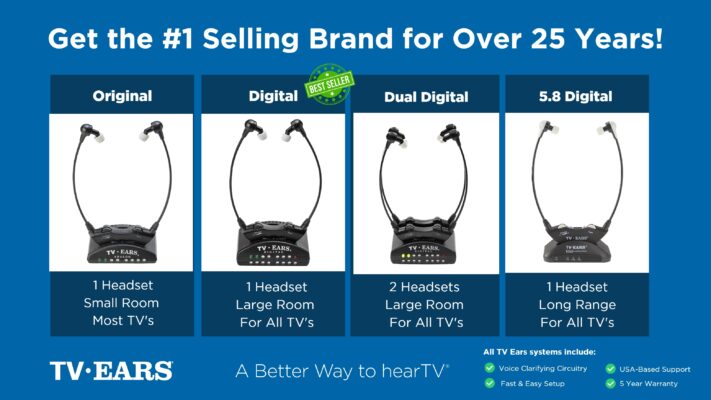 Ready to take your TV audio to the next level? Explore our Wireless Headphones and Headsets collection today! And don’t miss our custom audiologist-designed speaker system. At TV Ears, we are committed to ensuring that everyone can enjoy TV to the fullest. Our range of speakers for TV and wireless headphones and headsets are designed to cater to diverse needs and preferences, making your home entertainment experience truly exceptional. Don’t let hearing difficulties or differing audio preferences hold you back from enjoying your favorite shows and movies. Explore TV Ears’ solutions and rediscover the joy of TV-watching.
More Ways to Improve Your TV Experience
If you’re passionate about enhancing your TV-watching experience, you won’t want to miss our other blog posts. We regularly publish articles on the latest audio technology, home entertainment tips, and more. Check out our latest blogs below:
Enhance Your TV Viewing Experience with Wireless Headphones for Watching TV
Elevate Your TV Experience with TV Ears: The Ultimate Headphones for Televisions
Enjoy Ultimate Freedom with TV Ears: Enhance Your TV with Wireless Headphones
Don’t miss out on valuable insights and tips from TV Ears experts. Investing in the right speaker for your TV can dramatically enhance your home entertainment experience. Whether you’re an audiophile or simply want to enjoy your favorite shows and movies with exceptional sound, a speaker for TV is a worthwhile addition to your setup. Explore TV Ears’ wide range of speakers, headphones and headsets today and start enjoying TV like never before.
Alternative Ways to Hear the TV Better
While wireless headphones offer a fantastic personal listening experience, they aren’t the only solution out there. If you’re looking for other ways to make your television easier to hear, there are a few simple adjustments and devices you can explore. From using features already built into your TV to adding specialized equipment, here are some effective alternatives to help you catch every word of your favorite shows without reaching for the remote every five minutes.
Check Your TV’s Built-in Sound Settings
Before you buy any new gear, it’s always a good idea to start with what you already have. Your television likely has built-in sound settings that can make a real difference. Buried in the audio menu, you’ll often find presets like ‘Movie’ or ‘Sports,’ but the one to look for is usually labeled ‘Clear Voice’ or ‘Dialogue Enhance.’ Activating this mode tells your TV to focus on the frequencies of human speech, making dialogue stand out from background music and sound effects. It’s a simple, free adjustment that can significantly improve your TV’s sound without making the entire show louder. Just grab your remote, head to the ‘Sound’ or ‘Audio’ menu, and see what options are available.
Use Closed Captions or Subtitles
Another feature that comes standard on every TV is closed captioning. By turning on captions, you can read the dialogue right on the screen, which is a great way to catch any words you might have missed. It’s a quick and easy fix that doesn’t require any extra hardware. However, this approach isn’t for everyone. Some people find it distracting to try and read the text while keeping up with the action on screen. Plus, captions can sometimes be inaccurate or delayed, which can make following along even more confusing. While they are a helpful tool, it’s important to remember they are a visual aid rather than a true audio solution, which is something to consider as you explore your options.
Try a Voice Clarifying TV Speaker
If you’ve tried adjusting your TV’s settings and find captions distracting, a specialized speaker might be the perfect solution. It’s a common mistake to think that any soundbar will fix the problem of muffled dialogue. Most soundbars are designed to make everything louder—the explosions, the music, and the speech—all at once. A voice clarifying TV speaker, however, is engineered differently. It uses advanced technology to isolate and amplify the frequencies of the human voice, lifting dialogue out from the jumble of background noise. This means you can finally understand conversations clearly without having to constantly turn the volume up for quiet scenes and then rush to turn it down for loud action sequences.
Frequently Asked Questions
Will these headphones work with my specific TV model? Most likely, yes. These systems are designed to be universally compatible with almost any television, whether it’s brand new or several years old. The transmitter that comes with the headphones typically includes a few different cables (like digital optical, RCA, and 3.5mm) to match the audio output ports on the back of your TV. This means you should have everything you need to connect it right out of the box without any guesswork.
Can I just use my regular Bluetooth headphones for TV instead? While you can pair Bluetooth headphones with some smart TVs, they often aren’t the best tool for the job. The biggest issue is audio lag, where you see an actor’s lips move a split second before you hear their words. It can be very distracting. TV-specific headphones that use Radio Frequency (RF) technology are built to eliminate that lag, ensuring the sound and picture are perfectly synced for a much more natural viewing experience.
If I use the headphones, will my family still be able to hear the TV? This is a great question and a common concern. On most modern televisions, using the headphones won’t automatically mute the internal speakers. This allows you to listen at your ideal volume through the headset while your family or friends listen at a lower, more comfortable volume through the TV’s speakers. It’s the perfect way to ensure everyone in the room can enjoy the show together without arguing over the remote.
What if I already wear hearing aids? Can I use these headphones too? Yes, many people who wear hearing aids find these headphones very helpful. Some headsets are designed to be worn comfortably over your hearing aids. Others, like the under-the-chin style, can be used as an alternative specifically for watching TV. They provide a direct, clear audio feed that can give your hearing aids a break and deliver dialogue with exceptional clarity, so it’s a great option to have.
How are these better than just turning on the closed captions? Closed captions are a useful tool, but they require you to split your attention between reading the screen and watching the action. It can be easy to miss important visual cues or feel like you’re not fully immersed in the story. Voice clarifying headphones provide a true audio solution. They lift the dialogue out from the background noise, allowing you to actually hear and understand the conversations, so you can simply sit back and enjoy the show as it was meant to be experienced.
Key Takeaways
- Insist on RF Technology for a Lag-Free Experience: To avoid the distracting delay where an actor’s lips don’t match their words, choose headphones that use Radio Frequency (RF) technology. This provides a direct connection that keeps the audio and video perfectly synchronized.
- Solve Muffled Dialogue with Voice Clarifying Tech: Simply making the TV louder often makes background noise worse. Look for headphones with voice clarification, a feature that specifically isolates and enhances speech to make conversations crisp and easy to follow.
- Choose Features That Fit Your Life: The best headphones are the ones you’ll actually use. Prioritize a lightweight, comfortable design for long viewing sessions and a simple charging dock that ensures your headset is always ready when you are.
