
The nightly battle over the TV volume is a common struggle in many homes. One person needs it loud to catch the dialogue, while for everyone else, it’s just noise. A personal listening device can bring peace back to the living room, but which one is right for you? The search for the best wireless headsets for TV often leads to more questions than answers. This article cuts through the confusion. We’ll explore what truly matters for TV listening, from sound quality and dialogue enhancement to battery life and overall comfort, helping you find a solution that lets everyone enjoy television together again.
Are Bluetooth Headsets the Secret to Clearer TV Dialogue?

In today’s wireless world, Bluetooth headsets for TV seem like a convenient solution for private listening. They’re widely available, and many people already own them for their phones or music. But when it comes to achieving truly clear dialogue and an optimal TV listening experience, especially for those with hearing challenges, are generic Bluetooth headphones always the best choice? Let’s dive in.
The Appeal of Bluetooth Headsets for TV
Bluetooth headphones offer undeniable convenience. They’re wireless, often lightweight, and can connect to many modern Smart TVs directly. For casual listening or if you simply want to keep the volume down for others, they can be a decent option.
Where Bluetooth Headsets for TV Fall Short for Dialogue Clarity
While convenient, standard Bluetooth headsets often present several challenges when used for TV audio, particularly if you’re looking for enhanced dialogue clarity:
- Audio Delay (Lip Sync Issues): One of the most common frustrations with Bluetooth for TV is latency, or audio delay. This means the sound you hear in your headphones might be slightly out of sync with the actors’ lips on screen, creating a distracting and unnatural viewing experience. While some Bluetooth headphones feature “aptX Low Latency” , this requires both the headphones and the TV (or a separate transmitter) to support it, which isn’t always the case.
- Limited Range and Signal Stability: Bluetooth typically has a shorter effective range compared to dedicated TV listening systems, often around 30 feet. Moving too far from the TV can lead to signal dropouts or a degraded audio experience. Walls and other obstacles can further interfere with the signal.
- Lack of Voice Clarification: Generic Bluetooth headphones are designed for general audio, not specifically for enhancing dialogue. They often lack the specialized technology needed to isolate voices from background noise, making it difficult to discern speech, especially for those with mild to severe hearing loss.
- Compatibility Headaches: While many Smart TVs have Bluetooth, not all Bluetooth headphones are universally compatible, and some TVs may have limitations on what kind of Bluetooth devices they can connect to. Connecting hearing aids to a TV via standard Bluetooth is particularly challenging due to specialized protocols.
The TV Ears Advantage: Designed for Dialogue Clarity
This is where TV Ears systems truly shine. Unlike generic Bluetooth headsets, TV Ears are purpose-built for TV listening, with a specific focus on dialogue clarity and user comfort.
- Voice Clarifying Circuitry™: Our patented technology actively separates dialogue from background noise, amplifies it, and sends it directly to your ears for crystal-clear understanding.[1, 2] This is a level of speech enhancement that standard Bluetooth headphones simply cannot provide.
- Reliable Wireless Connection: TV Ears systems often use RF (Radio Frequency) technology, which provides a more stable and longer-range connection than Bluetooth, allowing you to move freely without signal interruptions.
- No Lip Sync Issues: Our systems are engineered to deliver audio with virtually no delay, ensuring perfect synchronization between what you see and what you hear.
- Doctor Recommended: TV Ears is a doctor-recommended solution, a testament to its effectiveness in addressing TV listening challenges for those with hearing difficulties.
Make the Clear Choice for Your TV Audio
While a Bluetooth headset for TV might offer basic wireless convenience, if you’re seeking truly clear dialogue, reliable performance, and a solution specifically designed for enhanced TV listening, a dedicated system like TV Ears is the superior choice. Don’t settle for muffled dialogue or frustrating delays.
Experience the difference that specialized technology makes. Explore TV Ears systems today and rediscover the joy of hearing every word clearly.
Understanding the Technology Behind TV Headsets
When you start looking for wireless TV headphones, you’ll quickly notice two main technologies: Bluetooth and Radio Frequency (RF). While both cut the cord, they work differently and offer distinct viewing experiences. Bluetooth is the technology you probably use for your phone or portable speakers. It’s incredibly common, but it wasn’t originally designed for the demands of TV audio, which can lead to some frustrating issues. RF, on the other hand, is a dedicated wireless technology that often provides a more seamless connection for home entertainment. Understanding the difference is the first step to finding a solution that lets you hear every word without any hiccups, ensuring your focus stays on your favorite show, not on technical glitches.
Bluetooth vs. Radio Frequency (RF)
Choosing between Bluetooth and RF isn’t just a technical detail; it directly impacts how you experience television. Bluetooth’s main advantage is its ubiquity—it’s built into countless devices, from smartphones to modern smart TVs. This can make setup seem simple. However, RF systems, which use a dedicated transmitter base connected to your TV, are specifically engineered for home audio. They often deliver a more robust and reliable signal that isn’t as prone to interference from other household devices. This dedicated connection is key to avoiding common audio problems and is why many specialized TV listening systems, including TV Ears, rely on RF technology for superior performance and clarity.
The Challenge of Audio Delay (Lip-Sync Lag)
Have you ever watched a movie where the actors’ lips move but the sound arrives a split second later? This distracting phenomenon is known as audio delay or latency, and it’s a common frustration with Bluetooth headphones. As one source notes, “the sound you hear in your headphones might be slightly out of sync with the actors’ lips on screen, creating a distracting and unnatural viewing experience.” While some newer Bluetooth devices use special low-latency technology to reduce this lag, both your headphones and your TV must support the exact same standard, which can be a compatibility gamble. This lip-sync issue can pull you right out of the story and is a significant drawback for a truly immersive TV session.
Why RF Offers a More Stable Connection
Radio Frequency (RF) systems excel where Bluetooth can sometimes falter. Because they use a dedicated transmitter that plugs directly into your TV, they create a private, stable wireless connection that is less susceptible to interference. This results in virtually zero audio delay, so the sound is always perfectly synchronized with the picture on the screen. Furthermore, RF technology typically provides a much longer range than Bluetooth. This means you can get up and walk to the kitchen for a snack without the sound cutting out. This freedom and reliability make RF a more dependable choice for uninterrupted TV enjoyment, especially in larger homes.
Key Features to Consider in Wireless TV Headphones
Once you’ve decided on the underlying technology, it’s time to look at the features that will make or break your listening experience. It’s easy to get caught up in brand names or sleek designs, but the most important factors are the ones that directly address your needs. Are you struggling to understand dialogue? Is a long battery life essential for movie marathons? Do you need the freedom to move around the room? Thinking through these key features will help you narrow down the options and select a pair of headphones that truly solves your TV audio challenges, rather than just adding another gadget to your collection.
Sound Quality: Is Dialogue Clarity a Priority?
For many people, the primary goal of using TV headphones is to finally understand what the characters are saying. Most standard headphones are built for music, balancing bass, mids, and treble for a rich, general-purpose sound. However, they often “lack the specialized technology needed to isolate voices from background noise.” This means explosions, music, and sound effects can still drown out the speech. If your main struggle is with dialogue, look for headphones specifically designed for voice clarification. Systems like TV Ears are purpose-built with technology that actively amplifies speech and separates it from distracting background sounds, making every word crisp and clear.
Battery Life and Wireless Range
Practical features like battery life and wireless range have a huge impact on how convenient your headphones are to use day-to-day. No one wants their audio to die in the middle of a season finale or cut out when they lean back on the couch. A long battery life means less time spent charging and more time enjoying your shows. Similarly, a strong wireless range gives you the flexibility to move around without being tethered to the television. These two features work together to provide a seamless, uninterrupted experience, so be sure to check the specifications before you buy.
Comparing Battery Performance Across Models
Battery life can vary dramatically between different models and types of headphones. Many popular Bluetooth headphones offer anywhere from 20 to 40 hours of listening time on a single charge. RF headphones often have a similar or slightly shorter battery life per charge, but they come with a major convenience: a charging base. Instead of fumbling with cables, you can simply place the headphones on their transmitter base when you’re done watching, and they’ll be fully charged for your next session. As one review from Audiophile ON advises, it’s best to “choose headphones that last a long time so you don’t have to charge them often.”
How Far Can You Go? RF vs. Bluetooth Range
The effective range of your wireless headphones determines how much freedom you have. Bluetooth technology typically has a range of about 30 feet under ideal conditions. However, walls, furniture, and even other wireless devices can interfere with the signal and shorten that distance. In contrast, RF systems often boast a much longer range, sometimes up to 100 feet or more. This powerful and stable connection allows you to move freely throughout your home—perhaps to grab a drink from the fridge or check on something in another room—without worrying about the audio dropping out. This extended range is a significant advantage for anyone who doesn’t want to be stuck in one spot.
Other Important Features
Beyond the core technology and practical specs, a few other features can significantly improve your viewing experience. Things like noise cancellation can help you block out distractions from the world around you, creating a more immersive environment. At the same time, the ability to personalize the sound to your specific hearing needs can make a world of difference. These additional features are often what separate a good pair of headphones from a great one, turning a simple accessory into an essential part of your entertainment setup.
Active Noise Cancellation (ANC)
Active Noise Cancellation is a popular feature in many high-end headphones. It uses microphones to detect ambient sounds—like the hum of an air conditioner, traffic outside, or people talking in another room—and creates an opposing sound wave to cancel them out. This can be incredibly effective for creating a quiet, focused listening environment. Brands like Bose and Sony are well-known for their excellent noise-canceling technology. If you live in a noisy household or simply want to block out distractions and fully immerse yourself in your show, headphones with ANC are worth considering.
Personalized Sound Profiles
Some advanced headphones and dedicated TV listening systems allow you to adjust the audio to match your personal hearing preferences. This can include tone and balance controls or even specialized modes that emphasize dialogue. This is a crucial feature for anyone with hearing loss, as it allows you to fine-tune the sound for maximum clarity. While generic headphones offer a one-size-fits-all audio experience, systems that are “purpose-built for TV listening, with a specific focus on dialogue clarity and user comfort,” like TV Ears, provide a tailored sound that can make understanding television dialogue significantly easier.
Top-Rated Wireless Headphones According to Tech Reviewers
When you’re investing in a new piece of technology, it’s always a good idea to see what the experts have to say. Professional tech reviewers spend countless hours testing and comparing products, offering unbiased insights that can help guide your decision. They run objective tests on everything from sound quality and battery life to comfort and ease of use. By looking at the top-rated models from trusted sources like RTINGS.com and Wirecutter, you can get a clear picture of the best options available on the market and find a pair of headphones that has been proven to perform well in real-world conditions.
For Best RF Performance: Sennheiser RS 195
If you’re looking for a top-tier RF system, the Sennheiser RS 195 RF Wireless headphones consistently receive high marks. The tech review site RTINGS.com named them the best wireless headphones for TV they tested, noting that they are “made specifically for home theater use.” These headphones are praised for their excellent, balanced sound and feature several listening modes designed to enhance dialogue clarity or music. They also offer balance controls, making them a great option for users with different hearing abilities in each ear. Their comfortable design and reliable RF connection make them a favorite among serious home theater enthusiasts.
For High-End Bluetooth with ANC: Sony WH-1000XM5 & Bose QuietComfort Ultra
For those who prioritize noise cancellation and are willing to invest in a premium Bluetooth experience, the Sony WH-1000XM5 and Bose QuietComfort Ultra headphones are leaders in the field. Both models are celebrated for their world-class active noise cancellation, which can effectively silence household distractions. Reviewers often highlight their comfortable fit and high-quality, balanced sound that works well for both movies and music. While they may be susceptible to the lip-sync issues common with Bluetooth, their versatility and exceptional ANC make them a popular choice for users who want one pair of headphones for TV, music, and travel.
For Best Value: Avantree HT5009
If you’re looking for a great balance of features and price, the Avantree HT5009 is often recommended as a top value pick. This model uses Bluetooth but includes a dedicated low-latency transmitter, which helps minimize the audio delay that can plague other Bluetooth setups. This transmitter also allows you to connect two pairs of headphones at once, so you and a partner can watch together. Reviewers appreciate its straightforward setup, comfortable fit, and solid audio performance for the price, making it an excellent entry point into the world of dedicated wireless TV headphones.
For Multiple Users: Avantree Duet & Quartet
Watching TV with family or friends can be a challenge when everyone has different volume needs. Avantree offers a simple solution with its Duet and Quartet systems, which are designed to support multiple headphones from a single transmitter. The Duet supports two users, while the Quartet can support up to four. These systems are praised for their ease of use and ability to provide personalized volume control for each viewer. This makes them an ideal choice for couples or families who want to enjoy movies together without arguing over the volume.
For Apple TV Users: Apple AirPods Max
If you’re an avid Apple user, the AirPods Max offer a uniquely seamless experience when paired with an Apple TV. They feature Spatial Audio with dynamic head tracking, which creates a theater-like, immersive sound experience that makes you feel like you’re in the middle of the action. The setup is incredibly simple, as the headphones connect automatically to your Apple devices. While they are a premium-priced option and work best within the Apple ecosystem, their exceptional sound quality and innovative features make them a top contender for dedicated Apple TV viewers.
Getting Started: Setup and Compatibility Tips
You’ve picked out the perfect headphones—now it’s time to get them working with your TV. The setup process can be a little intimidating, but it’s usually quite straightforward once you know what to look for. The most important step is making sure your TV has the right connections, or audio output ports, to work with your new headphones. Taking a few minutes to check your TV’s compatibility before you buy can save you a lot of time and frustration later on. With the right connections, you’ll be enjoying clear, personal audio in no time.
First, Check Your TV’s Audio Output Ports
Before you purchase any wireless headphones, take a look at the back or side of your television to see what kind of audio output ports it has. The most common types are Optical (also called Digital Audio Out or TOSLINK), RCA (the red and white ports), and a 3.5mm headphone jack. Most dedicated TV headphone systems, including both RF and Bluetooth models that use a transmitter, will connect to one of these ports. While many modern smart TVs have Bluetooth built-in, remember that “not all Bluetooth headphones are universally compatible,” so using a transmitter connected to a physical port is often a more reliable method.
Can Others Listen to the TV Speakers at the Same Time?
This is one of the most common questions people have, and it’s a crucial one for households with multiple viewers. The ability for the headphones and the TV speakers to work simultaneously depends entirely on your television’s settings. Many modern TVs allow you to output audio to both the internal speakers and an external device (like headphones connected via the Optical port) at the same time. However, some older TVs will automatically mute the speakers when you plug something into the headphone jack. It’s a good idea to check your TV’s audio menu or manual to confirm its capabilities.
A Note on Emerging Technology: Auracast
The world of wireless audio is always evolving, and a new technology called Auracast is on the horizon. According to a report from Wirecutter, Auracast aims to improve on standard Bluetooth by allowing a single device, like a TV, to broadcast audio to an unlimited number of headphones at once. It also promises to make connecting easier. While this technology sounds promising for the future, it’s “still new and not widely available or easy to use yet.” For now, proven technologies like RF and dedicated low-latency Bluetooth systems remain the most reliable solutions for clear, synchronized TV audio.
Hear Every Word: Our Best Wireless Headsets for TV
Discover the difference TV Ears wireless headphones and headsets can make in your TV-watching experience. Whether you’re looking for comfortable over-ear headphones or a compact, stylish headset, we have options to suit your needs. 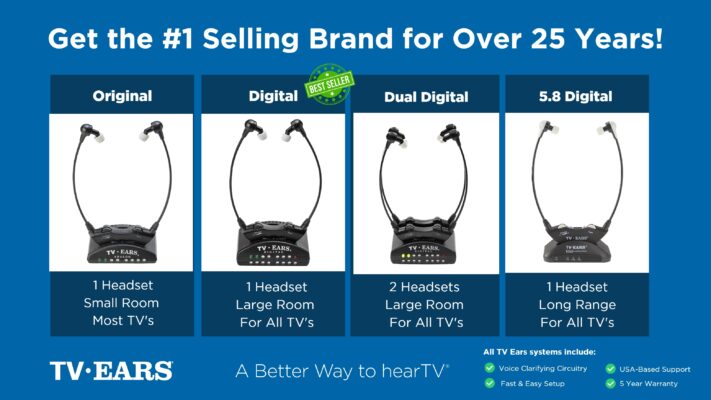 Ready to take your TV audio to the next level? Explore our Wireless Headphones and Headsets collection today! And don’t miss our custom audiologist-designed speaker system. At TV Ears, we are committed to ensuring that everyone can enjoy TV to the fullest. Our range of speakers for TV and wireless headphones and headsets are designed to cater to diverse needs and preferences, making your home entertainment experience truly exceptional. Don’t let hearing difficulties or differing audio preferences hold you back from enjoying your favorite shows and movies. Explore TV Ears’ solutions and rediscover the joy of TV-watching.
A Specialized Solution for Hearing Loss
How Voice Clarification Technology Makes Dialogue Easier to Understand
If you have hearing challenges, trying to follow the dialogue in television shows and movies can be a frustrating experience. While many people turn to Bluetooth headsets for a convenient listening solution, these generic devices often fall short. They are designed for general audio, not specifically for enhancing dialogue. As a result, they lack the specialized technology needed to isolate voices from background noise, making it difficult to discern speech, especially when music or sound effects are present in a scene.
In contrast, TV Ears systems are purpose-built to solve this exact problem. Our patented Voice Clarifying Circuitry™ actively identifies and separates speech from background sounds. It then amplifies the dialogue and delivers it directly to your ears for crystal-clear understanding. This level of speech enhancement is something standard Bluetooth headphones simply cannot provide, making it a core part of the TV Ears advantage. You can finally stop straining to hear and start enjoying the story as it was meant to be heard.
Furthermore, TV Ears systems are designed to eliminate common issues associated with Bluetooth technology, such as audio delay and limited range. We utilize RF (Radio Frequency) technology, which offers a more stable and longer-range connection. This allows you to move freely around the room without worrying about signal interruptions or annoying lip-sync issues. By choosing a specialized solution like TV Ears, you can rediscover the joy of clear dialogue and fully engage with your favorite TV programs without the typical frustrations of wireless audio.
Stay Tuned for More TV Ears Insights
If you’re passionate about enhancing your TV-watching experience, you won’t want to miss our other blog posts. We regularly publish articles on the latest audio technology, home entertainment tips, and more. Check out our latest blogs below:
The Wireless Wonders: Unleash the Magic of Wireless Headphones!
The Wireless Headphones for TV Experience: Elevate Your Entertainment!
Hear Every Word Clearly: Exploring Fun TV Listening Devices for Hearing Impaired
Don’t miss out on valuable insights and tips from TV Ears experts. Investing in the right speaker for your TV can dramatically enhance your home entertainment experience. Whether you’re an audiophile or simply want to enjoy your favorite shows and movies with exceptional sound, a speaker for TV is a worthwhile addition to your setup. Explore TV Ears’ wide range of speakers, headphones and headsets today and start enjoying TV like never before.
Frequently Asked Questions
Why aren’t my regular Bluetooth headphones working well for TV? Most Bluetooth headphones are designed for listening to music, where a perfect balance of bass and treble is the goal. When it comes to TV, the most important sound is dialogue. These general-purpose headphones often lack the specific technology to separate voices from loud background music and sound effects. This, combined with a common audio delay that causes a frustrating lip-sync issue, is why they can be a disappointing solution for clear TV watching.
If I use a wireless headset, will it mute the TV for everyone else in the room? This is a great question, and the answer depends entirely on your television. Many modern TVs are smart enough to play audio through their internal speakers and a connected device (like a headset transmitter) at the same time. However, some models, particularly older ones, will automatically mute the main speakers when you plug something into the audio output jack. The best way to know for sure is to explore the audio settings menu on your TV.
What exactly is “voice clarification” and how does it help? Voice clarification is specialized technology that acts like a smart filter for TV audio. Instead of just making everything louder, it intelligently identifies the frequencies of human speech, separates them from distracting background noise like music or explosions, and amplifies them. This makes dialogue crisp and easy to understand without having to blast the overall volume. It’s the key feature that makes dedicated TV listening systems so much more effective than standard headphones.
How do I know if a TV listening system will be compatible with my TV? It’s simpler than you might think. Before you buy, just take a quick look at the back or side of your TV for the audio output ports. You’re looking for a port labeled “Optical” (it looks like a small square), red and white “RCA” ports, or a standard 3.5mm headphone jack. Nearly all dedicated TV headphone systems are designed to connect to one of these common ports and usually include the necessary cables.
What’s the real-world difference between an RF and a Bluetooth connection for TV? Think of it this way: Bluetooth is like a busy party line where signals can get crossed, leading to delays or dropouts. Radio Frequency (RF) systems, on the other hand, create a private, direct channel between the transmitter and your headset. This results in a much more stable connection with virtually no audio lag, so the words you hear always match the lips you see on screen. RF also typically gives you a longer range, so you can walk to the kitchen for a snack without losing the signal.
Key Takeaways
- Solve lip-sync lag by choosing the right connection: Don’t settle for the audio delay common with standard Bluetooth. A dedicated TV headset using Radio Frequency (RF) or low-latency technology ensures the sound always matches the picture.
- Prioritize voice clarification for clear conversations: Most headphones are built for music, not dialogue. To finally hear every word, choose a system with technology specifically designed to separate speech from distracting background sounds.
- Confirm your TV’s audio ports before you buy: A quick look at the back of your TV for an Optical, RCA, or headphone jack will save you setup headaches. Ensuring compatibility is the most important step for getting your new headphones working right away.
