
Do you find yourself constantly asking “What did they say?” while watching your favorite shows? Are you tired of rewinding just to catch a single line of dialogue? This is an incredibly common issue, and it’s not your fault. TV audio is often poorly mixed, burying important speech under loud music and sound effects. Instead of just cranking up the volume for everyone in the room, a personal listening device can solve the problem at its source. We’ll explore the world of tv headphones for hearing impaired, explaining how they clarify speech and help you finally hear what you’ve been missing.
For individuals dealing with hearing impairment, watching TV can often become a frustrating experience due to unclear dialogue and muffled sound. Thankfully, modern technology offers a range of solutions to cater to this specific need. Hearing impaired headphones for TV have emerged as an excellent way to enjoy your favorite shows with crystal-clear audio and personalized volume control. In this blog, we will explore the various options available in this category and introduce you to TV Ears – a top-notch solution for an enhanced TV viewing experience. 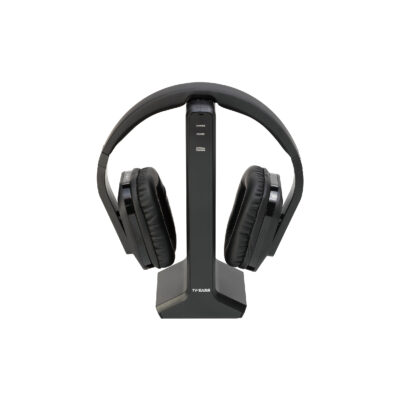
Why TV Sound is Hard to Hear: Clarity vs. Loudness
Have you ever found yourself cranking up the TV volume, only to find the dialogue is still a jumble of muffled sounds? It’s a common frustration, and it highlights a key issue: the problem often isn’t about loudness, but about clarity. As experts at Consumer Reports note, many people with hearing loss struggle to understand TV dialogue even at high volumes. Modern movies and shows are produced with complex soundscapes, mixing spoken words with loud music, explosive sound effects, and ambient noise. For someone with even mild hearing loss, the dialogue gets lost in that mix, making it nearly impossible to follow the plot. This can turn a relaxing evening into a stressful experience and often creates tension with others in the room who find the high volume overwhelming.
The core of the issue lies in the specific frequencies of human speech. Hearing loss often affects our ability to perceive higher-frequency sounds, which is exactly where the consonants that give speech its definition are found. When you simply turn up the volume on your TV, you’re amplifying everything equally—the booming bass of an explosion, the swelling musical score, and the dialogue. This doesn’t help separate the sounds you want to hear from the ones you don’t. Instead of making the words clearer, it just makes the entire audio track louder and more chaotic. This is why a specialized solution is often needed, one that can intelligently identify and lift the dialogue out of the background noise for a more enjoyable and less strenuous listening experience.
Separating Dialogue from Background Noise
The secret to better TV sound is isolating the dialogue from everything else. Think of it like trying to have a conversation at a loud party; you need to focus on the voice and tune out the chatter and music around you. Specialized headphones and audio devices are designed to do exactly that for your television. They use advanced technology to identify the frequencies associated with human speech and amplify them, while simultaneously reducing the volume of distracting background sounds. This process, often called voice clarifying, makes words sound crisp and distinct. Instead of a wall of noise, you get a balanced audio experience where the dialogue is front and center, right where it belongs.
How Wireless TV Headphones Work
Wireless TV headphones offer a straightforward and personal solution to the problem of unclear audio. Most dedicated systems are incredibly simple to set up and use, which is a huge plus. According to the audio experts at Soundly, these headphones typically come with a base station or transmitter that plugs directly into your television’s audio output port. This transmitter takes the sound from your TV and wirelessly sends it straight to your headset. This creates a direct, personal listening zone, allowing you to set your own perfect volume without affecting what others in the room hear. It’s a simple yet brilliant way to end the “volume wars” for good and ensure everyone can enjoy watching TV together again.
One of the biggest advantages of a dedicated wireless system is the reliability of the connection. Because the transmitter and headset are designed to work together, you get a stable audio stream with no noticeable delay between the picture and the sound. This is a critical feature, as even a tiny lag can be distracting and make it difficult to follow conversations on screen. The setup is designed to be plug-and-play, so you don’t have to worry about complicated pairing procedures or navigating confusing menus. You just connect the base station, put on the headphones, and immediately enjoy clear, rich sound tailored just for you.
Understanding Connectivity and Setup
Getting your wireless headphones connected to your TV should be a hassle-free process. Most dedicated systems are designed with simplicity in mind, ensuring you can start using them within minutes of opening the box. The transmitter base typically connects to your TV using one of two common ports: a digital optical audio port (which offers excellent sound quality) or the classic red and white RCA analog ports. These cables are almost always included, so you have everything you need. Once the transmitter is plugged into the TV and a power source, it automatically connects to the headset, making the entire setup process incredibly user-friendly, even for those who aren’t tech-savvy.
Choosing the Right Wireless Technology
When you start looking at wireless headphones for your TV, you’ll quickly notice two main types of technology: Radio Frequency (RF) and Bluetooth. Both can deliver sound wirelessly, but they work in different ways and offer distinct advantages. The best choice for you will depend on your television, your home’s layout, and what you value most in a listening device—whether it’s maximum range and a dedicated connection or the flexibility to use headphones you might already own. Understanding the basics of each will help you pick the perfect solution for your needs.
Radio Frequency (RF) Headphones
Radio Frequency (RF) headphones, like those used in TV Ears systems, are often considered the gold standard for dedicated TV listening. These systems use a transmitter that sends a powerful radio signal directly to the headphones. A major benefit of RF technology is its impressive range; it can transmit sound clearly over long distances and, as noted in product descriptions for devices like the ZANCHIE Wireless TV Headphones, the signal can even pass through walls and ceilings. This means you can walk into the kitchen for a snack without missing a single word of dialogue. RF provides a stable, private connection that isn’t prone to the interference or delays that can sometimes affect other wireless types.
Bluetooth Headphones
Bluetooth is a familiar technology that many of us use every day with our phones and other devices. Many new smart TVs come with Bluetooth built-in, which means you might be able to connect a pair of Bluetooth headphones you already own directly to the TV. If your television doesn’t have this feature, you can easily add it with an inexpensive adapter. While this offers great flexibility, it can sometimes come with minor drawbacks. The range is typically shorter than RF, and you might occasionally experience a slight audio delay. The pairing process can also be a bit more involved than a simple plug-and-play RF system.
Wireless Hearing Impaired Headphones for TV
Wireless hearing impaired headphones are an excellent option for TV viewing as they provide the freedom to move around without being tethered to the television. These headphones connect to the TV wirelessly, transmitting the audio directly to the user’s ears, ensuring a seamless and immersive listening experience.
Over-the-Ear Headphones
Over-the-ear headphones are a popular choice for individuals with hearing impairment as they provide excellent sound isolation and comfort. Their large ear cups cover the entire ear, blocking out external noise and delivering clear audio directly to the wearer.
In-the-Ear Hearing Impaired Headphones
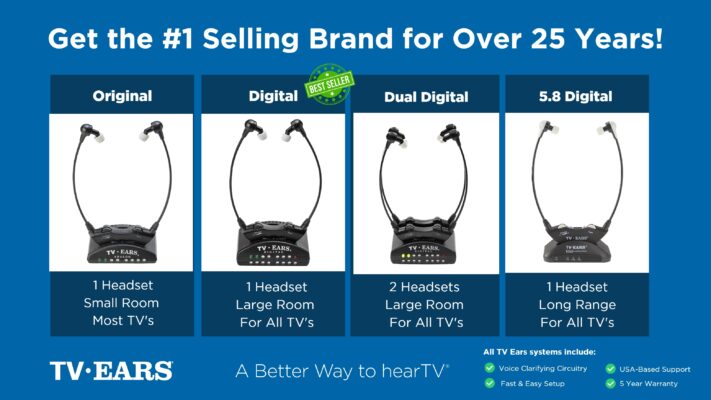
In-the-ear headphones, also known as in-ear monitors, offer a more discreet option for TV viewing. These headphones fit directly into the ear canal, providing clear sound and a snug fit. They are particularly suitable for those who prefer a more inconspicuous appearance.
Hearing Impaired Headphones with Volume Control
Many hearing impaired headphones for TV come with built-in volume control features, allowing users to adjust the sound according to their preferences. This feature is especially beneficial for those with varying degrees of hearing loss, ensuring a comfortable listening experience for everyone.
Support for Multiple Users
One of the most common household disagreements revolves around the TV volume, creating tension when one person needs it loud and another finds it overwhelming. Listening systems that support multiple users can help restore peace in the living room. Some devices are designed to allow two people to watch the same show while listening at their own preferred volume. For example, many TV Ears systems can transmit sound to two separate headsets simultaneously, each with its own independent volume and tone controls. This means you and your partner can sit together and enjoy a movie without arguing about who has the remote.
Ambient Sound Features
While getting lost in a good movie is wonderful, it’s also important to stay aware of your surroundings. You don’t want to miss a ringing doorbell, an important phone call, or a family member trying to get your attention. That’s why many modern TV listening devices include ambient sound features. These systems often have a built-in microphone on the headset that can amplify the sounds around you with the press of a button. This feature temporarily mutes the TV audio and lets you hear conversations and other environmental noises clearly, ensuring you remain connected to your home environment. It’s a crucial feature for both safety and convenience.
Alternatives to TV Headphones
While specialized headphones are a fantastic solution, they aren’t the only way to make television audio clearer. Depending on your existing equipment and specific needs, a few other options might work well for you. Exploring these alternatives can help you find the perfect setup for your home, ensuring that movie nights are enjoyable for everyone. From simple adjustments on your TV to dedicated sound systems, let’s look at some of the most effective ways to improve your listening experience.
Adjusting Your TV’s Built-in Audio Settings
Before you buy any new hardware, it’s worth checking the settings on your current television. Many people find that the issue isn’t just volume, but a lack of clarity that makes dialogue hard to distinguish from background music and sound effects. Most modern TVs have audio settings designed to help with this. Go into your TV’s sound menu and look for features with names like “Clear Voice,” “Speech Boost,” or “Dialogue Enhancement.” Activating one of these modes can make a significant difference. If you have a surround sound system, you may also be able to adjust the audio channels individually and turn up the center speaker, which is where most dialogue is broadcast.
Soundbars with Voice Enhancement
If your TV’s built-in speakers and settings aren’t quite cutting it, a soundbar is a great next step. These devices provide a major upgrade in audio quality and are simple to set up. For those who struggle to hear dialogue, the key is to look for a soundbar that specifically offers a voice enhancement feature. Much like the settings on your TV, these features are often called “Speech Enhancement” or “Clear Voice.” Some soundbars are even engineered specifically to isolate spoken words from other noises, using technology to separate voices from background sounds and make them stand out. This can feel like the audio is being clarified just for you, without making the entire show uncomfortably loud.
Streaming Audio Directly to Hearing Aids
For those who already use hearing aids, you may have a powerful TV listening tool at your disposal. Many newer hearing aids are equipped with Bluetooth technology, allowing them to connect directly to a compatible smart TV. This setup sends the television audio straight to your hearing aids, giving you a personalized and clear listening experience that you can often control through a smartphone app. If a direct connection isn’t possible, you can use a media streamer, which is a small device that acts as a bridge between your TV and hearing aids. It’s important to note that these streamers are typically brand-specific, so you’ll need one that matches your hearing aids.
TV Ears: A Superior Hearing Impaired Headphone Solution
TV Ears stands out as a leading provider of innovative hearing impaired headphones for TV. Designed to enhance TV audio specifically, TV Ears offers crystal-clear sound, making dialogue and audio effects more distinct and enjoyable.
Personalized Volume Control and Clarity
TV Ears headphones feature personalized volume control, allowing users to adjust the sound independently of the TV’s volume. This ensures that you can set the volume to your comfort level without affecting others in the room. Additionally, the advanced technology in TV Ears enhances sound clarity, making every word and sound in your favorite shows and movies sharper and more defined.
Comfort and Ease of Use
TV Ears headphones are crafted with comfort in mind, ensuring that you can enjoy your TV shows for extended periods without any discomfort. The wireless design provides freedom of movement, and the user-friendly setup makes them easy to use for individuals of all ages.
Compatibility and Hearing Aid Friendly
TV Ears is compatible with virtually all TV models, making it accessible to a wide range of users. Moreover, for those already using hearing aids, TV Ears provides a seamless solution, as it works well with most hearing aid models. Hearing impaired headphones for TV open up a world of enhanced TV viewing experiences for individuals dealing with hearing loss. The wireless, over-the-ear, and in-the-ear options cater to various preferences, ensuring that everyone can find a suitable solution. TV Ears stands out as a remarkable choice, offering personalized volume control, superior sound clarity, and utmost comfort. If you are looking to revolutionize your TV watching experience, consider evaluating TV Ears’ range of hearing impaired headphones for TV. Embrace the crystal-clear audio, personalized volume control, and enhanced comfort while enjoying your favorite shows. Experience the difference TV Ears can make and take the first step towards an immersive TV viewing experience today!
If you are struggling with hearing your favorite program, TV Ears has several top-rated, audiologist-designed systems that can help, find more at www.tvears.com.
Looking for more? Check out the recent stories on the TV Ears blog:
TV Ears: The Perfect Choice for Wireless Headphones for a TV with Hearing Loss
Hearing Aids Online: Your Ultimate Guide to Finding the Perfect Fit
AudioFetch: A New Competitor in the TV Headset Market Challenges TV Ears
Enhancing Your TV Experience with a High-Quality Headset from TV Ears
Forget Ears Bluetooth! Upgrade Your TV Audio with TV Ears’ Audiologist-Designed Voice Clarifying Technology
Elevate Your TV Experience Beyond TV Speakers: Discover the Power of TV Ears!
Unveiling the Truth: The Pros and Cons of As Seen on TV Hearing Aids
Enhancing TV Enjoyment for Seniors: The Power of TV Hearing Devices for Seniors
Frequently Asked Questions
Why can’t I just turn up the TV volume to hear the dialogue better? Simply making the TV louder amplifies everything at once—the music, the sound effects, and the speech. The real issue is often a lack of clarity, not volume. When dialogue gets buried in a chaotic mix of other sounds, turning it all up just creates a louder, more jumbled mess. A dedicated listening device works differently by isolating the frequencies of human speech and making them clearer, so you can understand conversations without blasting the entire soundtrack.
Will my family still be able to hear the TV while I’m using the headphones? Yes, absolutely. This is one of the biggest benefits of using a personal TV listening system. The headphones receive sound from a transmitter connected to the TV, allowing you to control your own volume independently. This means others in the room can listen to the television’s speakers at a volume that’s comfortable for them, while you enjoy the show at a level that’s perfect for you.
Are these wireless systems difficult to set up? Not at all. Most dedicated systems, like TV Ears, are designed to be incredibly straightforward. You typically just plug a small transmitter base into your TV’s audio output port and a power outlet. The headset then automatically connects to the base. There’s no complicated software or confusing pairing process, so you can get them working within minutes of opening the box.
What if I need to hear the doorbell or someone talking to me while I’m watching a show? Many modern TV headsets are designed with this exact situation in mind. They often include an ambient sound feature, which uses a built-in microphone on the headset. With the press of a button, you can temporarily mute the TV audio and amplify the sounds in your room. This allows you to hear a conversation, answer the phone, or listen for the doorbell without having to take the headset off.
Can I use these headphones if I already wear hearing aids? Yes, you have a couple of options. Many people find it comfortable to simply remove their hearing aids and use a TV headset like TV Ears, which is specifically designed to clarify television audio. Alternatively, some systems are designed to be worn along with hearing aids. It really comes down to personal preference and finding the setup that gives you the clearest and most comfortable listening experience.
Key Takeaways
- Focus on speech clarification, not just loudness: The real issue with TV audio is often poor mixing, not low volume. Look for solutions that specifically identify and amplify dialogue while reducing distracting background music and sound effects.
- Regain control with a personal listening system: Wireless TV headphones with a dedicated transmitter give you your own independent volume control. This ends household arguments over the remote and ensures you can listen comfortably without disturbing anyone else.
- Check your existing gear for hidden features: Before buying new equipment, explore your TV’s audio menu for settings like “Clear Voice.” Many soundbars also have speech-boosting modes, and modern hearing aids can often stream audio directly from your TV.
